Xfce 4.20 Released
Dec 15,2024
Xfce 4.20 released
After almost two years of work, we are happy to announce the release of Xfce 4.20.
Since Xfce 4.18 a lot of major development happened. Our team added many nice new features, did a gazillion of bug fixes and did various minor improvements. Finally, all that was released for your pleasure.
The major focus during this development cycle was the preparation of the codebase to be ready for Wayland. So that we meanwhile have experimental Wayland support for most components. More details in the 'Wayland' section below.
Assuming you have installed Xfce 4.18, here an overview on the major changes you will see on an upgrade to Xfce 4.20.
General
Wayland
Important Notice: Please be aware that the Wayland support in Xfce 4.20 is experimental. It is recommended for advanced users only, as you may encounter bugs and experience incomplete functionality. Proceed with caution!
Thanks to Brian and Gaël almost all Xfce components are able to run on Wayland windowing, while still keeping support for X11 windowing.
This major effort was achieved by abstracting away any X11/Wayland windowing specific calls and making use of Wayland/Wlroots protocols. A whole new Xfce library, "libxfce4windowing" was introduced during that process. XWayland will not be required to run any of the ported Xfce components.
So far Xfce does not feature a compositor which supports Wayland. If you want to run Xfce in Wayland, Labwc and Wayfire will give you the best results. A detailed instruction on this can be found here. Please be aware that Wayland support is still experimental!
Plans are underway to add Wayland support to Xfwm4 while preserving its existing X11 functionality. However, such a restructurization will be a major effort and we cannot tell yet when/if it will be done, so please don't hold your breath waiting for it.
For few components and multiple features, it was not possible to port them to Wayland, partly because there are no standardized Wayland protocols available yet to provide the required services:
- Workspace support is missing (ext-workspace protocol was just merged).
- Systray icons will be missing for multiple applications (required to use StatusNotifier instead of GtkStatusIcon)
- Xfce4-settings: Keyboard and mouse settings so far are internal to the Wayland compositor and as such the according Xfce dialogs won't be available on Wayland yet.
- Power related keyboard handling (brightness keys, suspend, etc.) is internal to the Wayland compositor and as such cannot be supported yet by Xfce components.
- Wayland does not specify a native protocol for taking screenshots. However, xfce4-screenshooter already supports screenshots via the wlroots 'screencopy' protocol (entire screen). Screenshots of a rectangle selection or the active window are not yet supported via Wayland.
Some other Xfce components don't run at all on Wayland:
- Xfwm4
- Xfdashboard
- Xfce4-screensaver (porting to Wayland completed but not merged, as it requires the experimental libwlembed library)
- Xfce4-windowck-plugin (needs to be ported to libxfce4windowing)
- Xfce4-xkb-plugin (keyboard handling is internal to the Wayland compositor)
More detailed info on the current Wayland status can be found on our Wayland roadmap.
Scaling
Icons and thumbnail scaling was fixed for various components. Various missing icons for larger scales were added. Any blurriness when using Xfce components on a HiDPI display should be gone now.
exo
Icon View Performance
By using different container types, the "Exo-Icon-View" now can handle 100,000 files and more without freezing.
Type ahead search box
The type ahead search box in the exo icon view now always stays inside the according view widget.
libxfce4ui
Shortcut Editor
Shortcuts now can be used for multiple actions if they don't conflict with each other.
About Dialog
The dialog now shows the distribution logo, information about the used windowing system and the used GPU.
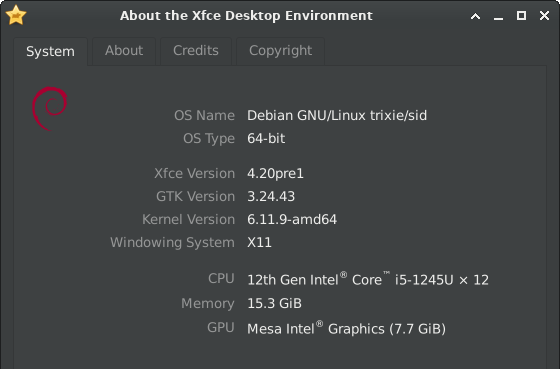
libxfce4windowing
This library is new to Xfce. Libxfce4windowing is an abstraction library that attempts to present windowing concepts (screens, top level windows, workspaces, etc.) in a windowing-system-independent manner.
Currently, X11 is fully supported via libwnck. Wayland is partially supported by using various Wayland protocol extensions. However, the full range of operations available on X11 is not available on Wayland, due to missing features in these protocols extensions.
thunar
Mounted and Remote Locations
Mount points now show an emblem and have a specific type description.
Ipv6 remote URLs are now supported.
It is now possible to create symbolic links as well on remote locations./p>
Search
It is not required any more to wait until a search is finished to open the context menu on search results.
Toolbar
A couple of new toolbar buttons were added:
- View Switcher - A drop-down button to select a view.
- Menu - This hamburger button will show automatically in the toolbar, when the menubar is hidden. It will reveal a vertical menu, bar, when pressed.
- New Tab - Open a new tab using the current directory.
- New Window - Open a new window using the current directory.
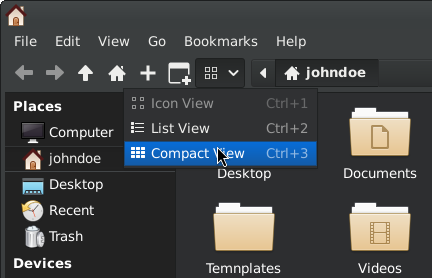
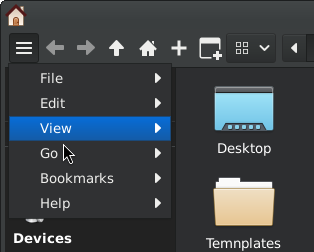
On shrinking the Thunar window, toolbar items will now be moved to an overflow menu. Like that, it is possible to maintain smaller thunar windows.
Furthermore, a bug was fixed which prevented the usage of submenu custom actions in the toolbar.
Window Decorations
There is now an option to use client side decorations in Thunar (CSD).
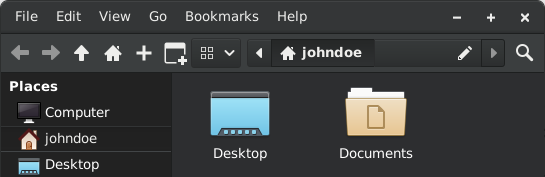

Statusbar
An option to show the number of hidden files in the statusbar was added.
Recently Used Files
Only files which were successfully opened are now added to the list of recently used files.
Directories won't be added to the recently used files anymore.
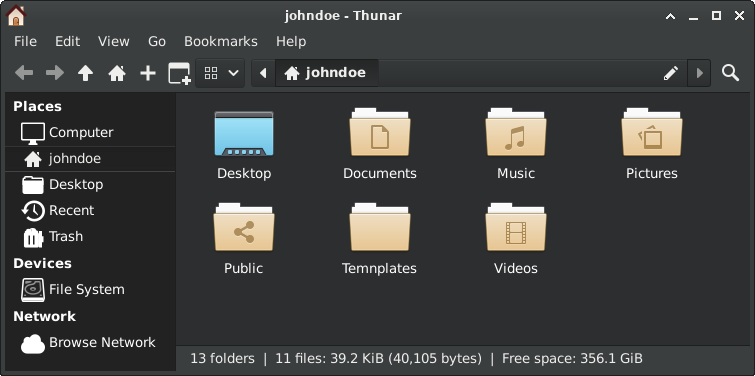
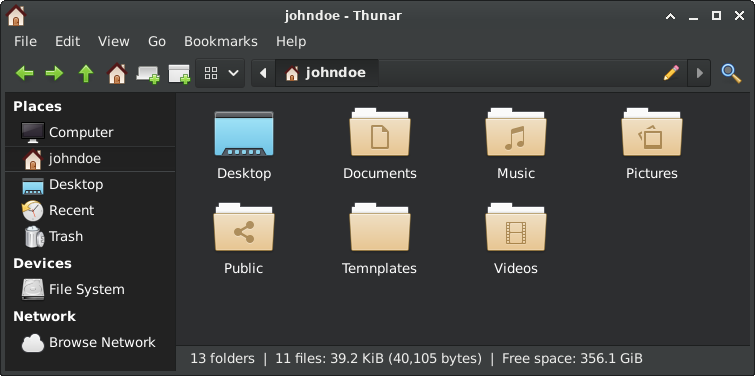
Symbolic Icons
There is now an option to use symbolic icons in the side pane and colored icons in the toolbar.
Drag and Drop
While dragging files, folders are now opened automatically on hover.
While dragging files, the focus of the split view pane is now updated when hovered.
Performance
In the past, you might have faced situation involving bigger numbers of files in which thunar showed a freeze. Due to various different performance measures, thunar now is much more bullet-proof for action involving huge numbers of files.
This was achieved by using appropriate container types, moving some actions into separate jobs and throttling of view-updates.
A number of integration test cases will be used in order to keep performance on the current level in the future.
Custom Actions
Shortcuts for custom action will now as well work when the custom action is located in a sub-menu.
File Transfer
For file validation in thunar 4.18.x a md5 checksum was calculated for source and target file. This calculation turned out to be rather slow and actually superfluous. Now files are just compared directly. In addition, the usage of direct I/O operations now attempts to prevent comparison of possibly cached buffers.
An option was added to only copy files in parallel if the relevant devices are in idle state. This prevents possible fragmentation during copy for HDD drives.
Transferring files no longer steals the current focus.
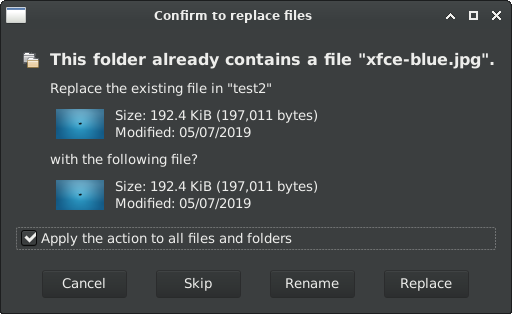
The file transfer question dialog now provides the same options while having less buttons. In addition, file thumbnails now are properly requested by the dialog.
Launchers
By default, launcher names instead of filenames are shown now for trusted launchers.
Undo/Redo
The user now will be asked before any deletion will be done by an undo operation.
List View
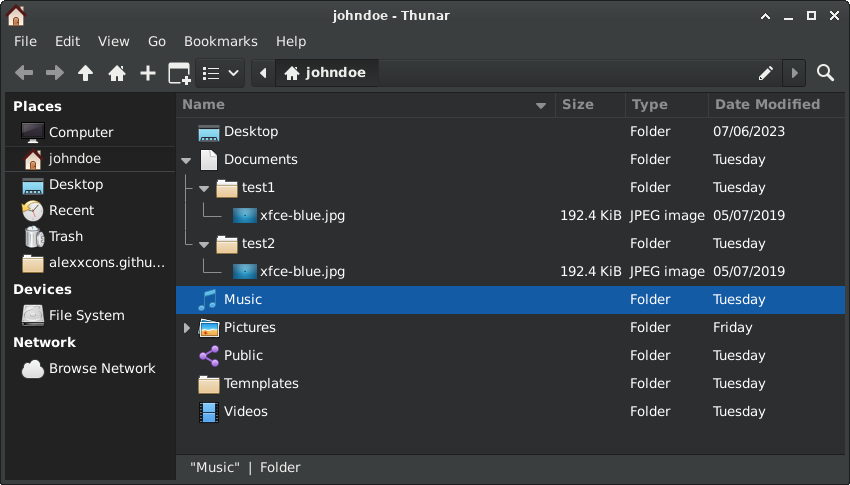
Similar to the tree-view side pane, the main view now also supports folder expansion.
Split View
A shortcut now can be used to toggle between split-view panes, and the focused pane now uses different coloring.
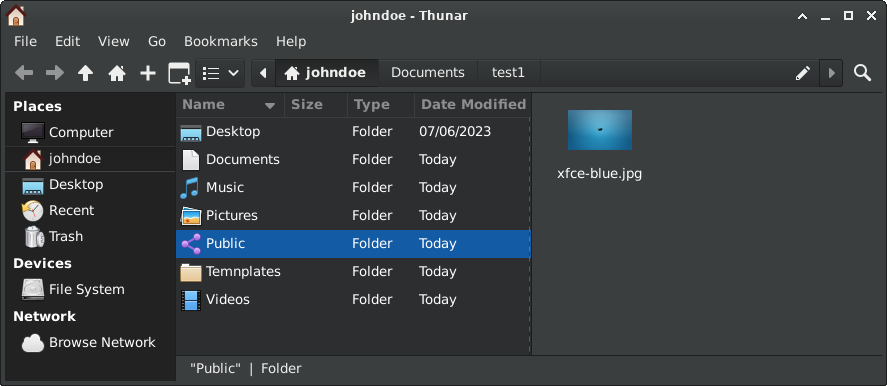
A dialog will now ask for confirmation when closing a split-pane with multiple tabs.
xfce4-appfinder
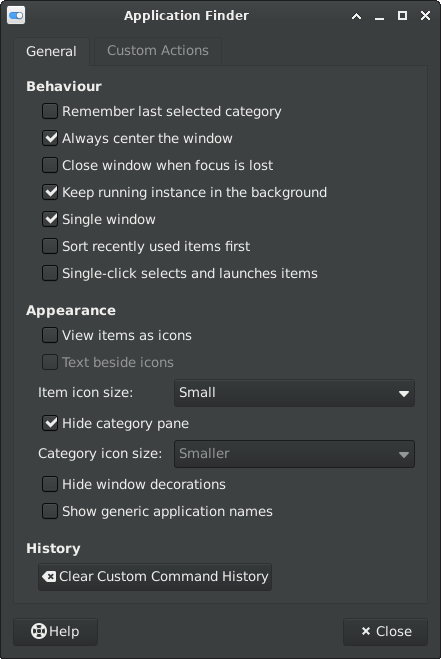
The application list now as well can be navigated via Ctrl+N / Ctrl+P keys (VI default).
An option was added to close the Appfinder window automatically when focus is lost.
Ctrl+Enter can be used to execute commands immediately when selecting entries from the dropdown.
Within the new version, application specific actions will show on right click.
An option to show generic names of launchers was added.
Appfinder optionally can now be launched as a daemon, so that it will respond even quicker.
An option allows now to launch items on a single click.
xfce4-panel
General
The border width of the panel is now configurable.
For manual installations: the panel now does its best to find plugins in XDG base directories, and better preserves its configuration when it can't find them.
Clock
LCD clock: An option was added to visualize inactive segments.
Analog: There is now an optional 24h mode.
Digital: Week numbers now are shown optionally.
Show Desktop
There is now the possibility to show the desktop when hovering the mouse on the "show desktop" panel icon.
Tasklist
Icon size management has been improved overall, notably by switching to libxfce4windowing.
Preferences
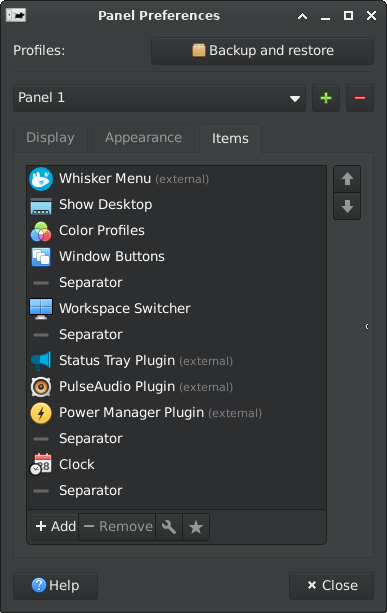
The 'delete' key can now be used to remove panel objects, and several objects can be removed at once.
Panel objects in the panel configuration list now will have the same icons as in the panel itself.
xfce4-power-manager
Screen Locking
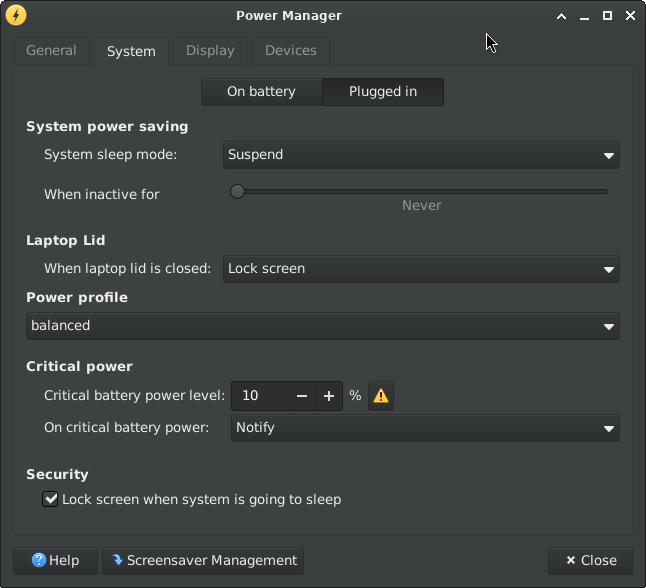
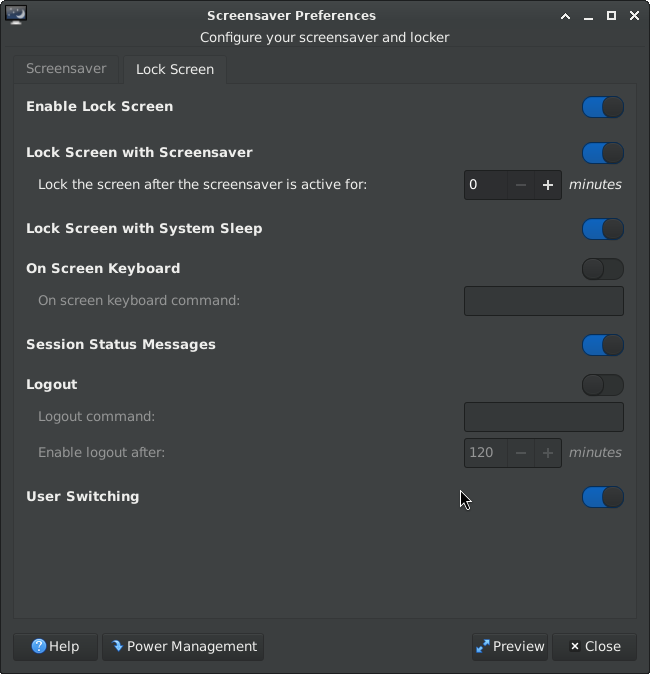
There is no dedicated "security" tab anymore. Lock screen management was massively simplified and "Light Locker" was dropped. "lock-on-sleep" is now synchronized with xfce4-session and xfce4-screensaver.
Screen locking settings are now only handled by xfce4-screensaver to avoid conflicts. A button to open xfce4-screensaver-preferences was added:
Power Settings
Support for handling different power profiles via power-profiles-daemon was added.
The overall charge state calculation was wrong for some cases and is now fixed.
When the critical power dialog pops up, unintentional user actions are now prevented.
There is now support for the hybrid sleep mode.
The device details tab now as well shows the energy rate.
Others
Several use-cases for lid close were fixed.
There are now the options "shutdown" and "do nothing" on lid close.
Buttons to change the brightness exponentially and keyboard backlight toggle keys now are supported.
xfce4-session
The logout dialog will not provide a checkbox to enable session saving anymore.
It is now possible to start a Wayland session via 'startxfce4 --wayland'.
Minimal support for xdg-desktop-portal was added by registering for a wallpaper, screenshot and background xapp.
xfce4-settings
Appearance Settings
Icon themes are now loaded in a separate thread, in order to prevent a possible freeze.
For icon themes which are known to be incomplete, a warning now will be shown.
The usage of client side decorations is opt-in now, not opt-out.
Dark themes now are identified and supported in a more reliable way. (Relevant e.g. for the Qogir and Orchis themes)
´Display Settings
The default display profile has been added to the list of profiles that can match, and will be used if more than one matches now.
Profile management has been extended to all profiles, not just those that match, and their names can now be edited.
Scaling now always is done for both dimensions, and the preview shows the resulting size.
Mirror state management has been improved overall, in particular by removing the need to match refresh rates.
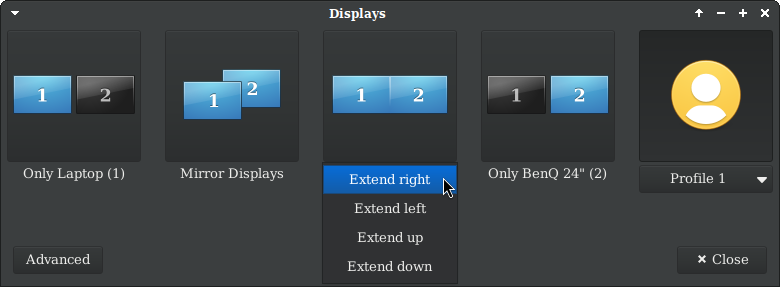
The minimal dialog has been improved, in particular by allowing the display to be extended to the left and from top to bottom, and with compact profile display.
Mouse Settings
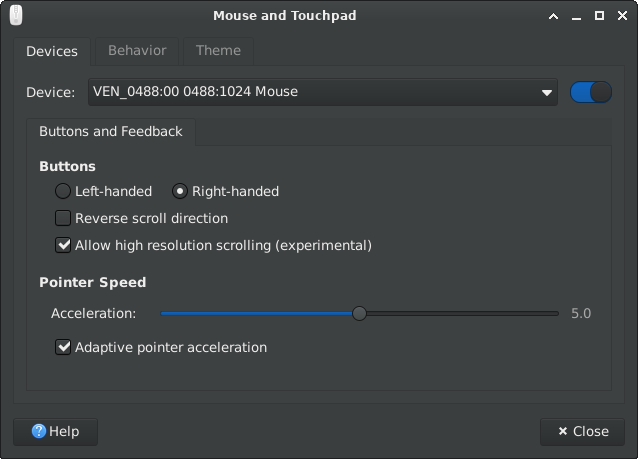
A checkbox was added to toggle between adaptive and flat mouse accel profile.
High resolution scrolling can now be enabled for mice which do support it.
Mime Settings
It is now possible to select/change multiple items at once.
xfconf
A systemd user unit, corresponding to the D-Bus session service, is now added.
Whitespaces are now properly escaped when writing a xfconf channel to disk.
Xfconf-query now displays array contents.
xfdesktop
Background Management
For random wallpaper cycling, wallpapers now are only repeated after all other wallpapers were shown.
Old Xfce backgrounds were ported from .png to .svg to be usable for large screens.
Gradients will now be rendered in a gamma-correct way.
Icon grid
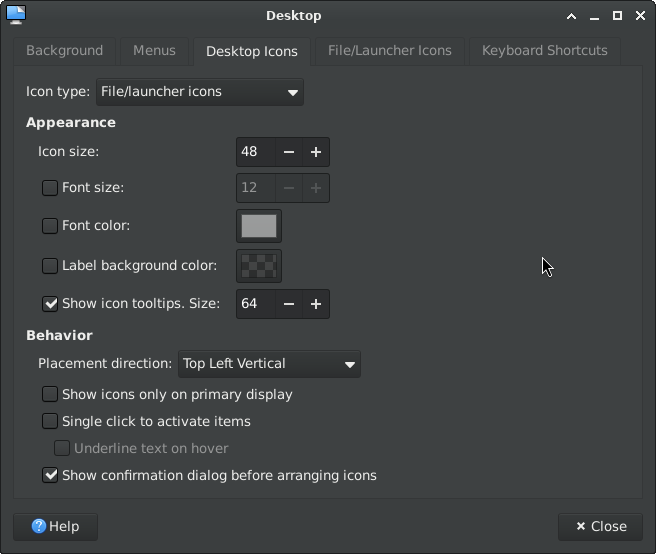
The confirmation dialog for arranging desktop icons now is optional.
It is now possible to set custom colors for icon labels and icon background.
The icon grid on each monitor is now independent of one another.
Minimized Application Icons
Window icons are now initially shown on the monitor where the window was present before being minimized.
The context menu (when clicking on an empty space) now has more useful options than before.
File Icons
There is now an option to sort folders before files.
The positions of the icons are now saved in a way that should avoid icons moving around in unexpected ways when monitors are added and removed.
New files and dropped files now will be placed near the current cursor location.
Icons of fixed disks and drives can now be optionally shown.
Preferences
The 'Desktop Icons' tab was fully reworked.
All shortcuts of Xfdesktop now can be configured, using the XfceShortcutsManagers widget.
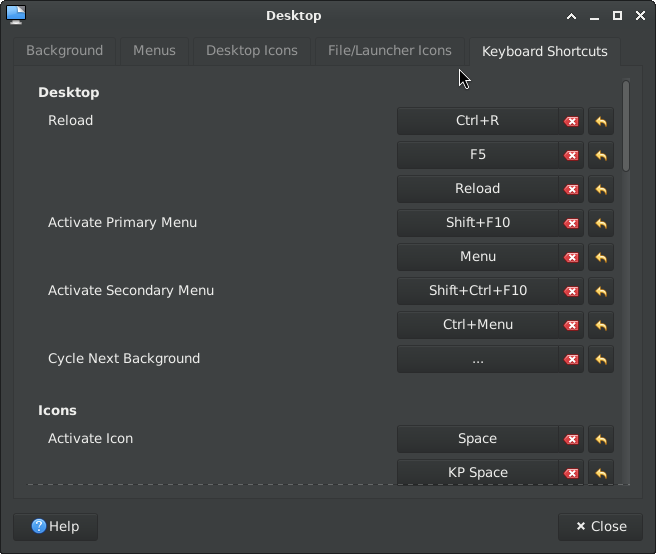
More folders that hold background images were added as shortcuts in the settings dialog.
The settings dialog will update if the background is changed from outside the dialog.
Wallpaper image folders now are loaded fully asynchronously to prevent lag.
Context Menu
Cascading custom actions will now as well shown correctly in Xfdesktop.
It is now possible to open multiple selected folders at once.
The context menu now opens on button press rather than button release, as most users will expect.
The middle-click window list menu has new styling and added features.
xfwm4
Support for stretch theme variants
compositor: Block softpipe for GLX vsync
focus: Include skip taskbar/pager when passing focus
Fix crash when alt-tabbing (#762)
For the sake of readability, this list only shows main highlights. Check the full Xfce 4.20 changelog for a more detailed list of changes.
The theme "Greybird-dark" and the icon-theme "elementary Xfce dark" were used for the screenshots. This summary can as well be viewed as a localized online tour.
This release can be downloaded here, either as a set of individual packages or as a single tarball including all individual versions.
Our Sponsors
Thanks go to Gandi for providing the Xfce server infrastructure for free, and to Kalmar NDC for sponsoring our GitLab runners. We appreciate your support!
As well, many thanks to our generous financial supporters on Open Collective US and Open Collective EU!
At the moment, aside from the couple of hardware purchases for our developers, we don't have specific plans for the funds. We are exploring the best ways to use them effectively. It's reassuring to know we have such strong financial backing. Thank you for your support!
Best regards,
The Xfce development team
Xfce 4.20 Pre2 Released
Dec 01,2024
Xfce 4.20 Pre2 Released
Dear Xfce community, I am happy to announce the release of Xfce4.20 pre2.
This platform pre-release consists of the Xfce core components and will be followed by the final Xfce4.20 release soon. We fixed some quirks which were found in Xfce4.20 pre1, did some further polishing and the result is now released as Xfce4.20 pre2.
Early adopters are invited to give it a try and check for compatibility before the final release, which is planned for 15. December.
Xfce4.20 pre2 includes all Xfce core components. The tarballs for building it can be found here:
Though, you might prefer to wait for distribution specific development packages.
Wallpaper contest
It is a pleasure for me to present you the outcome of our Xfce4.20 wallpaper contest, which received numerous nice wallpaper submissions.
This year we received 54 submissions in total, contributed by 18 different users.
Since two wallpapers were tied for the third place, four new wallpapers will be shipped with Xfce-4.20.
The winner wallpaper, which will be the new Xfce4.20 default wallpaper, was brought to you by "kaz sb":

The second place, authored by Denys DEKUVE:

The third place, authored by Farhang Bakhshi:

And another third place, authored by Rose Pierce:

You as well might be interested in the complete list of submissions.
Coming soon
A detailed sum up of all new features in Xfce4.20 is planned for the final release, so stay tuned!
Best regards,
The Xfce development team
Wallpaper Contest for Xfce 4.20 open for voting
Nov 15,2024
Wallpaper Contest for Xfce 4.20 open for voting
The submission phase for the Xfce 4.20 wallpaper contest is over now, and I am very happy to see numerous contributions.
While writing this blog post, 47 different wallpapers were submitted by 15 different authors.
Whatever will be the outcome of the contest, I would like to express my thanks to all these authors and wish all of them good luck for the voting period.
Starting by now, two weeks of voting will show which wallpapers are the most popular ones.
In order to cast your vote, login at gitlab.xfce.org and add a ❤️ reaction to all wallpapers you want to upvote. (Other emojis will not be counted)
Remember to vote for the best wallpaper, not just the best image. For instance, it's beneficial to provide free space for desktop items.
Voting will be closed on 29. November. Like that, the new wallpaper can be utilized for the Xfce4.18 pre2 announce, which is planned for beginning of December.
Happy voting !
Xfce 4.20 Pre1 Release and Wallpaper Contest for Xfce 4.20
Nov 01,2024
Xfce 4.20 Pre1 Released
Dear Xfce community, I am happy to announce the release of Xfce4.20 pre1.
Xfce 4.20 Pre1 is a platform pre-release, which gives early adopters the possibility to test the new release and to check for compatibility.
Further implications for the pre1 release:
- In order to increase stability, no new features will be added to Xfce core components until the final release.
- We will not add new strings either, in order to give translators the possibility to reach a complete translation for the final release.
A detailed overview on the major changes introduced in Xfce4.20 will be given for the final release, planned for December 15th.
Xfce4.20 pre1 includes all Xfce core components. The tarballs for building it can be found here:
Though, you might prefer to wait for distribution specific development packages.
Wallpaper Contest for Xfce 4.20
Like for Xfce 4.18 I would like to ask the Xfce community to contribute a few wallpapers. Everyone will have the opportunity to vote on them to elect the new default wallpaper for Xfce 4.20.
If you possess the required skills, your contribution would be greatly appreciated!
Like the old Xfce wallpapers, the new wallpaper should be a vector graphic with an unmodified Xfce mouse on it and some fancy shapes.
Note that the image must be all yours and needs to be licensed under CC BY-SA 4.0. If you do not specify a license in your post, then we will assume that you are licensing the image under the CC BY-SA 4.0.
The image should not mention the software (FOSS or proprietary) used to create the wallpaper in the metainfo.
The deadline for submissions is the 15th of November. Like that, we will have two weeks left for voting and integration of the new wallpaper into the Xfce pre2 release.
In order to participate, take a look at the Xfce wallpaper contest GitLab issue.
Please note that this year only the ❤️ emoji will be considered as an upvote, in order to simplify vote counting. You can upvote as many wallpapers as you like.
My journey to a new laptop enabled by Xfce donations
I have been contributing to Xfce since about 2013. Over the years, computers have come and gone, from netbooks to desktops to laptops. Since I moved to another country, I’ve been avoiding owning a desktop for practical reasons - the less bulky my belongings, the better. Before the move, I decided to sell my aging desktop (self-built) and even older laptop (a Dell Vostro - ah, fond memories of playing GTA V at 20 FPS) for peanuts and invest in a gaming laptop.Xfce is moving from IRC to Matrix
Apr 23,2024
Xfce is moving from IRC to Matrix
After a 6-month trial period, as of April 1, 2024, Xfce moved its official communication channels from IRC to Matrix.
The old IRC channels will remain open, so you can still hang out there. However, the 'official' channels linked in the Xfce Wiki now will be the Matrix channels.
This change affects the following channels:
- #xfce on libera.chat --> #xfce:matrix.org -- general user support and discussion
- #xfce-dev on libera.chat --> #xfce-dev:matrix.org -- development discussion
- #xfce-commits on libera.chat --> #xfce-commits:matrix.org -- notable GitLab activity
Reasoning
In the past, it was possible to connect and idle on libera IRC channels via Matrix.org bridge. Using Matrix to connect is very convenient for several reasons:
- When accessing IRC channels via Matrix bridge, it's not necessary to manage an IRC bouncer. Bridged Matrix channels retain messages that arrive while you are offline.
- Chat history is synchronised across multiple devices by default. No special BNC setup is required.
- Based on personal experience, the entry barrier for Matrix seems to be lower than for IRC.
- On IRC, after answering a support question, you might realize that the person asking it went offline hours ago (no BNC used) and as such you wasted your time. Won't happen if the question was raised by a Matrix user.
As such, several people started connecting to the Xfce IRC channels via Matrix (including myself). However, on July 2023, the party was over. Libera.Chat decided to disable Matrix bridging and suggested to use so-called "channel plumbing" until further notice. I'm not sure about the technical details here, but in the end, "plumbing" did not work out for some reason. By November 2023 it became clear that bridging would not come back either.
Meanwhile, Xfce communication became fragmented. Some people dusted off their IRC bouncers and used them again, some used a private Matrix server setup (Heisenbridge was still functional) and some just stayed on the Matrix channels, which were no longer interconnected to the IRC channels.
In order to end that fragmentation and because of the above mentioned Matrix advantages, after 6 months of testing and adding some Matrix bots (real nice job Brian!), the Xfce team decided to prefer Matrix over IRC in the future and settle down there.
So, even if you are a hardcore Xfce IRC user, please install the Matrix client of your choice and give the shiny new (cough) possibilities offered by Matrix a try. Looking forward to see you in the Xfce Matrix channels!
An Estimate on the Total Number of Xfce Users
Apr 06,2024
An Estimate on the Total Number of Xfce Users
Recently, my wife asked me how many people in total actually use the software I develop in my free time (mostly thunar).
I never thought about that question, so I just made a wild guess. Based on the number of people I believed are active on the Xfce Matrix / IRC channels, I answered: "... maybe between 2000 and 10.000 people do use Xfce".
I know nobody can give exact numbers. It's all about package downloads, OS types reported by browsers, and other more or less biased data harvesting.
However, the question nagged me, so I searched for some more reliable numbers.
Ubuntu came to my mind. Since it collects some user-data, I thought it might be a good starting point for my investigation.
Via web search, I found out that there seem to be about 40 Million Ubuntu users.
According to this post, 15% of them use Xubuntu.
--> 6 million Xubuntu users (holy crap)
Further digging revealed that aproximately 33% of Linux desktop users use a Ubuntu based distro.
--> Approximately 120 million Linux desktop users in total
--> Considering a rather conservative estimate of 10% Xfce users on non-Ubuntu systems --> another 8 million installs
That would be approximately 14 million Xfce users. So many people do use the software I tinker with? /o\
Considered that estimate is more or less accurate, than why are the Xfce communication channels rather calm?
For example, we currently have around 6000 non-blocked accounts at gitlab.xfce.org. That would be roughly one in every 2000 users (0,043%) who create an account. Can that be true?
Since I was not sure if my numbers are reasonable, I asked for feedback in the Xfce forums.
The estimate seems to be mostly fine. On the question about the rather low percentage of people who get in contact via official Xfce communication channels, there are several guesses:
- If users are looking for answers to Xfce related problems, most of them search/ask on Reddit, Stack Exchange, ChatGPT, etc., or in distro specific channels.
- Xfce is a very stable DE. Many Xfce users probably don't try to get in contact because things just work fine for them.
- Many people might just use software "as is" and don't even bother to ask for any advice.
I wanted to share this estimate with you, since for me, it was a surprise to see that such a huge number of people actually seem to use Xfce. Knowing so gives me even more motivation to further improve Xfce.
Xfce 4.18 released
Dec 15,2022
Xfce 4.18 released
After almost two years of work, we are happy to announce the release of Xfce 4.18 !
Since Xfce 4.16 a lot of major development happened. Our team added multiple nice new features, did a gazillion of bug fixes and did various minor improvements. Finally, all that is going to be released for your pleasure.
This development cycle was influenced a lot by GSoC 2021 and GSoC 2022, which led to various new features, most of them for Thunar, the Xfce File Manager. Though as well multiple other Xfce components got a lot of love and many improvements were done under the hood.
Assuming you have installed Xfce 4.16, here is an overview on the major changes you will see on an upgrade to Xfce 4.18:
libxfce4ui
XfceFilenameInput
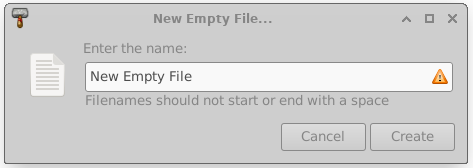
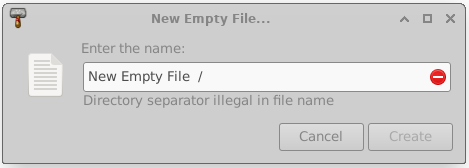
XfceFilenameInput is a comfortable widget for filename input, which was added in order to prevent invalid filenames at an early stage and to give detailed feedback on the concrete problem.
XfceShortcutsEditor
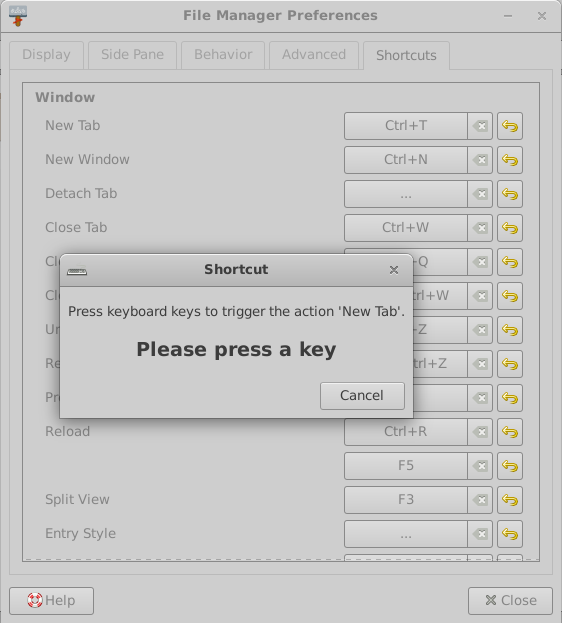
This widget is a shortcut editor which was introduced in order to have a graphical interface to modify component-specific shortcuts. Currently, it is only used inside Thunar, Xfce4-terminal and Mousepad, though other components might follow.
tumbler
Some performance improvements for the pixbuf-thumbnailer and the scheduler were done. As well now there are multiple overwrite options for the desktop-thumbnailer.
There is now support for the thumbnail sizes x-large and xx-large, which are very useful for high resolution displays.
Tumbler and Thunar now support shared thumbnail repositories, like described in the freedesktop.org thumbnail specification. This feature can be used to produce thumbnails for a folder in advance, directly located near the pictures. Like that, the thumbnails don't need to be re-generated for each individual user.
For more information on shared thumbnails, check the related blog post.
xfce4-panel
The DateTime and the Clock plugin provided overlapping functionallity. In order to prevent parallel development, they have been merged into a single plugin.
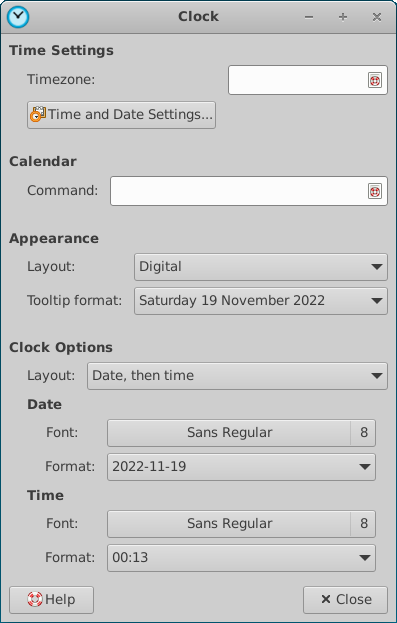
The new Clock plugin received a new binary time mode now and provides a sleep monitor. Here's a screenshot of all possible layouts which are: Analog, Binary, Digital, Fuzzy and LCD.

xfdesktop
Like in thunar, the "Delete" menu entry in the context menu can now be hidden.
In order to don't mess the desktop by accident on pressing 'rearrange desktop icons', the user is asked for confirmation now.
xfce4-settings
The search entry for xfce4-settings-manager was a bit simplified. Now it will always be shown, without any slider or button.
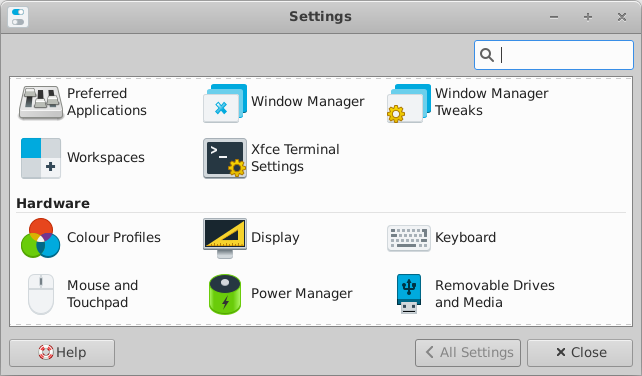
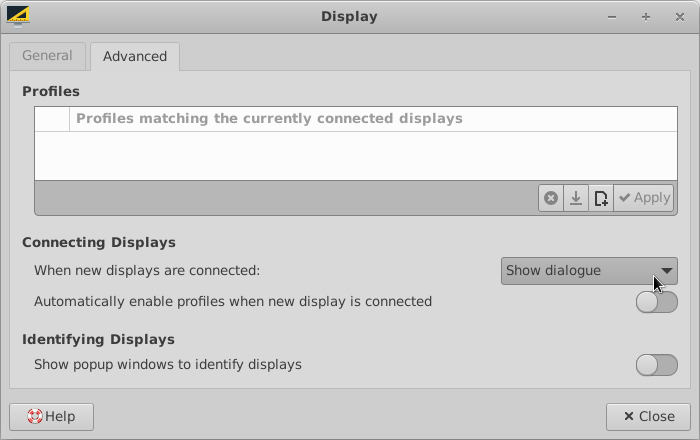
xfce4-display-settings
xfce4-display-settings got some minor improvements and the possibility to decide what to do when new displays are connected.
xfce4-appearance-settings
On selecting a new theme, there is now the option to automatically set a matching xfwm4 theme, if available.

thunar
List View
For directories, the count of containing files can now be displayed in the size column. It is now possible to add a 'file creation date' column, and the 'configure columns' dialog can be opened with a right-click on any column head.
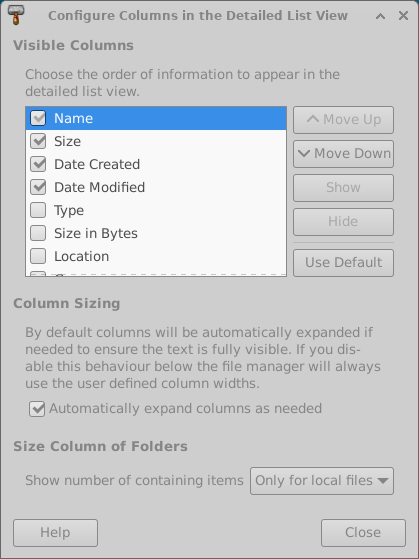
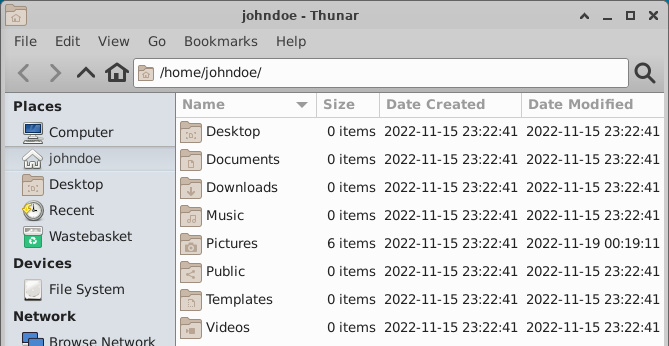
Image Preview
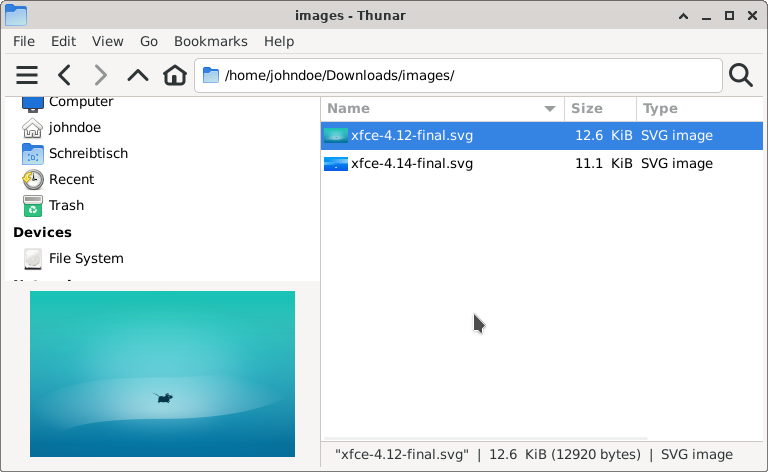
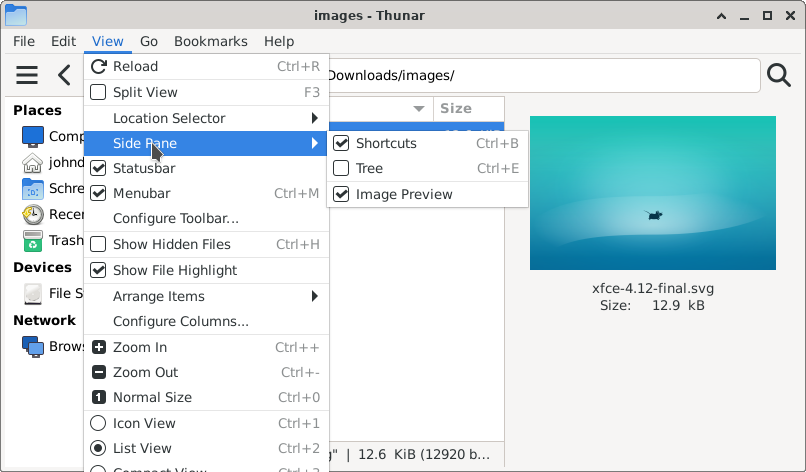
Finally, an image preview side pane has been added to Thunar. No, wait, actually two of them! You can choose to either use the 'embedded' mode which will take no extra space, but hide parts of the left side pane. Or you can go for the 'standalone' mode, which will use a separate pane on the right and display as well some basic information.
Undo and Redo
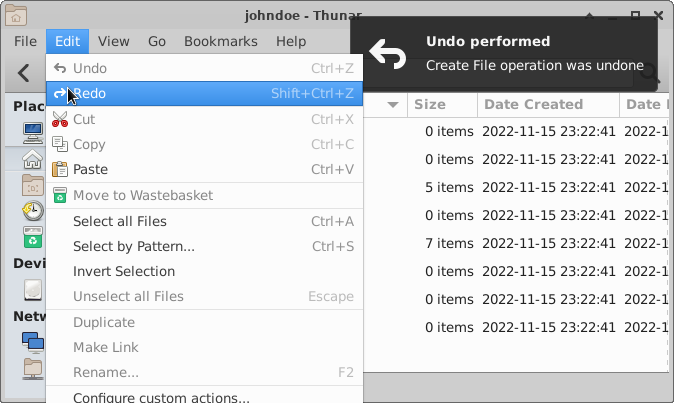
It is now possible to undo basic file operations and to redo them. Undo and Redo can be used for 'move', 'rename', 'trash', 'link' and 'create' operations. Per default, a history of the last 10 operations is stored, though the history length is configurable. Whenever an Undo/Redo is triggered, a notification with few details will be shown.
File Highlight
Files now can be highlighted by setting the background and the filename to different colors. This can be done via an additional tab, located in the 'properties' dialog. The view menu provides a checkbox in order to enable/disable the feature. Once enabled, files now can be shown in all the colors of the rainbow.
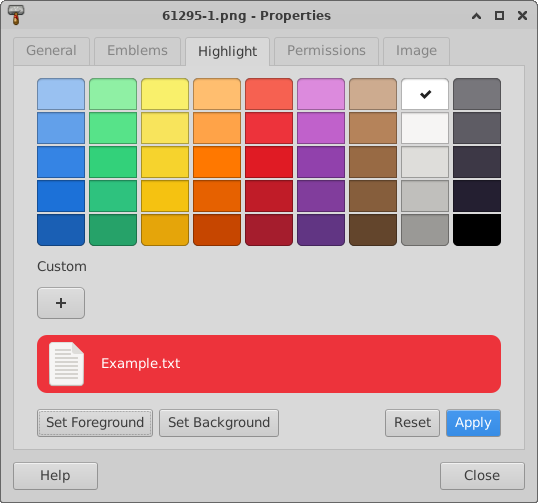
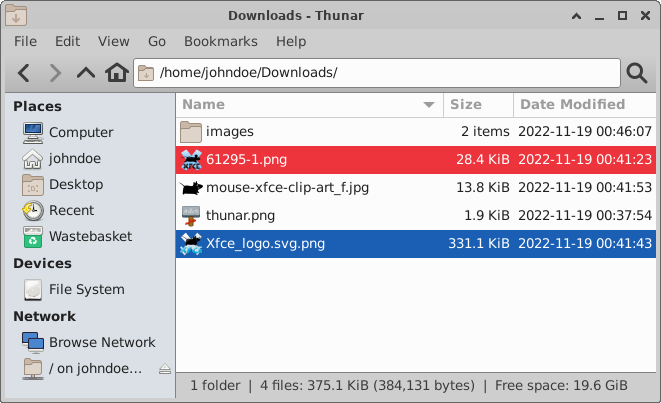
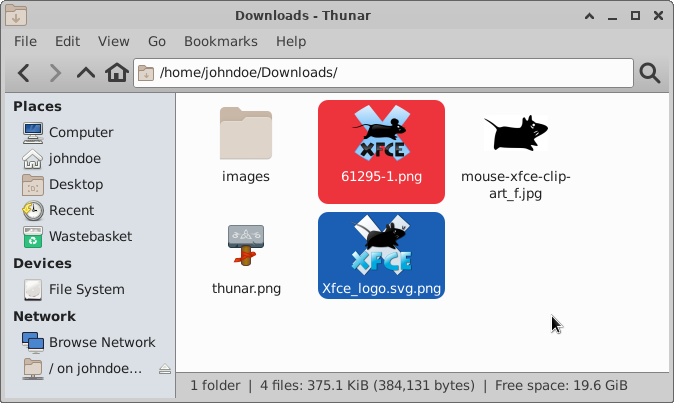
For more information on file highlight, check the related blog post.
Toolbar
It is now possible to customize the toolbar according to your personal needs! An additional dialog has been added for that purpose, on which the visibility and position of specific items can be managed. As well custom actions, which appear for folders can be used in the toolbar.
When the menubar is hidden, an additional toolbar button which can be used to show the menu will be displayed.

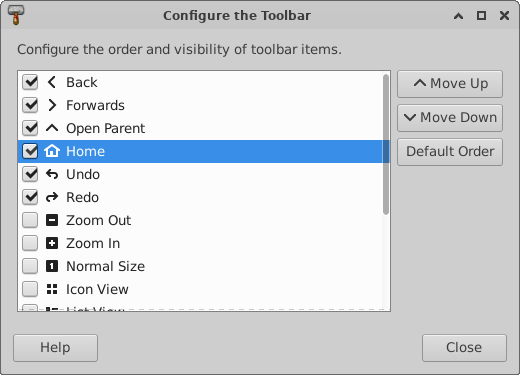

For more information on the configurable toolbar, check the related blog post.
Split View
Thunar now provides the option to use split panes. The pane separator can be moved, and its position will be stored. Via a xfconf setting, it is as well possible to have a vertical split.
Statusbar
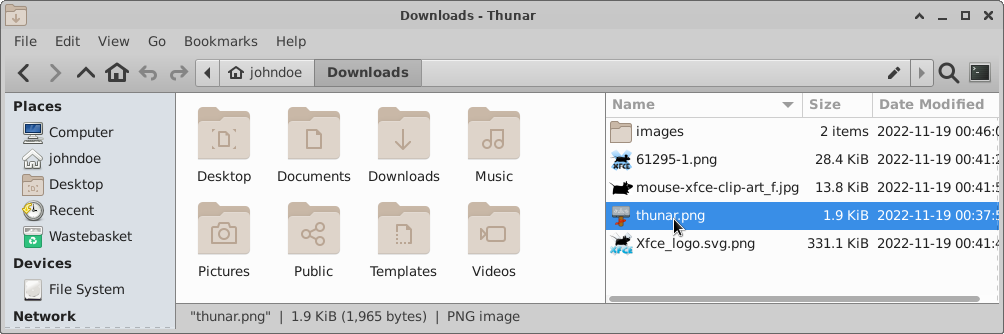
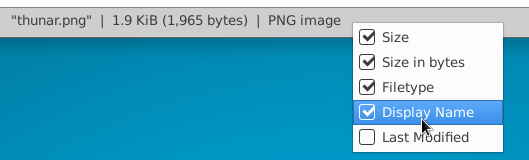
The status bar style was tweaked and '|' is now used to separate entries. Furthermore, it is now possible to customize it by using the context menu.
Recursive Search
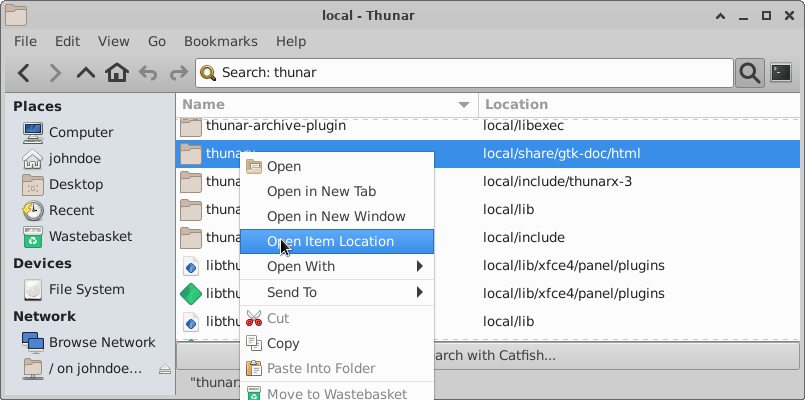
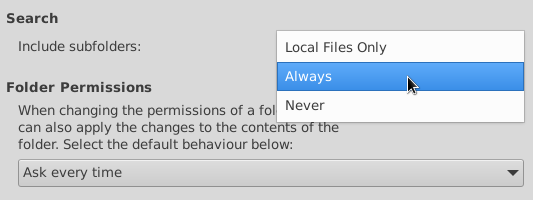
Thunar has now the possibility to search recursively, directly inside Thunar itself. The search is done in a separate thread and search results are added rapidly into a List View. A new row 'Location' shows where the search results are located, and the context menu provides the option 'Open Item Location' in order to travel there quickly. The preferences dialog provides an option to limit recursive search to local folders, or to disable it.
For more information on the recursive search feature, check the related blog post.
Recent
Recently used files now can be accessed in the side pane. Like for the 'Recursive Search' feature, the new 'Location' row can be used in List View. Additionally, for 'Recent' a new row 'Recency' can be added to sort the files by their latest usage.
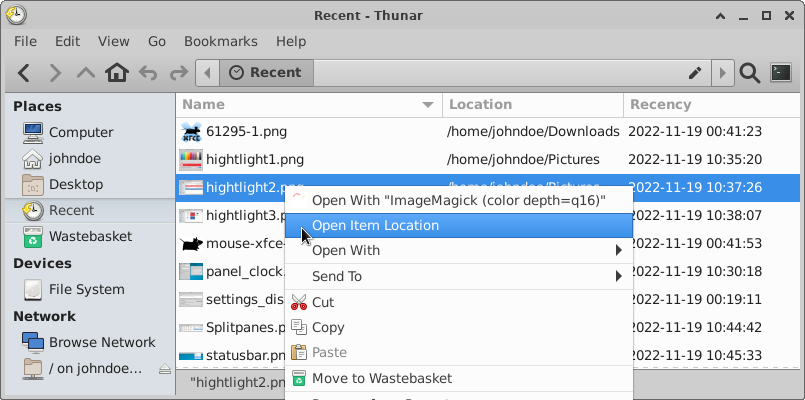
For more information on 'Recent' in Thunar check the related blog post.
Bookmark Menu
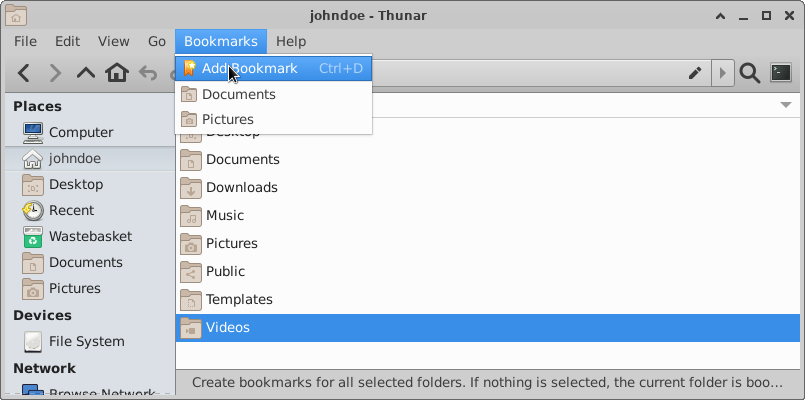
In order to keep the 'Go' menu compact, bookmarks have been moved into a separate, new 'Bookmarks' menu. The menu item 'add Bookmark' was rather hidden in the 'send to' menu in Thunar 4.16. As part of the new 'Bookmarks' menu, it is more prominent now.
Trash directory
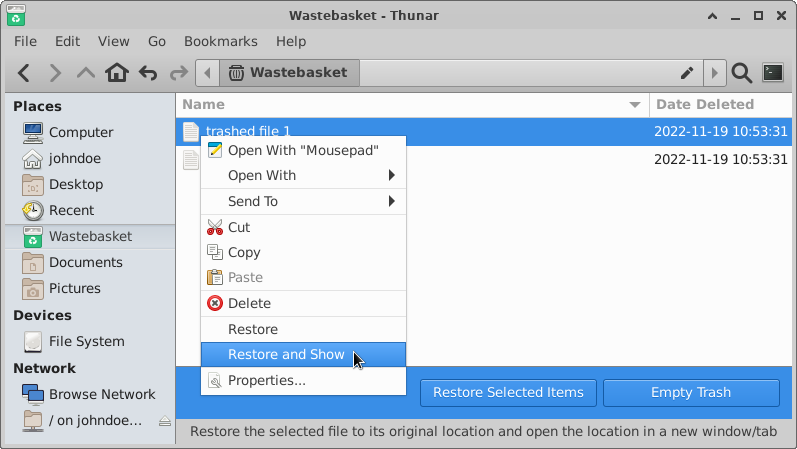
With the new release, the trash directory provides an info bar which gives easy access to `Empty Trash` and 'Restore' functionality. When using List View, a 'Date Deleted' column will be shown, so that the files can be sorted by deletion date. Via context menu, it is now possible to select 'Restore and Show' in order to automatically open a new tab in the folder of the restored file(s).
Default Applications
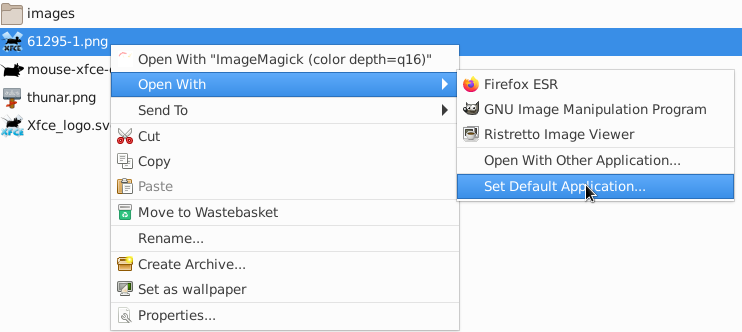
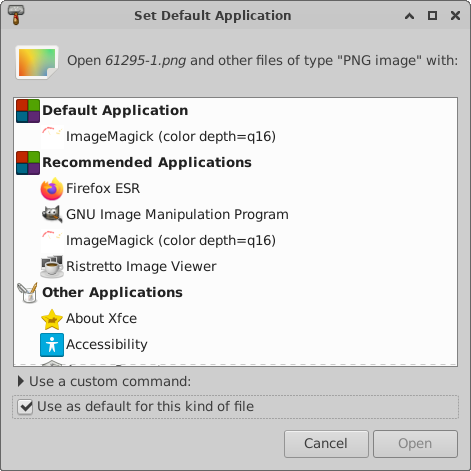
The management to set/unset default applications for specific mime types was improved. The context menu got a dedicated item 'Set Default Application' which will open the 'ApplicationChooserDialog' with 'use as default' preselected. The dialog now has a section 'Default Application' in order to make clear which default application currently is set. If you want to remove applications from the list, right click it and select 'forget association'.
Custom Actions
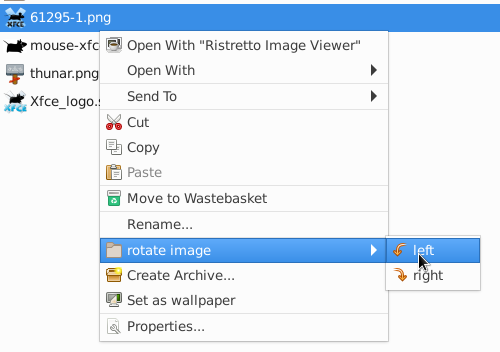
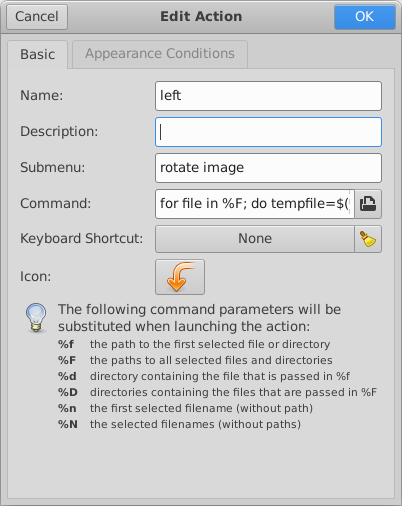
It is now possible to arrange custom actions in cascading submenus. Just enter the same submenu name for a custom action in order to place it into the same menu. If you require multiple menu levels, you can achieve that by using '/' in the path of the 'Submenu' entry.
Preferences
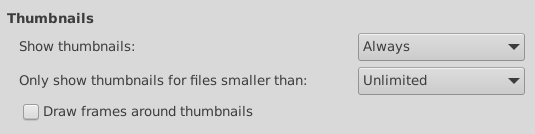
The thumbnail settings in the preferences dialog got grouped together, and meanwhile it is possible to limit the file size for which thumbnails should be generated. That should mitigate possible performance issues by preventing thumbnail generation for huge video files.
File transfer operations optionally can use *.partial~ as an intermediate file now. After a transfer operation, there is now the option to verify the file checksums in order to make sure that no single bit got corrupted. Note that the checksum feature will require some extra time during copy when activated.
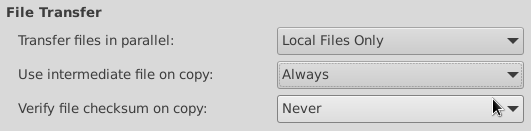
For more information on the new file transfer options, check the related blog post.
A checkbox was added in order to allow running shell scripts. In Thunar 4.16 it only was possible to change that behavior by changing a hidden setting. Use that option with caution!

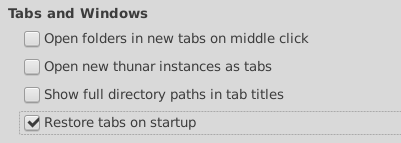
There is now the possibility to restore tabs on startup, and to show the full directory path in the tab title.
xfce4-appfinder
Configuration
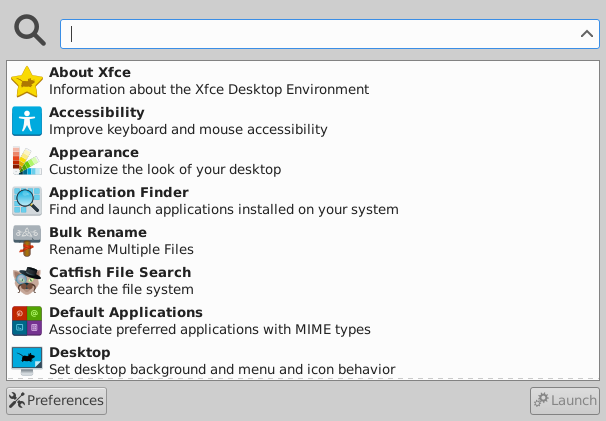
Appfinder got support for the 'PrefersNonDefaultGPU' property, which is useful for systems with hybrid graphic cards.
Environment variables are now parsed when passed in collapsed mode.
Appearance
An option to hide the window decorations was added.
xfwm4
Workspaces
Workspace setting will now work as well with other window managers.
Compositor
The compositor now supports adaptive vsync with GLX.
General
Scaling
Improved support for UI scaling and fix for many blurry icons in the core components when scaling is used. This will be particularly useful for Hi DPI screens.
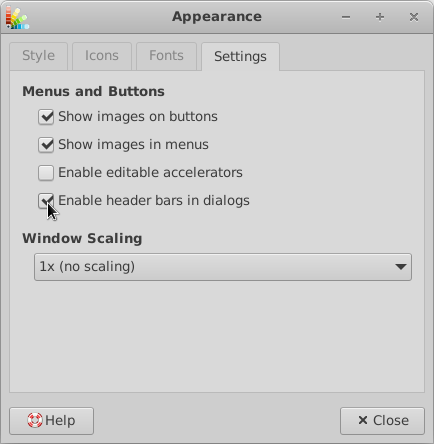
Window Header Bars
All header bars of Xfce Windows/Dialogs by default will be drawn by the window manager now (Xfwm4). Some dialogs optionally support 'GtkHeaderBar' (CSD) which can be enabled via a xfconf setting.
For the sake of readability, this list only shows main highlights. Check the full Xfce 4.18 changelog for a detailed list of changes.
This summary can as well be viewed as a localized online tour.
This release can be downloaded here, either as a set of individual packages or as a single tarball including all these individual versions.
Best regards,
The Xfce development team
Xfce 4.18 Pre2 Released
Dec 01,2022
Xfce 4.18 Pre2 Released
Dear Xfce community, I am happy to announce the release of Xfce4.18 pre2.
This platform pre-release consists of the Xfce core components and will be followed by the final Xfce4.18 release soon. We fixed some quirks which were found in Xfce4.18 pre1, did some further polishing and the result is now released as Xfce4.18 pre2.
Early adopters are invited to give it a try and to check for compatibility before the final release, which is planned for 15. December.
Xfce4.18 pre2 includes all Xfce core components. The tarballs for building it can be found here:
Though, you might prefer to wait for distribution specific development packages.
Wallpaper contest
It is a pleasure for me to present you the outcome of our Xfce4.18 wallpaper contest, which received numerous nice wallpaper submissions.
The winner wallpaper, which will be the new Xfce4.18 default wallpaper, was brought to you by Katerina Shkel:

The second and third place both go to Denis Kuzminok. As well these wallpapers will be shipped within Xfce:


You as well might be interested in the complete list of submissions !
Coming soon
A detailed sum up of all new features in Xfce4.18 is planned for the final release, so stay tuned!
Best regards,
The Xfce development team
Wallpaper Contest for Xfce 4.18 – End of submissions
Nov 20,2022
Wallpaper Contest for Xfce 4.18 - End of submissions
The submission deadline for the Xfce 4.18 wallpaper contest just ended, and I am happy to see that many submissions!
Starting by now, one week of voting will show which wallpapers are the most popular ones.
In order to cast your vote, login at gitlab.xfce.org and add a ❤️ or 👍 reaction to all wallpapers you want to upvote.
Please keep in mind that you should vote for the best wallpaper, not for the best picture. E.g. it makes sense to leave some free space where desktop items can be placed.
Voting will be closed on 27. November. Like that, the new wallpaper can be utilized for the Xfce4.18 pre2 announce, which is planned for beginning of December.
Happy voting !