GSoC’22 – File Highlighting in Thunar

About the feature
- The aim of this feature is to enable the user to highlight files/folders across the various different views.
- The feature can be toggled on/off through the View Menu.
- The highlight color can be selected by navigating to the Highlight tab in the properties dialog of the respective file. The properties dialog can be brought about by selecting the Properties option under the Context Menu (Right click on the desired file/folder to show the context-menu)
Requirement: GVFS (Gnome Virtual File System)
Implementation
- The biggest challenge was figuring out how to paint the highlights on the various different views.
- The solution was to use a GtkCellLayoutDataFunc that is called on each item of the view. This way we can set the specific background color in the CellRenderer for each of the different items on view.
- Another challenge that came up was implementing the rounded corners.
- For this, modifications were made to the IconRenderer & a new custom TextRenderer was introduced. The trick was to use cairo to clip the backgrounds & paint the specific color.
This feature is possible with the support by Thunar's lead developers - Alexander Schwinn (alexxcons), Sergios - Anestis Kefalidis (SKefalidis) and Yongha Hwang (MShrimp4).
GSoC’22: Making Thunar Bulk Renamer More Advanced.
The Task
Most of you would be aware of bulk renamer, a handy plugin in Thunar to rename many files together. The plugin is already very advanced and can perform many complex tasks. But sometimes, performing those tasks required more user interference than expected. Consider a case where you are renaming two files, and the new name for one file matches the old name of the second file. Now, no issue arises if the second file is renamed first, and the bulk renamer works perfectly. But if the first file is renamed, it throws an error message as the filename already exists. In the case of two files, the user can resolve such errors manually, but it can become a very tedious task for a large number of files. So the job was to make the bulk renamer intelligent enough to identify the best order in which the files should be renamed so that all such errors are resolved entirely. A trivial usage case for it
is to be able to rename files named file4, file5 ... file13 to file1, file2 ... file10.
The Solution
Sorting is a critical player in the entire solution. The bulk renamer now tries three runs to rename a file. In the first run, the files are renamed in the user-specified order. If some files are not renamed successfully in this run, then the bulk renamer moves for the second run. Before starting the second run, all the failed files are first sorted in ascending order according to their current name. And then it tries to rename them again. But if still some files fail, it moves to the third run. Here the files are first sorted in reverse order and then renamed. The user is shown an error message if a file is still falling.
Under The Hood
With the support of Thunar's lead developers Alexander Schwinn (alexxcons), Sergios - Anestis Kefalidis and Yongha Hwang (MShrimp4), the solution is implemented successfully. Implementing the three runs and sorting was not much of a big deal. But the real deal was to manage all the other systems that broke down due to the changes. One of the noteworthy was the undo option. But after rigorous manual testing, the entire system is working correctly and ready to be used by general users. I hope this advancement will highly benefit the users.
With this done, it's time for me to move on to my task for Xfce-Screenshooter.
GSoC 22 – The First Blog Post
I’m really looking forward to this summer, since my project proposal for this year’s Google Summer of Code has been selected! I’ll be working on adding features to Thunar file manager, an XFCE application, with the help of my mentor Alexander Schwinn.
My history with XFCE
I’ve been big on open-source ever since my school days, and actually ran Xubuntu (an Ubuntu distribution with XFCE as its desktop environment) on my daily driver, an old netbook back in eleventh grade. It was too slow of a device to run GNOME, so I absolutely had to use a lighter-weight desktop environment, and compared to alternatives like LXDE which I didn’t like the aesthetics of, and pantheon (the default DE for elementaryOS) which still felt lacking in terms of performance, XFCE was the perfect balance of form and functionality.
Since then, I’ve done some distro-hopping before settling on my current setup, hand-rolled with awesome window manager and no DE. While I generally prefer to use the command-line, Thunar has been by GUI file manager of choice ever since I started using this setup a little over 2 years ago. It’s fast, light-weight, and gets the job done without getting in your way, which is exactly what I need.
Planned features
Thunar does however lack a few features that would be really handy to have, which is exactly what I’ll be working on.
Undo-redo
Adding undo and redo is an absolute no-brainer for me, and would probably be the single biggest thing I think Thunar is currently missing. If you’re anything like me, you’ve often selected the wrong file to move into another directory, and you have to manually undo it and move the correct file once you realize your mistake. Implementing this would do away with such frustrating tedium in the case of minor mistakes.
File counts for folders
Currently, the list view in Thunar has a ‘size’ column which shows the size of the corresponding file in the listing. However, this column is blank for folders (or directories). As such, it’s essentially wasted space for directories, but it could be put to good use showing the count of the files in the folder instead.
Picture-specific maximized thumbnail view
Managing pictures is primarily based on the content of the picture itself, rather than metadata like the name, date etc. So it would be very convenient to have a specific view optimized for folders with a large number of pictures, where the thumbnails take up as much space on the screen as possible. Think Pinterest, Google images etc.
If somehow I complete the work enlisted in my proposal ahead of time, I plan on looking at some of the file system synchronisation bugs that some Thunar users have reported.
Conclusion
I’m glad to have the opportunity to be able to work on open-source tools I myself use everyday, and feel really lucky to have the support of Google to be able to work on this over this summer. I’m really grateful for the help I’ve gotten along the way to getting my proposal accepted from Sergios Kefalidis, Alexander Schwinn, and other members of the XFCE community.
I’d like to congratulate my fellow XFCE GSoC contributors Yogesh Kaushik and Amrit Borah as well (who coincidentally are also from different IIITs :grin:).
GSoC’22: The Journey Begins
I am pleased to inform you that my proposal for GSoC with Xfce, under the mentorship of André Miranda, has been accepted. So this summer, I will be contributing to Xfce. Allow me to introduce myself and the work that I will be doing.
I am Yogesh Kaushik, a sophomore at IIIT Delhi in the Computer Science Engineering branch. As per the suggestions of a few intelligent souls in my college, I dual-booted my system and began using Linux for regular use in my first semester of college. My first Linux distribution was Kali, and that's how I was introduced to Xfce. Over time, I also tried quite a few other desktop environments like KDE and GNOME. But for me, the simplicity of Xfce is simply unmatched. So when I got the opportunity to contribute to it, I can't refuse it. Luckily the opportunity didn't turn me down. Enough of my introduction; let me now tell you about my objectives for GSoC this year.
Thunar Bulk Renamer
Thunar is the file manager for Xfce. It comes with fascinating support for renaming multiple files, and that feature is called Bulk Renamer. The Bulk Renamer itself is a very advanced feature, but it may require unnecessary human intervention under some circumstances. If the user wants to rename a file, such that the new name is the original name of some other file, which is yet to be renamed, the system will require user interference. For more clarity, let's say the user wants to rename a file as "File02", but there is already a file named "File02," which is already added to the Bulk Renamer but is yet to be renamed. In such a situation, the Bulk Renamer will raise an error and ask the user to fix it manually. My task would be to make the Bulk Renamer intelligent enough to identify such situations and allow it to act independently in such cases.
This would be my first task in GSoC, so how I am going to do that, you will see quite soon.
Screenshooter
As the name suggests, it is an application to take screenshots in Xfce. The application is exceptionally rich in terms of the functionalities it currently has. And my task would be to make it even more prosperous. I would introduce the support for custom actions in the Screenshooter. For those of you who would have used Xfce a lot, you must have seen the custom actions in Thunar or AppFinder. For those who don't know it, allow me to elaborate. With the help of custom actions, the user will be able to run custom scripts for the taken screenshot. So if you want to directly upload your screenshot to your favorite hosting platform, you just need to create one script, and that's it; you are good to go. Similarly, you can do a lot more with it.
Panel
Xfce Panel is where you can find your open apps and a lot of widgets. Depending upon your Linux Distro, you can find it on any four sides. Generally, for Kali, it is present on the top. But you can customize it according to your own choices. Now panel has a lot of plugin, some of which are internal and some are external. My task would be to merge two such plugins, namely "DateTime" and "Clock". The two plugins are very similar and thus they should be merged for better developments in future.
If the time permits I will do a few more enhancements in the Xfce environment. My journey with Xfce has started and I hope it will go smoothly even beyond the scope of GSoC.
Congratulations to fellow Xfce GSoC contributors Pratyaksh Gautam and Amrit Borah.
A Journey Begins (GSoC – 2022)

Introduction
Hello 👋😁 ! I am overjoyed to announce that my proposal to XFCE for GSoC - 2022 got selected !
Oh ! I forgot to introduce myself. My name is Amrit Borah and I am a somophore undergraduate student at the Indian Institute of Information Technology Guwahati (IIITG), India, pursuing Computer Science Engineering (CSE). I have only recently completed my 4th semester at college.
Tasks in my proposal
So, getting back to the topic at hand - GSoC, I will be taking on 4 tasks for XFCE.
Namely,
- Implementing option to enable expansion of folders in "Details View" in Thunar. (link)The desired outcome -

- Adding user profiles to XFCE Terminal (link)

- I'll also be rewriting the preference-dialog in plain C. Currently it has been written using glade.

Further details on the topics can be found on the links corresponding to the respective tasks.
What I'll be working with -
I will be working with GTK - 3.0 toolkit and C source code for the aforementioned tasks.
Linux, C & XFCE
I first started using Linux back in 2018. Quite frankly, I hated the look of Windows 10. I wasn't really tech savvy enough to really know the fundamental differences between Windows & GNU/Linux. All I could differentiate them by, was their looks. I wanted to make my desktop look and feel like MacOS. I have always liked it's pleasant looks. The MacOS desktop is pure eye candy to me. But unfortunately I never had the pleasure to own a Apple Mac. So I installed Ubuntu. Followed youtube tutorials and customised gnome to look like mac os. Then as year went by I tried out other distros like Pop OS, Opensuse, etc. But the laptop I had then was the Y530 from Lenovo which had Nvidia GTX 1050. Gaming was an issue for me. So I switched back to Windows.
Finally in 2020, when I got my own personal laptop for college, I got a thinkpad E14 with the intention of daily driving Linux. I tried out a variety of flavors on that hardware. It had great keyboard ! On the quest for the perfect Distro, I stumbled upon numerous YouTube channels on Linux notably DistroTube. Following the guide for Arch installation I successfully installed arch and tasted my first WM i.e Awesome WM. Customising it wasn't too bad but since I had little knowledge of lua I found it's config too verbose and hard to hack into ( (whispering...) I wasn't tech savvy back then ) . It was only a matter of time before I started WM hopping much like my distro hoping earlier. Tried out bspwm & xmonad. I even tried learning Haskell, but only went as far as the basics (didn't venture into monads).
But I think I finally settled down on Fedora. Gnome is/was my favourite DE but I always had one gripe i.e stuttering/lagging when switching into the overview view using intel igpus. It has now been solved ig with Gnome 42, at least it's really smooth for me now. So (I sincerely hope ! distro/wm hopping is fun but tedious 😭) Gnome it is then.
Coming onto C now, my first introduction to C programming language was in my CS course. It was one of the topics in my 1st semester. I kinda like C to be honest. I am most familiar with it's syntax more so than other programming languages. But memory management is not fun 😭. Oh the seg faults 😇 ! Later we did have Java as a course. I have a good relation with Java. But the real meaty portions of the OS was taught in my Operating Systems course in 4th sem. I loved that course.Finally got a formal introduction to the depths of an operating system.
I hadn't used XFCE on any of my main machines since they were quite capable hardware. It's only when I bought a raspberry pi 4, I got the taste of the XFCE DE. I am quite impressed with the performant and snappy look and feel of the DE. And Now I have the pleasure to work for XFCE 😄 !
Final thoughts
I have gone on for too long now. So keeping it short, I am really greatful for the opportunity that I am provided with and I thank Sergios - Anestis Kefalidis (my mentor & maintainer of XFCE Terminal), Alexander Schwinn (maintainer of Thunar & xfce org admin for gsoc) & Yongha Hwang (Xfce Developer) for the reviews and support.
I would also like to congratulate my fellow GSoC contributors - Pratyaksh Gautam & Yogesh Kaushik - and wish them the best of luck !
Really excited ! 😁
My contributions to XFCE
Settings GUI
Welcome back! It's time to talk about hidden preferences.
The problem
It's a sunny day and you boot up your PC, which uses Xfce, ready to do some file-organizing. You open Thunar and suddenly you realise something. All this time you would have prefered sorting to be case-sensitive. You open the Preferences Dialog but alas, there is no relevant setting. You are left disappointed, hoping that Thunar devs add this option in a future release. You might even create a feature request.
Little do you know, Thunar does have a preference to enable this functionality but it is hidden away. You can only find it in the wiki and even that is not a guarantee because we might forget about updating the wiki. Then you have to go and manually enable it in the Settings Editor or using xfconf-query.
Thunar is not the only Xfce application that has hidden settings, Terminal is another prominent application that has preferences that don't showup in its preferences dialog.
Settings Editor à la Shortcuts Editor
If you have been following the development of Xfce you probably know that I created a Shortcuts Editor widget that can be easily integrated in Xfce apps. Presently, Thunar, Mousepad and Terminal use that widget to give users an easy way of editing shortcuts.
I've been working on a similar widget for Settings based on the Xfce Settings Editor. The end goal is to have a simplified version of that settings editor that can be easily integrated in Xfce Apps that use xfconf. That will allow us to eliminate hidden preferences (or at least, greatly reduce them).
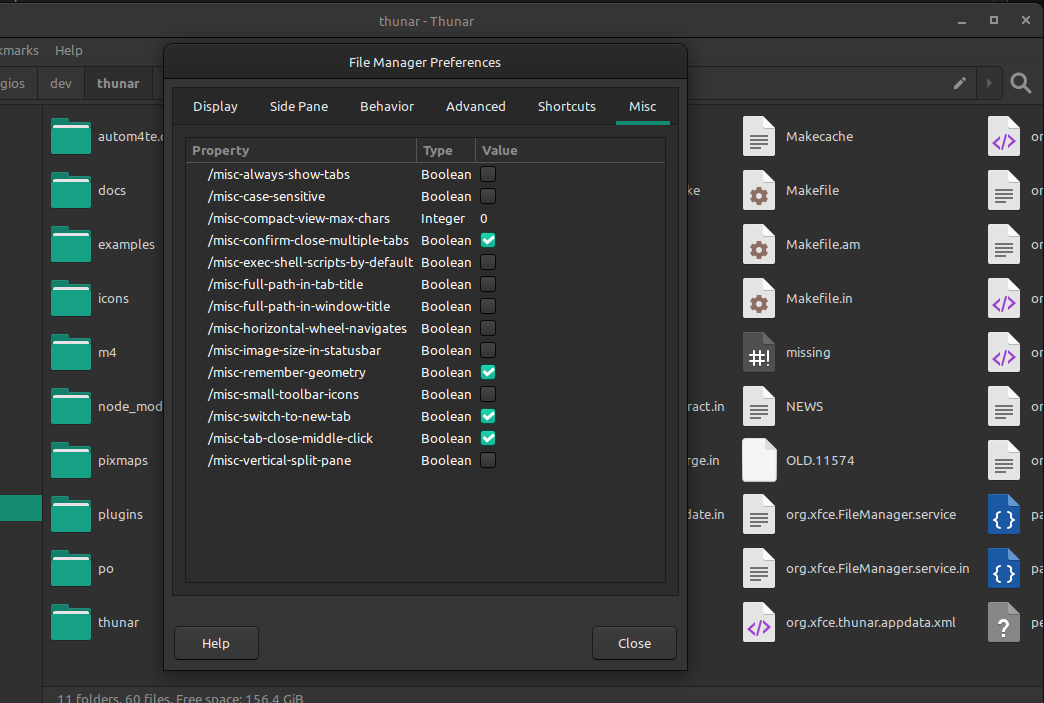
XfceSettingsEditor integrated in Thunar's Preferences Dialog.
Searching in the Xfce Settings Editor
The other big feature that I've been working on is Search/Filtering for the existing Xfce Settings Editor. Simon had started working on a patch for this but never finished it, so I continued where he left off. I am not planning to include this functionality in the separate widget that was described previously.
xfce4-terminal 1.0.0 stable release
After 15 months a new stable release of Xfce Terminal is out full of improvements for everybody to enjoy!
A new maintainer
From 2016 until 2020, Terminal was in the capable hands of Igor Zakharov. It became unmaintained for a few months in 2021 until I took up its development in September. This is Terminal's first stable release with me as its maintainer, and I hope you will find it worthy of the quality standards set by my predecessors and the Xfce desktop environment as a whole.
A new versioning scheme
After asking around the Xfce community about Terminal's versioning scheme and looking into its history, I decided to adopt Thunar's old versioning. That means that the next cycle of development releases will be 1.1.x, and the next major stable release will be 1.2.0. That will continue until we reach 2.0.0 or some major change happens (for example, porting to GTK 4).
Improvements
For anyone who hasn't kept up with Terminal's development here are the major improvements:
- The `Scrolling on ouput` preference has been improved and will now be temporarily disabled if you scroll up.
- Overlay scrollbars are now supported.
- You can now send signals to the foreground process through the UI.
- The '--tab' and '--window' command line arguments have been reworked to be more intuitive.
- For those who use background images, 'Fill' is a new style option.
- The 'Unsafe Paste' dialog has been significantly revamped and now also gives you an option to temporarily disable it.
- You can now change the behavior of right click.
- Accelerators that contain the 'Tab' key can now be changed at runtime.
- A new Shortcuts Editor was created for Xfce applications, and Xfce Terminal is one of the first apps to support it (requires libxfce4ui 4.17.2 or greater).
- XfceTitledDialog is used where possible for better synergy with the rest of your Xfce desktop.
Under the hood
As far as under the hood improvements go, I spent most of my time rewriting the code that handles the accelerators and the creation of various menus. This removed most of the deprecated code in Xfce Terminal and fixed various small issues or inconsistencies that existed in the old code while also reducing the size of the codebase. At first, this transition introduced a bunch of regressions but thanks to testers in the community it looks like any shortcuts or UI issues created by it have been fixed. A nice bonus of this transition is being able to customize the goto-tab accelerators.
I did also spent some time fixing build warnings and removing code for ancient versions of VTE. All in all, I believe that the codebase is in a better place than it was one year ago and this will enable me to make 1.2.0 an even bigger release.
Future plans
Xfce Terminal
The future of Xfce Terminal is bright. Some of my goals for 1.2.0 are:
- Rewriting the Preferences Dialog to use XfceTitledDialog and integrate the Shortcuts Editor into it.
- Creating a new Settings Editor widget in libxfce4ui by reusing code from the exisitng Settings Editor and using that to eliminate hidden preferences.
- Documenting all public functions in Xfce Terminal.
- Introducing Profiles-like functionality which will close a bunch of open issues.
- Tab restoration outside of Xfce environments.
- Improved FreeBSD support.
Videos showcasing features and improvements in this release:
FOSS Roundup #7 – M1, Gaming, Docs, and More!

It’s been another exciting week in the Linux landscape, with Linux support arriving for the M1 and gaming on Linux continuing to expand thanks to the Steam Deck. Around Xubuntu, docs are done, and AppImage continues to be supported. As usual, Xfce has a few new releases as well. All this and more in this week’s FOSS Roundup!
The first Asahi Linux alpha release arrives
The first release of Asahi Linux, the first distribution for M1-powered Macs, has been made available. There are still many missing features, but even just getting here is incredible. This team has made so much progress in a very short time. Interestingly, Apple has, at the same time, been quietly enabling features to support booting Linux on the M1 Macs.
Microsoft is working to bring Xbox Cloud Gaming to Steam Deck
Working closely with Valve, Microsoft has prepared a beta version of the Microsoft Edge browser that brings the cloud gaming service to Linux and the Steam Deck. A handful of Microsoft-published verified titles are also available on Steam.
The new Xubuntu Documentation is finally ready
After nearly two years, the newly rewritten Xubuntu Documentation is ready to be reviewed, merged, and published. Together with another Xubuntu Team member, I worked with members of the community to document Xubuntu’s user experience more completely. The most painful part of it all was converting to DocBook, our native documentation format. This part is now complete.
It's finally done. 🎉 https://t.co/k7a2bP6sYH https://t.co/jinkuoI6ZV
I'm so tired of working with Docbook. pic.twitter.com/k0rmta101k
— Sean Davis 🦣 @bluesabre@floss.social (@bluesabredavis) March 19, 2022
Supporting AppImage on Xubuntu
While installing Xubuntu 22.04 on my main machine for testing, I found that it could no longer open software distributed with AppImage. This includes .run and .AppImage files that you might find online, like DaVinci Resolve or Cryptomator. The missing piece was the libfuse2 package, which was no longer pulled in as a dependency in 22.04. As of today’s daily ISO, this issue should be resolved for Xubuntu and Ubuntu Studio.
http://changelogs.ubuntu.com/changelogs/pool/universe/x/xubuntu-meta/xubuntu-meta_2.240/changelog
This week’s Xfce releases
libxfce4ui 4.17.5 was released this week, including several bug fixes and enabling Mousepad to use the XfceShortcutsEditor. Sounds like some nice new features are on their way.
Orage 4.16.0, previously unmaintained and archived, has now been ported to GTK 3 and is once again an active Xfce project. The Orage panel plugin has been discontinued, but the standalone calendar application will be supported going forward.
What I’m working on…
With the documentation updates nearly out of the way and bug lists cleaned up, I hope to start working on bug fixes and more testing this week. We’ve also nearly completed voting on the 22.04 Xubuntu Wallpaper contest, with 3 clearly identified winners and three we’re sorting out. Look for more news early this week.
Thanks for reading!
If you enjoyed this newsletter, consider sending me a tip! I’ve added links to GitHub Sponsors, Ko-Fi, and Patreon to the Donate page on my website.
Thanks for reading. I’ll see you next week with some new and exciting Xfce and Xubuntu updates! Have a great week, and stay safe out there!
FOSS Roundup #7 – M1, Gaming, Docs, and More!
This week's roundup features the first alpha release of Asahi Linux, Microsoft looking to bring more games to the Steam Deck, and more!
The post FOSS Roundup #7 – M1, Gaming, Docs, and More! appeared first on Sean Davis.
FOSS Roundup #6 – Where have all the good bugs gone?
Welcome to the sixth edition of my Weekly FOSS Roundup! I’ve been hard at it this week, cleaning up Xubuntu bugs and hacking on docs. A new Linux vulnerability, “Dirty Pipe,” was announced. And Xfce has been accepted into the 2022 Google Summer of Code program. What a week!
Dirty Pipe Linux Vulnerability Discovered
A new Linux vulnerability that allows attackers to overwrite read-only files, including immutable files and those on read-only Btrfs snapshots. Kernel versions 5.10.102, 5.15.25, and 5.16.11 have already been patched. Update your machines now!
Xfce Accepted into Google Summer of Code 2022
Xfce will again participate in the Google Summer of Code (abbreviated “GSoC”) in 2022. GSoC is a program focused on attracting new contributors to open-source software development through a 12-plus-week mentorship program.
Submissions for the 22.04 Xubuntu Wallpaper Contest are Now Closed
After receiving a fantastic 126 submissions from numerous contributors, the 22.04 Xubuntu Wallpaper Contest is now closed for additional submissions. The Xubuntu Team will begin the voting process, with expected results within the next two weeks.
Submissions for the 22.04 Xubuntu Wallpaper Contest are now closed! We received 126 submissions, and will now begin the voting process. Look forward to news of the winning entries in the near future. In the meantime, you can browse the entries here: https://t.co/HamoGf1sQp
— Xubuntu (@Xubuntu) March 13, 2022
This Week’s Xfce Releases
Xfce Screenshooter 1.9.10 features a handful of fixes and now uses symbolic icons for the interface. This means the application will automatically look better regardless of using a dark or light GTK theme.
Xubuntu Bug Spring Cleaning
I’m unsure what prompted me, but I got into a cleaning mood this week. I started the long and arduous task of cleaning up Xubuntu’s bug reports. After starting with nearly 2,000 bug reports that affect Xubuntu and its related packages, I’ve reduced this list to a (still large) 1,584 bugs! There’s still lots of work and probably a hundred or more bugs that could be cleaned up or de-duplicated.
My first pass is finally done. Down from nearly 2,000 bugs to 1,584! What remains now are bugs that are reported or confirmed for 20.04+. I also didn't touch blueman, onboard, synaptic, or the Mate apps.
Next steps: Triage in 22.04, tag duplicates, and report bugs upstream. pic.twitter.com/omNBENUNan
— Sean Davis 🦣 @bluesabre@floss.social (@bluesabredavis) March 11, 2022
Making Strides with Xubuntu Documentation
I had a really productive week with the Xubuntu Documentation, getting the to-do list down to just two more chapters. I need to go through and clean up some of the formatting and tag usage, but we should be ready to merge this week! The latest documentation has been built here.
Thanks for reading!
If you enjoyed this newsletter, consider sending me a tip! I’ve added links to GitHub Sponsors, Ko-Fi, and Patreon to the Donate page on my website.
Thanks for reading. I’ll see you next week with some new and exciting Xfce and Xubuntu updates! Have a great week, and stay safe out there!