GSoC’22 – File Highlighting in Thunar

About the feature
- The aim of this feature is to enable the user to highlight files/folders across the various different views.
- The feature can be toggled on/off through the View Menu.
- The highlight color can be selected by navigating to the Highlight tab in the properties dialog of the respective file. The properties dialog can be brought about by selecting the Properties option under the Context Menu (Right click on the desired file/folder to show the context-menu)
Requirement: GVFS (Gnome Virtual File System)
Implementation
- The biggest challenge was figuring out how to paint the highlights on the various different views.
- The solution was to use a GtkCellLayoutDataFunc that is called on each item of the view. This way we can set the specific background color in the CellRenderer for each of the different items on view.
- Another challenge that came up was implementing the rounded corners.
- For this, modifications were made to the IconRenderer & a new custom TextRenderer was introduced. The trick was to use cairo to clip the backgrounds & paint the specific color.
This feature is possible with the support by Thunar's lead developers - Alexander Schwinn (alexxcons), Sergios - Anestis Kefalidis (SKefalidis) and Yongha Hwang (MShrimp4).
GSoC 22 – The First Blog Post
I’m really looking forward to this summer, since my project proposal for this
year’s Google Summer of Code has been selected! I’ll be working on adding
features to Thunar file
manager,
an XFCE application, with the help of my mentor Alexander Schwinn.
My history with XFCE
I’ve been big on open-source ever since my school days, and actually ran
Xubuntu (an Ubuntu distribution with XFCE as its desktop
environment) on my daily driver, an old netbook back in eleventh grade. It was
too slow of a device to run GNOME, so I absolutely had to use a lighter-weight
desktop environment, and compared to alternatives like
LXDE which I didn’t like the aesthetics of, and
pantheon (the default DE for elementaryOS) which still
felt lacking in terms of performance, XFCE was the perfect balance of form and
functionality.
Since then, I’ve done some distro-hopping before settling on my current setup,
hand-rolled with awesome window manager and no DE.
While I generally prefer to use the command-line, Thunar has been by GUI file
manager of choice ever since I started using this setup a little over 2 years
ago. It’s fast, light-weight, and gets the job done without getting in your way,
which is exactly what I need.
Planned features
Thunar does however lack a few features that would be really handy to have,
which is exactly what I’ll be working on.
Undo-redo
Adding undo and redo is an absolute no-brainer for me, and would probably be the
single biggest thing I think Thunar is currently missing. If you’re anything
like me, you’ve often selected the wrong file to move into another directory,
and you have to manually undo it and move the correct file once you realize your
mistake. Implementing this would do away with such frustrating tedium in the
case of minor mistakes.
File counts for folders
Currently, the list view in Thunar has a ‘size’ column which shows the size of
the corresponding file in the listing. However, this column is blank for folders
(or directories). As such, it’s essentially wasted space for directories, but it
could be put to good use showing the count of the files in the folder instead.
Picture-specific maximized thumbnail view
Managing pictures is primarily based on the content of the picture itself,
rather than metadata like the name, date etc. So it would be very convenient to
have a specific view optimized for folders with a large number of pictures,
where the thumbnails take up as much space on the screen as possible. Think
Pinterest, Google images etc.
If somehow I complete the work enlisted in my proposal ahead of time, I plan on
looking at some of the file system synchronisation bugs that some Thunar users
have reported.
Conclusion
I’m glad to have the opportunity to be able to work on open-source tools I
myself use everyday, and feel really lucky to have the support of Google to be
able to work on this over this summer. I’m really grateful for the help I’ve
gotten along the way to getting my proposal accepted from Sergios
Kefalidis, Alexander Schwinn, and other members of the XFCE community.
I’d like to congratulate my fellow XFCE GSoC contributors Yogesh
Kaushik
and Amrit
Borah
as well (who coincidentally are also from different IIITs :grin:).
Settings GUI
Welcome back! It's time to talk about hidden preferences.
The problem
It's a sunny day and you boot up your PC, which uses Xfce, ready to do some file-organizing. You open Thunar and suddenly you realise something. All this time you would have prefered sorting to be case-sensitive. You open the Preferences Dialog but alas, there is no relevant setting. You are left disappointed, hoping that Thunar devs add this option in a future release. You might even create a feature request.
Little do you know, Thunar does have a preference to enable this functionality but it is hidden away. You can only find it in the wiki and even that is not a guarantee because we might forget about updating the wiki. Then you have to go and manually enable it in the Settings Editor or using xfconf-query.
Thunar is not the only Xfce application that has hidden settings, Terminal is another prominent application that has preferences that don't showup in its preferences dialog.
Settings Editor à la Shortcuts Editor
If you have been following the development of Xfce you probably know that I created a Shortcuts Editor widget that can be easily integrated in Xfce apps. Presently, Thunar, Mousepad and Terminal use that widget to give users an easy way of editing shortcuts.
I've been working on a similar widget for Settings based on the Xfce Settings Editor. The end goal is to have a simplified version of that settings editor that can be easily integrated in Xfce Apps that use xfconf. That will allow us to eliminate hidden preferences (or at least, greatly reduce them).
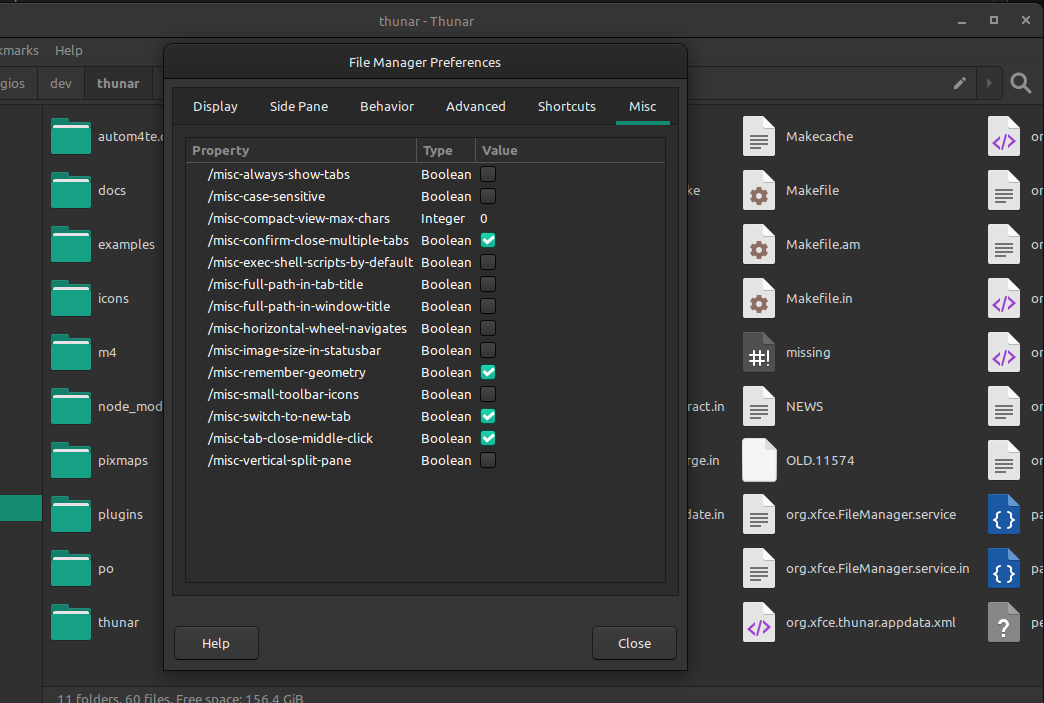
XfceSettingsEditor integrated in Thunar's Preferences Dialog.
Searching in the Xfce Settings Editor
The other big feature that I've been working on is Search/Filtering for the existing Xfce Settings Editor. Simon had started working on a patch for this but never finished it, so I continued where he left off. I am not planning to include this functionality in the separate widget that was described previously.
xfce4-terminal 1.0.0 stable release
After 15 months a new stable release of Xfce Terminal is out full of improvements for everybody to enjoy!
A new maintainer
From 2016 until 2020, Terminal was in the capable hands of Igor Zakharov. It became unmaintained for a few months in 2021 until I took up its development in September. This is Terminal's first stable release with me as its maintainer, and I hope you will find it worthy of the quality standards set by my predecessors and the Xfce desktop environment as a whole.
A new versioning scheme
After asking around the Xfce community about Terminal's versioning scheme and looking into its history, I decided to adopt Thunar's old versioning. That means that the next cycle of development releases will be 1.1.x, and the next major stable release will be 1.2.0. That will continue until we reach 2.0.0 or some major change happens (for example, porting to GTK 4).
Improvements
For anyone who hasn't kept up with Terminal's development here are the major improvements:
- The `Scrolling on ouput` preference has been improved and will now be temporarily disabled if you scroll up.
- Overlay scrollbars are now supported.
- You can now send signals to the foreground process through the UI.
- The '--tab' and '--window' command line arguments have been reworked to be more intuitive.
- For those who use background images, 'Fill' is a new style option.
- The 'Unsafe Paste' dialog has been significantly revamped and now also gives you an option to temporarily disable it.
- You can now change the behavior of right click.
- Accelerators that contain the 'Tab' key can now be changed at runtime.
- A new Shortcuts Editor was created for Xfce applications, and Xfce Terminal is one of the first apps to support it (requires libxfce4ui 4.17.2 or greater).
- XfceTitledDialog is used where possible for better synergy with the rest of your Xfce desktop.
Under the hood
As far as under the hood improvements go, I spent most of my time rewriting the code that handles the accelerators and the creation of various menus. This removed most of the deprecated code in Xfce Terminal and fixed various small issues or inconsistencies that existed in the old code while also reducing the size of the codebase. At first, this transition introduced a bunch of regressions but thanks to testers in the community it looks like any shortcuts or UI issues created by it have been fixed. A nice bonus of this transition is being able to customize the goto-tab accelerators.
I did also spent some time fixing build warnings and removing code for ancient versions of VTE. All in all, I believe that the codebase is in a better place than it was one year ago and this will enable me to make 1.2.0 an even bigger release.
Future plans
Xfce Terminal
The future of Xfce Terminal is bright. Some of my goals for 1.2.0 are:
- Rewriting the Preferences Dialog to use XfceTitledDialog and integrate the Shortcuts Editor into it.
- Creating a new Settings Editor widget in libxfce4ui by reusing code from the exisitng Settings Editor and using that to eliminate hidden preferences.
- Documenting all public functions in Xfce Terminal.
- Introducing Profiles-like functionality which will close a bunch of open issues.
- Tab restoration outside of Xfce environments.
- Improved FreeBSD support.
Videos showcasing features and improvements in this release:
FOSS Roundup #7 – M1, Gaming, Docs, and More!
This week's roundup features the first alpha release of Asahi Linux, Microsoft looking to bring more games to the Steam Deck, and more!
The post FOSS Roundup #7 – M1, Gaming, Docs, and More! appeared first on Sean Davis.
FOSS Roundup #7 – M1, Gaming, Docs, and More!

It’s been another exciting week in the Linux landscape, with Linux support arriving for the M1 and gaming on Linux continuing to expand thanks to the Steam Deck. Around Xubuntu, docs are done, and AppImage continues to be supported. As usual, Xfce has a few new releases as well. All this and more in this week’s FOSS Roundup!
The first Asahi Linux alpha release arrives
The first release of Asahi Linux, the first distribution for M1-powered Macs, has been made available. There are still many missing features, but even just getting here is incredible. This team has made so much progress in a very short time. Interestingly, Apple has, at the same time, been quietly enabling features to support booting Linux on the M1 Macs.
Microsoft is working to bring Xbox Cloud Gaming to Steam Deck
Working closely with Valve, Microsoft has prepared a beta version of the Microsoft Edge browser that brings the cloud gaming service to Linux and the Steam Deck. A handful of Microsoft-published verified titles are also available on Steam.
The new Xubuntu Documentation is finally ready
After nearly two years, the newly rewritten Xubuntu Documentation is ready to be reviewed, merged, and published. Together with another Xubuntu Team member, I worked with members of the community to document Xubuntu’s user experience more completely. The most painful part of it all was converting to DocBook, our native documentation format. This part is now complete.
It's finally done. 🎉 https://t.co/k7a2bP6sYH https://t.co/jinkuoI6ZV
I'm so tired of working with Docbook. pic.twitter.com/k0rmta101k
— Sean Davis 🦣 @bluesabre@floss.social (@bluesabredavis) March 19, 2022
Supporting AppImage on Xubuntu
While installing Xubuntu 22.04 on my main machine for testing, I found that it could no longer open software distributed with AppImage. This includes .run and .AppImage files that you might find online, like DaVinci Resolve or Cryptomator. The missing piece was the libfuse2 package, which was no longer pulled in as a dependency in 22.04. As of today’s daily ISO, this issue should be resolved for Xubuntu and Ubuntu Studio.
http://changelogs.ubuntu.com/changelogs/pool/universe/x/xubuntu-meta/xubuntu-meta_2.240/changelog
This week’s Xfce releases
libxfce4ui 4.17.5 was released this week, including several bug fixes and enabling Mousepad to use the XfceShortcutsEditor. Sounds like some nice new features are on their way.
Orage 4.16.0, previously unmaintained and archived, has now been ported to GTK 3 and is once again an active Xfce project. The Orage panel plugin has been discontinued, but the standalone calendar application will be supported going forward.
What I’m working on…
With the documentation updates nearly out of the way and bug lists cleaned up, I hope to start working on bug fixes and more testing this week. We’ve also nearly completed voting on the 22.04 Xubuntu Wallpaper contest, with 3 clearly identified winners and three we’re sorting out. Look for more news early this week.
Thanks for reading!
If you enjoyed this newsletter, consider sending me a tip! I’ve added links to GitHub Sponsors, Ko-Fi, and Patreon to the Donate page on my website.
Thanks for reading. I’ll see you next week with some new and exciting Xfce and Xubuntu updates! Have a great week, and stay safe out there!
FOSS Roundup #6 – Where have all the good bugs gone?
This week's roundup features another Linux vulnerability, Xfce's acceptance into the Google Summer of Code program, and spring cleaning!
The post FOSS Roundup #6 – Where have all the good bugs gone? appeared first on Sean Davis.
FOSS Roundup #6 – Where have all the good bugs gone?
Welcome to the sixth edition of my Weekly FOSS Roundup! I’ve been hard at it this week, cleaning up Xubuntu bugs and hacking on docs. A new Linux vulnerability, “Dirty Pipe,” was announced. And Xfce has been accepted into the 2022 Google Summer of Code program. What a week!
Dirty Pipe Linux Vulnerability Discovered
A new Linux vulnerability that allows attackers to overwrite read-only files, including immutable files and those on read-only Btrfs snapshots. Kernel versions 5.10.102, 5.15.25, and 5.16.11 have already been patched. Update your machines now!
Xfce Accepted into Google Summer of Code 2022
Xfce will again participate in the Google Summer of Code (abbreviated “GSoC”) in 2022. GSoC is a program focused on attracting new contributors to open-source software development through a 12-plus-week mentorship program.
Submissions for the 22.04 Xubuntu Wallpaper Contest are Now Closed
After receiving a fantastic 126 submissions from numerous contributors, the 22.04 Xubuntu Wallpaper Contest is now closed for additional submissions. The Xubuntu Team will begin the voting process, with expected results within the next two weeks.
Submissions for the 22.04 Xubuntu Wallpaper Contest are now closed! We received 126 submissions, and will now begin the voting process. Look forward to news of the winning entries in the near future. In the meantime, you can browse the entries here: https://t.co/HamoGf1sQp
— Xubuntu (@Xubuntu) March 13, 2022
This Week’s Xfce Releases
Xfce Screenshooter 1.9.10 features a handful of fixes and now uses symbolic icons for the interface. This means the application will automatically look better regardless of using a dark or light GTK theme.
Xubuntu Bug Spring Cleaning
I’m unsure what prompted me, but I got into a cleaning mood this week. I started the long and arduous task of cleaning up Xubuntu’s bug reports. After starting with nearly 2,000 bug reports that affect Xubuntu and its related packages, I’ve reduced this list to a (still large) 1,584 bugs! There’s still lots of work and probably a hundred or more bugs that could be cleaned up or de-duplicated.
My first pass is finally done. Down from nearly 2,000 bugs to 1,584! What remains now are bugs that are reported or confirmed for 20.04+. I also didn't touch blueman, onboard, synaptic, or the Mate apps.
Next steps: Triage in 22.04, tag duplicates, and report bugs upstream. pic.twitter.com/omNBENUNan
— Sean Davis 🦣 @bluesabre@floss.social (@bluesabredavis) March 11, 2022
Making Strides with Xubuntu Documentation
I had a really productive week with the Xubuntu Documentation, getting the to-do list down to just two more chapters. I need to go through and clean up some of the formatting and tag usage, but we should be ready to merge this week! The latest documentation has been built here.
Thanks for reading!
If you enjoyed this newsletter, consider sending me a tip! I’ve added links to GitHub Sponsors, Ko-Fi, and Patreon to the Donate page on my website.
Thanks for reading. I’ll see you next week with some new and exciting Xfce and Xubuntu updates! Have a great week, and stay safe out there!
FOSS Roundup #5 – Time to Test (Ubuntu Flavors)
This week's roundup features the Xubuntu 22.04 wallpaper contest, the Ubuntu Testing Week until March 10, and Linux Mint switching to Blueman.
The post FOSS Roundup #5 – Time to Test (Ubuntu Flavors) appeared first on Sean Davis.
FOSS Roundup #5 – Time to Test (Ubuntu Flavors)
Welcome to the fifth edition of my Weekly FOSS Roundup! We’re halfway through the Ubuntu Testing Week (March 3-10), and it’s time to start getting involved. In other news, the Xubuntu Wallpaper contest is ongoing, and there are some updates around Bluetooth and Xfce. Here’s the latest!
The Xubuntu 22.04 Wallpaper Contest Continues
The Xubuntu 22.04 Wallpaper Contest is progressing smoothly. So far, we’ve already had 77 quality submissions from numerous contributors. Submissions are open through March 12, so it’s not too late to submit your own. Keep your submissions coming!
Ubuntu Testing Week March 3-10
The next LTS release of Ubuntu and its many flavors will be released in less than two months. Feature Freeze is behind us, so there is no better time to get started with testing. Please help make this another dependable release by taking time to test and report any bugs you find.
Linux Mint is Switching to the Blueman Bluetooth Manager
Linux Mint has been using its own Blueberry application to manage Bluetooth devices for several years now. Later this year, it looks like they’ll be switching to Blueman, the same utility found in Xubuntu and several other Linux distributions. Their move will no doubt have a positive impact on any other Blueman-using distros.
This Week’s Xfce Releases
The 0.9.2 release of the Xfce Terminal is a release candidate for the upcoming 1.0.0 release. It includes several improvements and bug fixes. Take it for a test drive to help identify and eliminate the remaining bugs!
Xfdashboard provides a GNOME Shell-like experience for Xfce. The new 0.9.90 release is a release candidate for the upcoming 1.0.0 release. If you’re a fan of GNOME Shell’s behavior but prefer to stick with Xfce, Xfdashboard is worth a look.
The Xfce Diskperf (Disk Performance) plugin displays instant disk and partition performance in the panel. The 2.7.0 release features various usability and feature improvements.
What I’m working on…
This week I spent extra time working on the Xubuntu Documentation updates. Chapters 7, 8, and 9 have been converted to Docbook, leaving only 8 chapters to go. I’ve got a pretty good flow for converting them now; it depends on having a solid, uninterrupted 20-30 minutes to migrate a single chapter.
Thanks for reading!
If you enjoyed this newsletter, consider sending me a tip! I’ve added links to GitHub Sponsors, Ko-Fi, and Patreon to the Donate page on my website.
Thanks for reading. I’ll see you next week with some new and exciting Xfce and Xubuntu updates! Have a great week, and stay safe out there!