Code Comments
I’m a bit of a minimalist when it comes to commenting my code. This is probably in some ways a bad thing; code that is completely obvious to me in its function may be difficult to understand for others, and I’m often not so great at realizing this on the first pass. So that leads […]
The new Xfce release manager for users and packagers
I deleted the last post about the release manager because due to the high number of changes I made it was soon out of date. So let’s get back to the topic again. I’ll split it up into two posts: this one which is for users and packagers mostly, and another one directed to developers or, more precisely, maintainers.
Let’s start with a simple question (with a long answer): what am I talking about and what is this release manager anyway?
First, a bit of background. At Xfce, we are currently working on improving our infrastructure. We are about to switch to git and along with that, our repository layout will change. Xfce and goodie repositories will no longer be found in separate locations. We thought it would be nice to implement the same layout in other places as well, like Bugzilla and our download archive.
Nick went ahead and enabled so-called bugzilla classifications and used those to resemble the repository layout on bugzilla.xfce.org.
That still left us with separate download archives for core Xfce, goodies and other stuff. For goodies, we had a very simple release manager web application written in PHP that uploaded tarballs to http://goodies.xfce.org/releases/ and was able to send release announcements to mailing lists. The design however was very limited. For Xfce releases we had nothing like that. Uploading and copying tarballs around manually for each release was what we had to do.
And this is where the new all-in-one release manager comes into play. It’s called Moka, it is written in Ruby using Sinatra, ERB and JSON and the source code can be found here.
For you as a user or packager, it does two things:
- it uploads all (core and goodies) tarballs to http://archive.xfce.org which uses the same layout as our future git repositories and bugzilla
- it pushes release announcements out to mailinglists, Atom feeds, identi.ca and Twitter.
Download archive
The layout is described in the archive reorganization section of this mail. It contains releases of all projects, be they goodies, core components or something else. Again, we use classifications like apps, libs, bindings or core to add semantics the archive layout.
All tarballs are accompanied by an MD5 and SHA1 checksum file. In the future, we’re hoping to also support PGP signing of tarballs. So, for the 0.4.0 release of terminal, you’ll get these three files:
- Terminal-0.4.0.tar.bz2
- Terminal-0.4.0.tar.bz2.md5
- Terminal-0.4.0.tar.bz2.sha1
If you download one of the checksum files along with the tarball you can verify the download went fine with md5sum -c Terminal-0.4.0.tar.bz2.md5 or sha1sum -c Terminal-0.4.0.tar.bz2.sha1.
Announcements
Release announcements are sent to different mailinglists (almost always to xfce@xfce.org, so you’re on the safe side subscribing to that one), identi.ca/xfce and twitter.com/xfceofficial.
The status updates on identi.ca/xfce and twitter.com/xfceofficial use the following format:
terminal 0.4.0 released! http://releases.xfce.org/feeds/project/terminal !Xfce
Atom feeds for all projects are available on http://releases.xfce.org/feeds/project/. There also is a dedicated feed for bundle releases of Xfce core components available on http://releases.xfce.org/feeds/collection/xfce. These feeds provide more information about the releases than the posts on identi.ca or Twitter do. There’s no central feed for all releases yet, but you can as well subscribe to the feeds offered to you by identi.ca or Twitter.
Mailinglist announcements and feed posts use the same format. Here’s a good example for a project release announcement:
xfce4-power-manager 0.8.3 is now available for download from

  http://archive.xfce.org/src/apps/xfce4-power-manager/0.8/xfce4-power-manager-0.8.3.tar.bz2
  http://archive.xfce.org/src/apps/xfce4-power-manager/0.8/xfce4-power-manager-0.8.3.tar.bz2.md5
  http://archive.xfce.org/src/apps/xfce4-power-manager/0.8/xfce4-power-manager-0.8.3.tar.bz2.sha1

  SHA1 checksum: 2d531b9fc2afec3cff034e1acfc331051d8bf47a
   MD5 checksum: 0db6b6f5b13c8b0829c6a07b7dfdc980


What is xfce4-power-manager?
============================

This software is a power manager for the Xfce desktop, Xfce power
manager manages the power sources on the computer and the devices that
can be controlled to reduce their power consumption (such as LCD
brightness level, monitor sleep, CPU frequency scaling). In addition,
xfce4-power-manager provides a set of freedesktop-compliant DBus
interfaces to inform other applications about current power level so
that they can adjust their power consumption, and it provides the
inhibit interface which allows applications to prevent automatic sleep
actions via the power manager; as an example, the operating system’s
package manager should make use of this interface while it is performing
update operations.

Website:
  http://goodies.xfce.org/projects/applications/xfce4-power-manager


Release notes for 0.8.3
=======================

- Provides more standard org.fd.PowerManagement DBus methods and signal
(bug #5569).
- Make it possible to compile without network manager support.
- Add never show icon to the system tray configuration (bug #5613).
- Fix a typo that prevents from getting the correct critical
configuration (bug #5619).
- Use Gtk as a popup indicator to show the brightness level as the cairo
seems to be
  problematic on some hardware. (bug #5544 #5632).
- Better alignement in the interface file, worked by Josef Havran.
This is what the new release manager does for you. I think or rather hope that it provides an efficient way to to keep you posted about what’s going on. And hopefully, all of you enjoy our efforts to unify our infrastructure and by that make things more transparent. As always, if you have any ideas for improvements, let us know!
Notes, notebook, tabs
The notes plugin features a notebook since the port to Xfce 4.4 and in the last release I hide the tabs and gave a try to a new navigation bar. Seems you like the tabs so no worries it will be back in the next release.
Update: Revision 7717 has an option to show the tabs.

Appfinder Ideas
I’ve switched to using xfce4-appfinder as a replacement for xfrun4 recently. It’s a pretty nice experience overall, even though I’m missing the ability to launch arbitrary commands like I could with xfrun4. So today I had an idea on how we could improve this: all we need is a custom tree model and a plugin infrastructure to allow plugins to be written as appfinder item providers. They could provide any kind of actions depending on the text typed in by the user. Here are two example mockups:


Implementing this should be relatively easy with a bit of experience in GTK+ and GLib. It’s not as powerful as GNOME Do but it’s also much more simple … and useful, at least as far as I’m concerned.
Anyone up for the task? Maybe this could be one of the projects for next year’s GSoC, should we decide to apply.
iTunes Protected vs. Unprotected
Dear lazyweb,
A friend of mine has released an album on the iTunes store, and I want to buy it to support her. Of course, I don’t want to buy it there if it’s a DRM-protected AAC file. Anybody know how you can tell before you buy? I checked both using iTunes on a Mac, and on the iTunes Store app on my iPod Touch, but I can’t seem to figure it out.
It seems her album is also sold on Amazon (cheaper, even), and they sell 256kbps MP3s, so I’ll probably end up doing that regardless. But it would be nice to know if you can figure this out for Apple’s store too.
Update: It appears everything on the iTunes store is now DRM-free. Interesting.
Preview: Browsing SFTP with Thunar
It feels like I’m finally getting somewhere. My GIO migration branch of Thunar now generates thumbnails using the D-Bus service provided by Tumbler (which is still in development but almost ready for a release). It has no references to ThunarVFS anymore, except for one function required by Thunarx, the Thunar extension library. The next step will be to prepare thunarx-2 with a ThunarVFS-free API. All plugins shipped with Thunar itself need to be updated. ThunarVFS will be moved out of the Thunar tarball and into its own, so that applications depending on it will still work. And then we only need to fork the HAL based volume monitor from GVfs and of course thunar-volman needs to be rewritten on top of GIO …
Anyway, just a few moments ago, I did something I thought is worth sharing: I browsed one of our servers remotely over SFTP! Mounting still needs to be done from the terminal but after that, you can simply type in the SSH or SFTP URI and it will display its contents. Thumbnails are generated over D-Bus. Here’s a screenshot:

Update
Thunar can now mount remote URIs on demand:

FTP browsing also works:

On In-Kernel Drivers
It’s pretty well-known that the Linux kernel developers advocate getting your drivers into the main line kernel tree. Doing so ensures that your driver always gets fixed to conform to the latest “correct” internal interfaces when they change, and in-kernel device drivers always get distributed with the kernel, so you get automatic end-user distribution for […]
Xfce4 Screenshooter 1.6.0
I’m pleased to announce the 1.6.0 release of Xfce4 Screenshooter. This cycle was quite long because I had some exams and the number of implemented features is bigger than usual.
First, there is a brand new interface based on a review by Fabrice Viale : it is simpler and more polished. This new interface also allows you to choose whether the mouse cursor should be captured and whether the application should be closed after taking the screenshot. Here is a screenshot of the application:
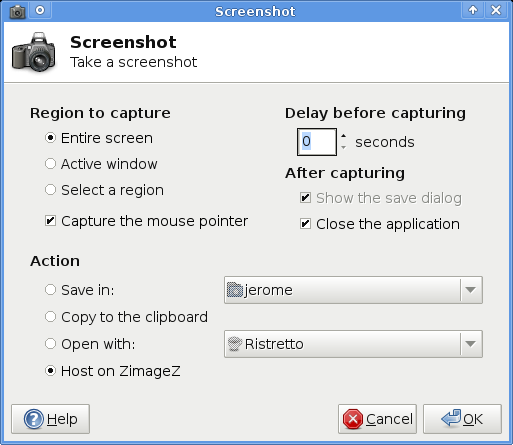
It is now possible to save screenshots on any remote share supported by GVFS: ftp, sftp, samba… You just need to connect to a share or a distant computer using Gigolo or gvfs-connect and it will be displayed in the sidebar of the save dialog.
This release also features the possibility to host screenshots online, on ZimageZ. You just need to set up an account on their website and you will then be able to upload your screenshots to ZimageZ directly from Xfce4 Screenshooter. This feature is still a bit experimental and will be improved in the next release: for example accents in the user name or password cause a fail during the upload…
There are also some other small changes which can be found in the changelog. I would like to thank Jannis Pohlmann (for his help concerning jobs and threads), Fabrice Viale (for his interface review), Mike Massonnet and Enrico Tröger (for their various patches) ,Yves-Alexis Perez and Ali Abdallah (for the testing and the suggestions). And last but not least, the translation team who did a great job by adding and updating a lot of translations of the application and of the documentation.
Benchmarks: gtk+ engines revisited
Six months ago I posted some benchmarks of popular gtk+ engines. It’s time to revisit those benchmarks and test the engines again, this time using FOSS drivers for my new hardware.
Today I installed my brand-spankin’ new graphics card, an ATI RadeonHD 4550, by Sapphire. Getting working 2D acceleration with EXA was a cinch, now that the 2.6.30 kernel is out. Doesn’t require anything special in terms of packages; nothing from overlays or bleeding-edge git checkouts. Only needs three ~arch packages: gentoo-sources, libdrm, and mesa.
For this updated round of testing, I used the same gtk+ engines, but also added some new ones. These can all be obtained by installing the following packages: gtk-engines, gnome-themes, gtk-engines-aurora, gtk-engines-candido, gtk-engines-rezlooks, and gtk-engines-xfce. New to the testing list are the Crux, ThinIce, HighContrast, and Redmond95 engines.
Once again, gtkperf-0.40 was used to obtain these benchmarks. With the exception of the graphics hardware and driver, the testing environment is mostly the same. Xfce has been updated to 4.6.1.
Let’s see how all these engines perform on my Xfce workstation, eh?
Notes on the hardware:
CPU: Athlon 64 X2 4600+
Graphics: ATI RadeonHD 4550, DVI 1440×900 @ 60Hz
RAM: 4GB DDR2-667
Mobo: ASUS M3N78-VM
Notes on the testing environment:
OS: Gentoo Linux (duh)
Kernel: Linux 2.6.30-gentoo-r1 #1 SMP PREEMPT x86_64
xf86-video-ati: 6.12.1-r1
CFLAGS: -march=athlon64-sse3 -O2 -fomit-frame-pointer
DE: Xfce 4.6.1
– Xfwm4 with Composite enabled, effects: drop shadows & transparency
– Open applications: 2 instances of x11-terms/terminal
Custom themes are noted with *. These are personal themes I’ve made, nothing more than simple color modifications of an existing freely available theme. No additional images are used, so rendering time should not be affected.
All tests were conducted 3 times, using a Test Round setting of 100. I picked the best score of the 3, as I was looking for best-case usage conditions. The results are ranked in order from fastest to slowest.
Engine: HighContrast
Theme: HighContrast
GtkEntry – time: 0.03
GtkComboBox – time: 0.63
GtkComboBoxEntry – time: 0.46
GtkSpinButton – time: 0.04
GtkProgressBar – time: 0.02
GtkToggleButton – time: 0.04
GtkCheckButton – time: 0.03
GtkRadioButton – time: 0.06
GtkTextView – Add text – time: 0.18
GtkTextView – Scroll – time: 0.08
GtkDrawingArea – Lines – time: 0.91
GtkDrawingArea – Circles – time: 1.21
GtkDrawingArea – Text – time: 0.89
GtkDrawingArea – Pixbufs – time: 0.11
—
Total time: 4.70
Engine: Rezlooks
Theme: Rezlooks Blue Ink*
GtkEntry – time: 0.05
GtkComboBox – time: 0.61
GtkComboBoxEntry – time: 0.41
GtkSpinButton – time: 0.05
GtkProgressBar – time: 0.03
GtkToggleButton – time: 0.06
GtkCheckButton – time: 0.04
GtkRadioButton – time: 0.11
GtkTextView – Add text – time: 0.18
GtkTextView – Scroll – time: 0.07
GtkDrawingArea – Lines – time: 0.94
GtkDrawingArea – Circles – time: 1.17
GtkDrawingArea – Text – time: 0.89
GtkDrawingArea – Pixbufs – time: 0.11
—
Total time: 4.72
Engine: Mist
Theme: Mist
GtkEntry – time: 0.03
GtkComboBox – time: 0.65
GtkComboBoxEntry – time: 0.45
GtkSpinButton – time: 0.06
GtkProgressBar – time: 0.03
GtkToggleButton – time: 0.05
GtkCheckButton – time: 0.04
GtkRadioButton – time: 0.10
GtkTextView – Add text – time: 0.18
GtkTextView – Scroll – time: 0.07
GtkDrawingArea – Lines – time: 0.87
GtkDrawingArea – Circles – time: 1.17
GtkDrawingArea – Text – time: 0.91
GtkDrawingArea – Pixbufs – time: 0.12
—
Total time: 4.72
Engine: ThinIce
Theme: ThinIce
GtkEntry – time: 0.03
GtkComboBox – time: 0.65
GtkComboBoxEntry – time: 0.42
GtkSpinButton – time: 0.07
GtkProgressBar – time: 0.03
GtkToggleButton – time: 0.05
GtkCheckButton – time: 0.03
GtkRadioButton – time: 0.07
GtkTextView – Add text – time: 0.19
GtkTextView – Scroll – time: 0.09
GtkDrawingArea – Lines – time: 0.91
GtkDrawingArea – Circles – time: 1.16
GtkDrawingArea – Text – time: 0.88
GtkDrawingArea – Pixbufs – time: 0.12
—
Total time: 4.72
Engine: Glide
Theme: Glider
GtkEntry – time: 0.06
GtkComboBox – time: 0.65
GtkComboBoxEntry – time: 0.49
GtkSpinButton – time: 0.08
GtkProgressBar – time: 0.03
GtkToggleButton – time: 0.05
GtkCheckButton – time: 0.05
GtkRadioButton – time: 0.14
GtkTextView – Add text – time: 0.20
GtkTextView – Scroll – time: 0.09
GtkDrawingArea – Lines – time: 0.85
GtkDrawingArea – Circles – time: 1.20
GtkDrawingArea – Text – time: 0.87
GtkDrawingArea – Pixbufs – time: 0.14
—
Total time: 4.90
Engine: Redmond95
Theme: Redmond
GtkEntry – time: 0.04
GtkComboBox – time: 0.76
GtkComboBoxEntry – time: 0.57
GtkSpinButton – time: 0.06
GtkProgressBar – time: 0.02
GtkToggleButton – time: 0.10
GtkCheckButton – time: 0.12
GtkRadioButton – time: 0.13
GtkTextView – Add text – time: 0.19
GtkTextView – Scroll – time: 0.08
GtkDrawingArea – Lines – time: 0.90
GtkDrawingArea – Circles – time: 1.17
GtkDrawingArea – Text – time: 0.90
GtkDrawingArea – Pixbufs – time: 0.12
—
Total time: 5.16
Engine: Clearlooks
Theme: Glossy
GtkEntry – time: 0.02
GtkComboBox – time: 0.77
GtkComboBoxEntry – time: 0.56
GtkSpinButton – time: 0.19
GtkProgressBar – time: 0.12
GtkToggleButton – time: 0.12
GtkCheckButton – time: 0.08
GtkRadioButton – time: 0.11
GtkTextView – Add text – time: 0.18
GtkTextView – Scroll – time: 0.10
GtkDrawingArea – Lines – time: 0.95
GtkDrawingArea – Circles – time: 1.17
GtkDrawingArea – Text – time: 0.91
GtkDrawingArea – Pixbufs – time: 0.12
—
Total time: 5.40
Engine: Crux
Theme: Crux
GtkEntry – time: 0.03
GtkComboBox – time: 0.89
GtkComboBoxEntry – time: 0.75
GtkSpinButton – time: 0.14
GtkProgressBar – time: 0.04
GtkToggleButton – time: 0.05
GtkCheckButton – time: 0.06
GtkRadioButton – time: 0.10
GtkTextView – Add text – time: 0.18
GtkTextView – Scroll – time: 0.12
GtkDrawingArea – Lines – time: 0.90
GtkDrawingArea – Circles – time: 1.16
GtkDrawingArea – Text – time: 0.90
GtkDrawingArea – Pixbufs – time: 0.13
—
Total time: 5.46
Engine: Industrial
Theme: Industrial
GtkEntry – time: 0.05
GtkComboBox – time: 1.13
GtkComboBoxEntry – time: 0.54
GtkSpinButton – time: 0.06
GtkProgressBar – time: 0.05
GtkToggleButton – time: 0.15
GtkCheckButton – time: 0.06
GtkRadioButton – time: 0.07
GtkTextView – Add text – time: 0.19
GtkTextView – Scroll – time: 0.15
GtkDrawingArea – Lines – time: 0.89
GtkDrawingArea – Circles – time: 1.16
GtkDrawingArea – Text – time: 0.91
GtkDrawingArea – Pixbufs – time: 0.12
—
Total time: 5.54
Engine: Aurora
Theme: Aurora
GtkEntry – time: 0.05
GtkComboBox – time: 1.10
GtkComboBoxEntry – time: 0.90
GtkSpinButton – time: 0.20
GtkProgressBar – time: 0.06
GtkToggleButton – time: 0.12
GtkCheckButton – time: 0.08
GtkRadioButton – time: 0.16
GtkTextView – Add text – time: 0.19
GtkTextView – Scroll – time: 0.13
GtkDrawingArea – Lines – time: 0.92
GtkDrawingArea – Circles – time: 1.17
GtkDrawingArea – Text – time: 0.89
GtkDrawingArea – Pixbufs – time: 0.12
—
Total time: 6.08
Engine: Pixmap
Theme: Elegant Autumn*
GtkEntry – time: 0.04
GtkComboBox – time: 1.00
GtkComboBoxEntry – time: 0.80
GtkSpinButton – time: 0.15
GtkProgressBar – time: 0.15
GtkToggleButton – time: 0.22
GtkCheckButton – time: 0.06
GtkRadioButton – time: 0.11
GtkTextView – Add text – time: 0.23
GtkTextView – Scroll – time: 0.23
GtkDrawingArea – Lines – time: 0.98
GtkDrawingArea – Circles – time: 1.17
GtkDrawingArea – Text – time: 0.92
GtkDrawingArea – Pixbufs – time: 0.13
—
Total time: 6.19
Engine: Candido
Theme: Graphite Light
GtkEntry – time: 0.05
GtkComboBox – time: 1.94
GtkComboBoxEntry – time: 1.36
GtkSpinButton – time: 0.08
GtkProgressBar – time: 0.17
GtkToggleButton – time: 0.22
GtkCheckButton – time: 0.07
GtkRadioButton – time: 0.09
GtkTextView – Add text – time: 0.22
GtkTextView – Scroll – time: 0.16
GtkDrawingArea – Lines – time: 0.89
GtkDrawingArea – Circles – time: 1.17
GtkDrawingArea – Text – time: 0.91
GtkDrawingArea – Pixbufs – time: 0.12
—
Total time: 7.45
Interesting. Six months (and one new graphics card and driver) later, there’s been a bit of a shuffle. All engines tested are clustered much closer together. There used to be a 12-second gap between the fastest and slowest engines. Now it’s only 3 seconds. Part of that disparity comes from new versions of the engines. Aurora in particular has made phenomenal improvements since 1.4; the numbers you see here are from version 1.5.1. It’s no longer at the back of the pack — last place now belongs to Candido, which is still rather slow, especially in the ComboBox tests.
Curiously, although the completion times are stacked very closely, there seemed to be a general slowdown. While the older gtk+ engines still turn in respectable times, they’re not always at the front of the pack. In particular, the Pixmap engine, which has historically had a speedy reputation, is now trailing most other engines. The theme used is extremely simple. I’m not sure what’s causing the slowdown here. Perhaps its reputation for speed is no longer deserved; even six months ago it wasn’t a standout.
There’s no longer an engine that can turn in 3-second completion times; in fact, the four fastest engines all tied at 4.7 seconds. Of the four, Rezlooks is without a doubt the prettiest. Many of the screenshots in my devspace feature Rezlooks themes.
Two of the engines added for this round of benchmarks, Crux and Redmond95, end up in the middle of the pack. They’re not particularly fast, nor are they pleasing to the eye. The other two newcomers, ThinIce and HighContrast, distinguish themselves by jumping to the very top of the charts. HighContrast is undoubtedly the ugliest engine presented here, while ThinIce’s appearance rather resembles Mist. It’s tolerable, but nothing I’d use, personally.
Once again, I’ll stick with Rezlooks-based themes, as well as the occasional standout Pixmap or Clearlooks theme such as ClearLUX. ClearLUX in particular is extremely easy on the eyes when doing late-night computer work.

But where are the Xfce engine results? Let’s take a look . . .
The Xfce engine results baffled me. The completion times varied wildly, everywhere from middle-of-the-road to flat-out fast to back-of-the-pack. So I intermittently benchmarked the Xfce engine for an hour, under varying degrees of desktop activity. Everything from lots of different applications open to a completely blank desktop. I couldn’t generate consistent results. So, I decided to close down all applications and run a final series of three tests. Presented here are the slowest and fastest times logged for this series.
Engine: Xfce
Theme: Xfce
Slowest times
GtkEntry – time: 0.06
GtkComboBox – time: 1.18
GtkComboBoxEntry – time: 0.50
GtkSpinButton – time: 0.08
GtkProgressBar – time: 0.07
GtkToggleButton – time: 0.08
GtkCheckButton – time: 0.03
GtkRadioButton – time: 0.06
GtkTextView – Add text – time: 0.20
GtkTextView – Scroll – time: 0.14
GtkDrawingArea – Lines – time: 0.90
GtkDrawingArea – Circles – time: 1.17
GtkDrawingArea – Text – time: 0.94
GtkDrawingArea – Pixbufs – time: 0.15
—
Total time: 5.56
Fastest times
GtkEntry – time: 0.02
GtkComboBox – time: 0.55
GtkComboBoxEntry – time: 0.43
GtkSpinButton – time: 0.06
GtkProgressBar – time: 0.06
GtkToggleButton – time: 0.06
GtkCheckButton – time: 0.03
GtkRadioButton – time: 0.04
GtkTextView – Add text – time: 0.18
GtkTextView – Scroll – time: 0.12
GtkDrawingArea – Lines – time: 0.86
GtkDrawingArea – Circles – time: 1.19
GtkDrawingArea – Text – time: 0.90
GtkDrawingArea – Pixbufs – time: 0.12
—
Total time: 4.63
Look at that. A completion time of 4.63 seconds, well ahead of any other engine. That’s best-case though; it can be almost as slow as the Aurora engine, which is notoriously heavy. The DrawingArea and TextView numbers are fairly static in both sets. Everything else tends to vary widely. No idea why. Perhaps the developers have made some changes under the hood between Xfce 4.4 and 4.6?
Recently in Xfce
This is just a short post with what happened recently in Xfce.
- Xfce4 Power Manager 0.8.0 was released. I did not have time yet to test it, but it looks promising.
- Jannis Pohlmann and Stephan Arts drafted a release process for Xfce. It still needs to be discussed, but it already looks great. Expect some progress on this once the migration to git is done.
- Brian Tarricone worked a lot on the git migration, things are almost settled.
- Jannis Pohlmann is making some awesome progress on Thunar. He developped Tumbler, a D-Bus thumbnailing service based on the thumbnail management D-Bus specification, to replace the old thumbnailing code. A video shows how his first experimental implementation behaves.
- Nick Schermer made a lot of progress on Xfce4 Panel, fixing and lot of bugs and improving performances. His code can be found on git.xfce.org.
- Stephan Arts has improved the git version of Ristretto a lot: it works, supports basic printing and features a new improved user interface.
- It seems that Colin Leroy will be the maintainer of Xfce4 Weather Plugin from now on. Welcome!
- Mike Massonnet rewrote Xfce4 Notes Plugin in Vala, and improved and lot of things at the same time. Expect a release soon.
- Ali Abdallah, the developper of Xfce4 Power Manager, added a new Goodie to the SVN. Parole is a Gstreamer based media player. I did not test it, so I cannot say more…