Xfce Settings 4.12.4 and 4.13.4 Released
The latest developments in Xfce Settings continue to make their way to both the stable and development releases. Both 4.12.4 and 4.13.4 include a number of improvements, and 4.13.4 is steadily marching toward the 4.14 future.
What’s New?
Bug Fixes (4.12 and 4.13)
xfsettingsd --replacedoes not replace old daemon (Xfce #14381)- Uninitialized scalar variables (CID #292062, #292063)
- Resolved warnings for
-Wcast-function-type(GCC 8) - Fixed redefinition of DISTCLEANFILES in Makefile.am
- Fixed typo in display manufacturers, “PRECISON” to “PRECISION”
Improved Display Manufacturer Recognition (4.12 and 4.13)
- Refreshed PNP IDs from hwdata
- Added support for VBX (VirtualBox)
- Standardized and shortened manufacturer names
- Updated laptop detection to include eDP in XfceRandr
Xfce 4.14 Progress (4.13 Only)
- Xfce Settings has been ported from D-Bus GLib to GDBus as of 4.13.3
- D-Bus GLib was deprecated in favor of GDBus with GLib 2.26
XRandr Display Scaling (4.13 Only)
- This new feature is equivalent to
xrandr --scaleand is used to scale the entire display area - The scale values are stored in Xfconf under
/Default/<NAME>/Scale/{X,Y} - For now, this setting can only be configured via Xfconf. If you’d like to submit a patch to add it to the GUI, we’d love to have it!

Translation Updates
Belarusian, Catalan, English (Australia), Galician, Greek, Hebrew, Hungarian, Japanese, Kazakh, Korean, Portuguese, Portuguese (Brazil), Russian, Spanish, Swedish, Ukrainian
Downloads
XFCE SETTINGS 4.12.4
Source tarball (md5, sha1, sha256)
XFCE SETTINGS 4.13.4
Source tarball (md5, sha1, sha256)
Exo 0.12.1 (and 0.12.2) Released
Xfce application developers rejoice! A new version of the Exo support library is now available. With performance improvements and full support for GCC 8, both users and developers should be excited for this news.
What’s New?
Bug Fixes
- Use the “user-bookmarks” icon instead of “bookmark-new” (Xfce #14243)
- Properly scale application icons in Preferred Applications dialog (Xfce #14362)
- Remove pure attribute of function that returns void (Xfce #14427)
Missing varargs init or cleanup (CID #30799)- Reverted in 0.12.2 to get rid of some unwelcome segmentation faults (Xfce #14465)
- Uninitialized scalar variable (CID #127777)
Exo Icon Chooser Dialog
- Dropped deprecated International icon context, added Stock icon context
- Increased context title max length to support long translations
- Symbolic icons are no longer populated in the icon chooser dialog, which could lead to significant performance gains with various icon themes
- Added a new test to the test suite for the GTK 3 version of this dialog
Helpers
- Added PCManFM-Qt (from LXQt) to supported file managers (Xfce #14333)
Compiler Support
- Disabled
-Wexpansion-to-definedand resolve various compiler warnings for GCC 7 - Fixed
-Wcast-function-typefor GCC 8
Translation Updates
Albanian, Amharic, Belarusian, Bulgarian, Catalan, Chinese (China), Chinese (Taiwan), Czech, Danish, Dutch, English (Australia), Finnish, French, Galician, Greek, Hebrew, Hungarian, Italian, Polish, Portuguese, Russian, Slovak, Swedish, Turkish
Downloads
Source tarball (md5, sha1, sha256)
Xfce Settings 4.12.4 & 4.13.4 Released
The latest developments in Xfce Settings continue to make their way to the stable and development releases. Xfce Settings 4.12.4 and 4.13.4 include several improvements, and 4.13.4 is steadily marching toward the 4.14 future.
What’s New?
Bug Fixes (4.12 and 4.13)
xfsettingsd --replacedoes not replace old daemon (Xfce #14381)- Uninitialized scalar variables (CID #292062, #292063)
- Resolved warnings for
-Wcast-function-type(GCC 8) - Fixed redefinition of DISTCLEANFILES in Makefile.am
- Fixed typo in display manufacturers, “PRECISON” to “PRECISION”
Improved Display Manufacturer Recognition (4.12 and 4.13)
- Refreshed PNP IDs from hwdata
- Added support for VBX (VirtualBox)
- Standardized and shortened manufacturer names
- Updated laptop detection to include eDP in XfceRandr
Xfce 4.14 Progress (4.13 Only)
- Xfce Settings has been ported from D-Bus GLib to GDBus as of 4.13.3
- D-Bus GLib was deprecated in favor of GDBus with GLib 2.26
XRandr Display Scaling (4.13 Only)
- This new feature is equivalent to
xrandr --scaleand is used to scale the entire display area - The scale values are stored in Xfconf under
/Default/<NAME>/Scale/{X,Y} - For now, this setting can only be configured via Xfconf. If you’d like to submit a patch to add it to the GUI, we’d love to have it! 😉
Translation Updates
Belarusian, Catalan, English (Australia), Galician, Greek, Hebrew, Hungarian, Japanese, Kazakh, Korean, Portuguese, Portuguese (Brazil), Russian, Spanish, Swedish, Ukrainian
Downloads
Xfce Settings 4.12.4
Source tarball ( md5, sha1, sha256)
Xfce Settings 4.13.4
Source tarball ( md5, sha1, sha256)
Exo 0.12.2 Released
Xfce application developers rejoice! Exo 0.12.2, the latest version of the application support library, is now available. With performance improvements and full support for GCC 8, users and developers should be excited about this news.
What’s New?
Bug Fixes
- Use the “user-bookmarks” icon instead of “bookmark-new” (Xfce #14243)
- Properly scale application icons in the Preferred Applications dialog (Xfce #14362)
- Remove pure attribute of function that returns void (Xfce #14427)
- Uninitialized scalar variable (CID #127777)
Exo Icon Chooser Dialog
- Dropped deprecated International icon context, added Stock icon context
- Increased context title max length to support long translations
- Symbolic icons are no longer populated in the icon chooser dialog, which could lead to significant performance gains with various icon themes
- Added a new test to the test suite for the GTK 3 version of this dialog
Helpers
- Added PCManFM-Qt (from LXQt) to supported file managers (Xfce #14333)
Compiler Support
- Disabled
-Wexpansion-to-definedand resolve various compiler warnings for GCC 7 - Fixed
-Wcast-function-typefor GCC 8
Translation Updates
Albanian, Amharic, Belarusian, Bulgarian, Catalan, Chinese (China), Chinese (Taiwan), Czech, Danish, Dutch, English (Australia), Finnish, French, Galician, Greek, Hebrew, Hungarian, Italian, Polish, Portuguese, Russian, Slovak, Swedish, Turkish
Downloads
Exo 0.12.2 is available to download from the link below.
Source tarball ( md5, sha1, sha256)
Thunar 1.8.0 Release
Good news fellow Xfce users, we proudly present a new Thunar release, our beloved easy-to-use and fast file manager!
The main highlight in this release is that Thunar, as all Xfce components, is saying goodbye to Gtk+ 2 and is now Gtk+ 3 based. Other than that, our team has addressed several critical bugs that compromised Thunar’s stability. Most of those fixes were backported to 1.6.x series and we hope our users do not experience crashes anymore.
By the way, by “our team” I mean Alexander Schwinn and myself, as well as all other developers which contributed to the project, specifically Jonas Kümmerlin, without his work we wouldn’t get here.
We picked up where Jonas left off, his initial port saved us a lot of work, with few adjustments we got Thunar to run under Gtk+ 3. But so we discovered this was no easy job, let’s just say Gtk+ migration path was far from a smooth experience. Besides fixing bugs and regressions, new features were introduced. Not to mention the wonderful work done by translators in promptly updating translations.
What Thunar 1.8.0 has to offer?
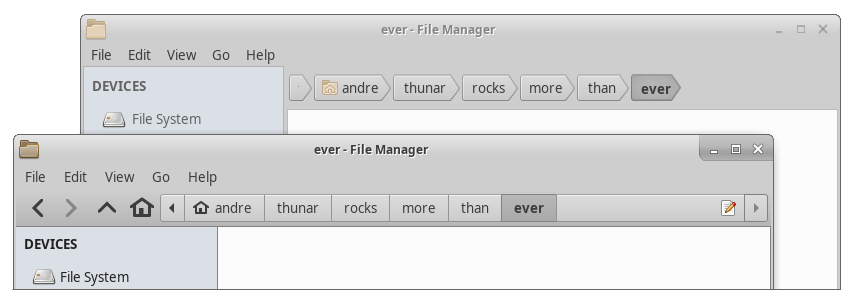
- A completely revised pathbar
- Buttons next/previous/up/home added
- Click on the right filler opens path as editable string
- Here’s a comparison between the old pathbar and the new one
- GObject Introspection support for thunarx
- It paves the way to new language bindings
- Thunarx-python has already been updated
- Minor improvements:
- Show file size as well in bytes
- Add systemd user unit for D-Bus session services
- Make it possible to assign accelerators to custom actions
- Enable Thunar UCA (User Configurable Actions) for remote locations
- Refreshed tray icons for file transfer
- Improved various styling details
While moving to Gtk+ 3 it was necessary to replace parts of the Thunar Plugin API (thunarx). It means that to update to Thunar 1.8.0 one should also update all installed thunar-plugins and xfdesktop to their latest versions, see the compability matrix for more details.
A complete list of added features, bug fixes and translation changes can be found in the NEWS file.
That’s it, we hope you enjoy the new Thunar.
Thunar 1.8.0 Release
Good news fellow Xfce users, we proudly present a new Thunar release, our beloved easy-to-use and fast file manager!
The main highlight in this release is that Thunar, as all Xfce components, is saying goodbye to Gtk+ 2 and is now Gtk+ 3 based. Other than that, our team has addressed several critical bugs that compromised Thunar’s stability. Most of those fixes were backported to 1.6.x series and we hope our users do not experience crashes anymore.
By the way, by “our team” I mean Alexander Schwinn and myself, as well as all other developers which contributed to the project, specifically Jonas Kümmerlin, without his work we wouldn’t get here.
We picked up where Jonas left off, his initial port saved us a lot of work, with few adjustments we got Thunar to run under Gtk+ 3. But so we discovered this was no easy job, let’s just say Gtk+ migration path was far from a smooth experience. Besides fixing bugs and regressions, new features were introduced. Not to mention the wonderful work done by translators in promptly updating translations.
What Thunar 1.8.0 has to offer?
- A completely revised pathbar
- Buttons next/previous/up/home added
- Click on the right filler opens path as editable string
- Here’s a comparison between the old pathbar and the new one
- GObject Introspection support for thunarx
- It paves the way to new language bindings
- Thunarx-python has already been updated
- Minor improvements:
- Show file size as well in bytes
- Add systemd user unit for D-Bus session services
- Make it possible to assign accelerators to custom actions
- Enable Thunar UCA (User Configurable Actions) for remote locations
- Refreshed tray icons for file transfer
- Improved various styling details
While moving to Gtk+ 3 it was necessary to replace parts of the Thunar Plugin API (thunarx). It means that to update to Thunar 1.8.0 one should also update all installed thunar-plugins and xfdesktop to their latest versions, see the compability matrix for more details.
A complete list of added features, bug fixes and translation changes can be found in the NEWS file.
That’s it, we hope you enjoy the new Thunar.
Xfce PulseAudio Plugin 0.4.0 (and 0.4.1) Released
Stable as a rock. Xfce PulseAudio Plugin hit a new stable milestone with the 0.4.0 release. This release wraps up the awesome development cycle we’ve had on this over the last few months and is recommended for all users.
What’s New?
Since 0.2.5, the previous stable release.
Device Management
- Added support for audio input devices
- Added support for the XF86AudioMicMute key
- Added ability to switch active audio devices and streams
- Simplified audio volume controls
MPRIS2 Integration
- New optional MPRIS2 support (play/pause, raise, track switching, playlists)
- Added multimedia keyboard support, keys control the active media player and add keyboard support for any MPRIS2-enabled player
- Experimental libwnck support adds support for raising windows that do not otherwise support it (Spotify included)
- Players can be selectively hidden from the menu in the preferences dialog
General
- Significant code cleanup, dropping unused IDO support and simplifying widgets
- Improved memory management with numerous memory leaks patched
Translation Updates
Bulgarian, Catalan, Chinese (China), Chinese (Taiwan), Croatian, Czech, Danish, Dutch, English (Australia), French, Galician, German, Greek, Hebrew, Hungarian, Icelandic, Indonesian, Irish, Italian, Japanese, Kazakh, Korean, Lithuanian, Malay, Norwegian Bokmal, Norwegian Bokmål, Occitan (post 1500), Polish, Portuguese, Portuguese (Brazil), Russian, Serbian, Slovak, Slovenian, Spanish, Swedish, Thai, Turkish, Ukrainian
Downloads
Source tarball (md5, sha1, sha256)
Available on Debian Testing and Ubuntu 18.04 “Bionic Beaver”. Included in Xubuntu 18.04.
Xfce Settings 4.12.3 / 4.13.2 Released
Fixes galore! Xfce Settings 4.12.3 and 4.13.2 were released on March 18th with several improvements, feature parity, and translations.
What’s New?
Both 4.12.3 and 4.13.2: Improvements for Multi-monitor Support
- Visualize all three display configuration states
- Visually note if two displays overlap (mirrored) but are not cloned
- Always draw active display last so it’s on top
- Fix: Correctly position monitors in extended mode
- Fix: Race condition with monitor connect and disconnect
- Fix: Segfault on monitor reconnect
Xfce Settings 4.13.2
- New: Show location of the mouse pointer on keypress (Introduced in 4.12.2)
- Fix: syncdaemon not starting with certain locales
- Fix: division by 0 crash from gdk_screen_height_mm()
- Fix: Remove existing socket from socket viewport (Xfce #13847)
- Fix: Use transient notifications for improved logging
- Fix: Do not expand event sounds section so font scaling is correctly
positioned - Resolved GTK+ 3.22 deprecations (Xfce #14273)
Translation Updates
Amharic, Arabic, Asturian, Basque, Belarusian, Bengali, Bulgarian, Catalan, Chinese (China), Chinese (Hong Kong), Chinese (Taiwan), Croatian, Czech, Danish, Dutch, English (Australia), English (United Kingdom), Finnish, French, Galician, German, Greek, Hebrew, Hungarian, Icelandic, Indonesian, Italian, Japanese, Kazakh, Korean, Lithuanian, Malay, Norwegian Bokmål, Norwegian Nynorsk, Occitan (post 1500), Polish, Portuguese, Portuguese (Brazil), Romanian, Russian, Serbian, Slovak, Slovenian, Spanish, Swedish, Thai, Turkish, Uighur, Ukrainian
Downloads
Xfce Settings 4.12.3
Source tarball (md5, sha1, sha256)
Available in Debian Unstable and Ubuntu 18.04 “Bionic Beaver”. Included in Xubuntu 18.04.
Xfce Settings 4.13.2
Source tarball (md5, sha1, sha256)
Available in the Xubuntu QA Experimental PPA
Xfce PulseAudio Plugin 0.4.1 Released
Solid as a rock. Xfce PulseAudio Plugin 0.4.1 is a new stable milestone. This release wraps up the awesome development cycle we’ve had on it over the last few months and is recommended for all users.
What’s New?
Since 0.2.5, the previous stable release.
Device Management
- Added support for audio input devices
- Added support for the XF86AudioMicMute key
- Added ability to switch active audio devices and streams
- Simplified audio volume controls
MPRIS2 Integration
- New optional MPRIS2 support (play/pause, raise, track switching, playlists)
- Added multimedia keyboard support for any MPRIS2-enabled player
- Experimental libwnck support adds support for raising windows that do not otherwise support it (Spotify included)
- Players can be selectively hidden from the menu in the preferences dialog
General
- Significant code cleanup, dropping unused IDO support and simplifying widgets
- Improved memory management with numerous memory leaks patched
Translation Updates
Bulgarian, Catalan, Chinese (China), Chinese (Taiwan), Croatian, Czech, Danish, Dutch, English (Australia), French, Galician, German, Greek, Hebrew, Hungarian, Icelandic, Indonesian, Irish, Italian, Japanese, Kazakh, Korean, Lithuanian, Malay, Norwegian Bokmal, Norwegian Bokmål, Occitan (post 1500), Polish, Portuguese, Portuguese (Brazil), Russian, Serbian, Slovak, Slovenian, Spanish, Swedish, Thai, Turkish, Ukrainian
Downloads
Source tarball ( md5, sha1, sha256)
Available on Debian Testing and Ubuntu 18.04 “Bionic Beaver”. Included in Xubuntu 18.04.
Xfce Settings 4.12.3 & 4.13.2 Released
Fixes galore! Xfce Settings 4.12.3 and 4.13.2 were released on March 18th with several improvements, feature parity, and translations.
What’s New?
Both 4.12.3 and 4.13.2: Improvements for Multi-monitor Support
- Visualize all three display configuration states
- Visually note if two displays overlap (mirrored) but are not cloned
- Always draw the active display last so it’s on top
- Fix: Correctly position monitors in extended mode
- Fix: Race condition with monitor connect and disconnect
- Fix: Segfault on monitor reconnect
Xfce Settings 4.13.2
- New: Show the location of the mouse pointer on keypress (Introduced in 4.12.2)
- Fix: syncdaemon not starting with certain locales
- Fix: division by 0 crash from gdk_screen_height_mm()
- Fix: Remove existing socket from socket viewport (Xfce #13847)
- Fix: Use transient notifications for improved logging
- Fix: Do not expand the event sounds section so font scaling is correctly positioned
- Resolved GTK+ 3.22 deprecations (Xfce #14273)
Translation Updates
Amharic, Arabic, Asturian, Basque, Belarusian, Bengali, Bulgarian, Catalan, Chinese (China), Chinese (Hong Kong), Chinese (Taiwan), Croatian, Czech, Danish, Dutch, English (Australia), English (United Kingdom), Finnish, French, Galician, German, Greek, Hebrew, Hungarian, Icelandic, Indonesian, Italian, Japanese, Kazakh, Korean, Lithuanian, Malay, Norwegian Bokmål, Norwegian Nynorsk, Occitan (post 1500), Polish, Portuguese, Portuguese (Brazil), Romanian, Russian, Serbian, Slovak, Slovenian, Spanish, Swedish, Thai, Turkish, Uighur, Ukrainian
Downloads
Xfce Settings 4.12.3
Source tarball ( md5, sha1, sha256)
Available in Debian Unstable and Ubuntu 18.04 “Bionic Beaver”. Included in Xubuntu 18.04.
Xfce Settings 4.13.2
Source tarball ( md5, sha1, sha256)
Available in the Xubuntu QA Experimental PPA