Xubuntu 17.10 “Artful Aardvark” Released
It’s another great Ubuntu release day, with fresh versions of Ubuntu, Kubuntu, Lubuntu, Ubuntu Budgie, Ubuntu Kylin, Ubuntu MATE, Ubuntu Studio, and my personal favorite: Xubuntu.
This has been a comparatively quiet development cycle for Xubuntu. With increased development on Xfce as we prepare for Xfce 4.14, less Xubuntu-specific changes took place this cycle. Thankfully, there are still plenty of goodies to get excited about.
- Appearance Updates: Greybird‘s client side decorations (CSD) have been refreshed and now consume much less space. elementary-xfce, our preferred icon theme, has been updated and includes new device, mimetype, and panel icons. And we have a fancy new wallpaper.
- Application Updates: This is the first release of Xubuntu to feature GNOME Font Viewer, a handy tool for font management. LibreOffice, Firefox, and Thunderbird have been updated to their latest versions (5.4, 56, and 52.4 respectively). On the Xfce side, Dictionary, Genmon Plugin, Mount Plugin, Exo, and Tumbler have been updated to take advantage of the latest GTK+ version and continue the march toward Xfce 4.14.
- Technical Updates: GTK+ 3.26, Python 3.6, and Linux 4.13 are all included. Thanks to the Ubuntu Desktop team, hardware accelerated video, improved bluetooth audio, and driverless printing round out a solid development cycle.

Screenshots


Download
Download Xubuntu 17.10 from Xubuntu.org. It’s available in both 32-bit and 64-bit varieties.
What’s Next?
After the release festivities calm down, work will begin on Xubuntu 18.04, our next LTS release. These are always our most active cycles as we polish the work that we’ve been doing the past 18 months and prepare for a 3-year support window. A few things we already have planned…
- Replacing the Sound Indicator with the Xfce PulseAudio Plugin, a very capable replacement with more features landing soon.
- Replacing the Xfce Indicator Plugin with the Xfce StatusNotifier Plugin, a fully compatible and better maintained plugin with a few new tricks.
- Another wallpaper contest to showcase the community’s artful taste.
- And plenty more as we begin the blueprint process!
In Case You Missed It
- I had a nice chat with Igor at Dedoimedo about Xfce and Xubuntu.
- Simon just published a significant xfce4-notifyd release.
- Pasi refreshed the Xfce Bugzilla, and it’s so much better.
New hotness: xfce4-notifyd 0.4.0
After quite some development time I have decided to push out xfce4-notifyd 0.4.0 today. This is not just a bugfix, but a feature-packed release.
Panel plugin
Among the biggest changes there is a panel plugin which displays the most recent notifications as well as allowing for quick access to the do-not-disturb mode. It also serves as a status indicator for the do-not-disturb mode, so you can easily see whether notifications are shown or hidden overall.

Improved logging
I’ve also spent some time on improving the notification image handling in the log. While handling icon-names is easy (just save them as string) handling the pixbufs was a little more challenging. I decided to do it the Git way and deduplicate these pixbufs based on their (unique) hashes, so that each picture would only be saved once. All of those pictures end up in a sub-directory of the log (which by default is ~/.cache/xfce4/notifyd/icons). Currently there is no monitoring of how much space these images consume and no button to clear them away, maybe I’ll add that later if people feel it would be useful/necessary. After using this feature for several months I have accumulated less than 7MB.
The log also received some more love in terms of markup support and character escaping. Multi-line notifications should now be correctly logged.
New animation: slide-out
Just for the fun of it I also worked out a new animation optional addon to the standard fade-out. I called it slide-out and it’s a fairly wide-spread animation mix of fade-out and sliding the bubble (depending on its location on the screen of course) off-screen.
New logo

As this turned out to be a bigger release I went for a bigger version jump and also included the new logo I had been working on for a while. I evaluated several “notification” metaphors and went for the ‘ol bell (notification bubbles felt a little odd and not easy to depict, as they look usually very diverse).
Bugfixes
Some people may be happy to know that I dropped the feature that let xfce4-notifyd exit after 10 minutes of inactivity. I can only guess but I presume this was implemented to save resources. Nowadays it feels more annoying if a daemon has to be restarted and the first notification that’s that split-second longer to appear.
A few more tweaks have been done to the geometry of the notification bubble windows to not take more space than needed and distribute things evenly (no more strange margins) and the configuration dialog now shows a warning if xfce4-notifyd is not detected as running.
Download
As always, you can download and build/install the tarball or wait for your favorite distribution to package and ship it to you.
https://git.xfce.org/apps/xfce4-notifyd/snapshot/xfce4-notifyd-0.4.0.tar.bz2
Development Release: Xfce PulseAudio Plugin 0.3.1
A new release, some handy new features! But, I’ve never posted about this plugin before, so we’ll start with a proper introduction.
Xfce PulseAudio Panel Plugin
This is a plugin for the Xfce panel that allows the user to easily adjust the audio volume of the PulseAudio sound system. As of the 0.3.0 release, this plugin was extended with support for controlling multimedia players via the MPRIS DBUS interface. And with this latest release, users can now easily toggle the default audio input and output devices.
Features
- Control device volume, from 0% to 100% and beyond
- Instantly mute volumes by middle-clicking the plugin or clicking the mute toggle
- Launch the configured audio mixer
- Open, raise, or control playback from known media players (since 0.3.0)
- Select default input and output devices (since 0.3.1)
Screenshots


Downloads
The latest version of Xfce PulseAudio Plugin can always be downloaded from the Xfce archives. Grab version 0.3.1 from the below link.
- SHA-256: 61a39f892e5e06723a08f919682362ebaf54792ed1076f5be828d0209a52f482
- SHA-1: 6db0e12f5f171bd57b1330c7996d503aca7a4883
- MD5: ab2a12283555db063db3abea26b3237e
Xfce PulseAudio Plugin 0.3.1 Released
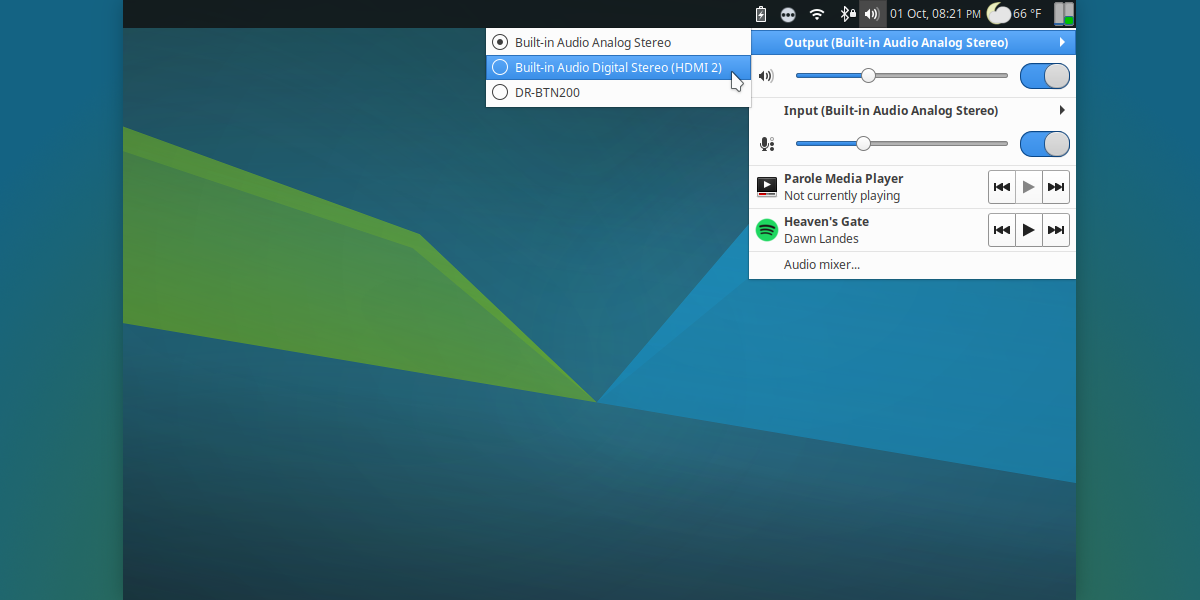
Xfce PulseAudio Plugin 0.3.1 has been released with some handy new features! But I’ve never posted about this plugin before, so we’ll start with a proper introduction.
Xfce PulseAudio Panel Plugin
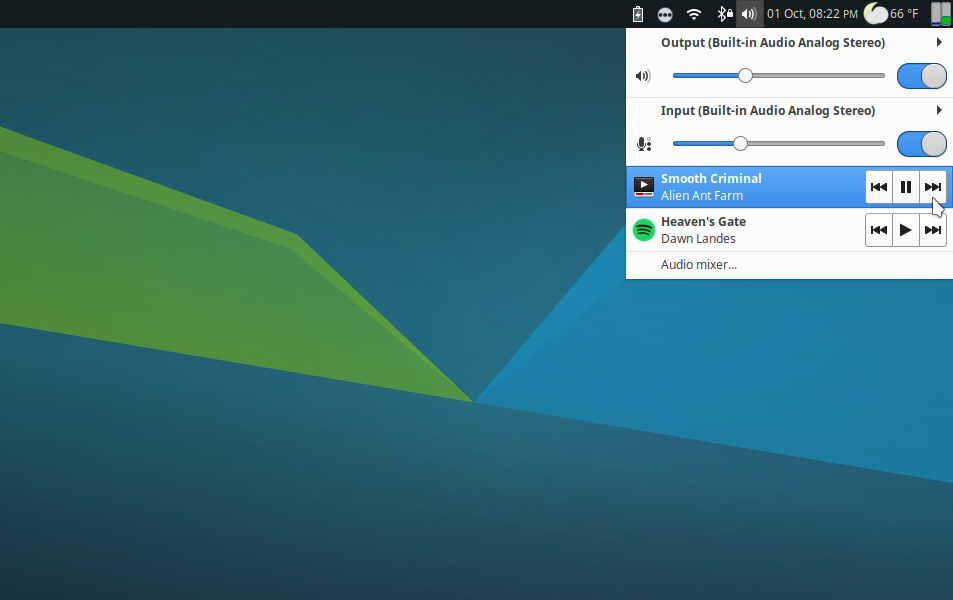
This plugin for the Xfce panel allows the user to adjust the audio volume of the PulseAudio sound system easily. As of the 0.3.0 release, this plugin was extended with support for controlling multimedia players via the MPRIS DBUS interface. This latest release lets users toggle the default audio input and output devices.
Features
- Control device volume from 0% to 100% and beyond
- Instantly mute volumes by middle-clicking the plugin or clicking the mute toggle
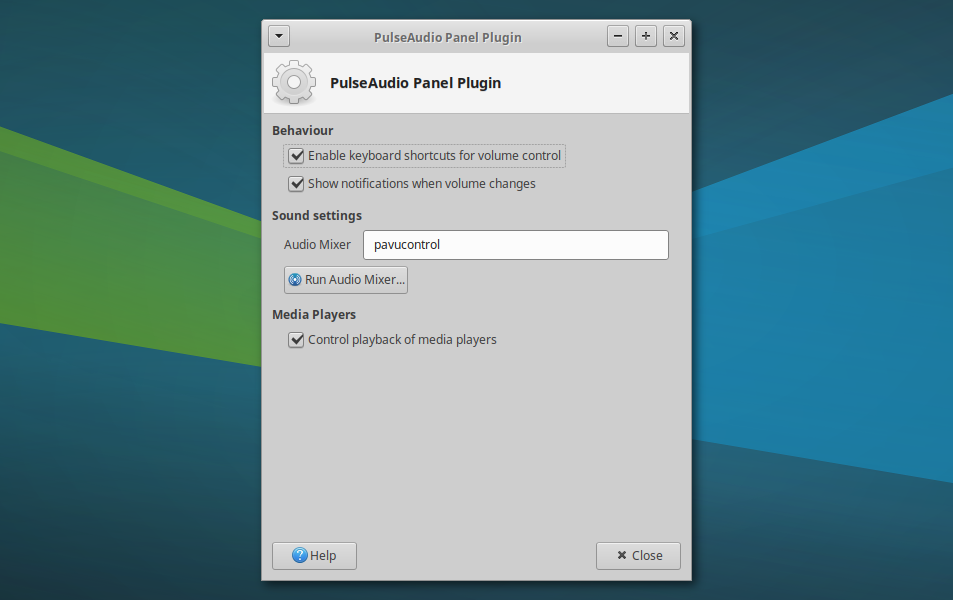
- Launch the configured audio mixer
- Open, raise, or control playback from known media players (since 0.3.0)
- Select default input and output devices (since 0.3.1)
Screenshots
Downloads
The latest version of the Xfce PulseAudio Plugin can always be downloaded from the Xfce archives. Grab version 0.3.1 from the link below.
- SHA-256: 61a39f892e5e06723a08f919682362ebaf54792ed1076f5be828d0209a52f482
- SHA-1: 6db0e12f5f171bd57b1330c7996d503aca7a4883
- MD5: ab2a12283555db063db3abea26b3237e
Development Release: Exo 0.11.4
After quite some time, the first release candidate for the Exo 0.12.x series is ready for some serious testing!
What’s New in Exo 0.11.4?
This release completes the GTK+ 3 port and can now be used for GTK+ 2 or 3 Xfce application development.
New Features
- GTK Extensions:
- GTK+ 3: Added support for the “insensitive” state in
exo_cell_renderer_icon - Helpers:
- WebBrower: Added Brave, Google Chrome, and Vivaldi
- MailReader: Added Geary, dropped Opera Mail (no longer available for Linux)
Bug Fixes
- Removed
--disable-debugflag frommake distcheck(Xfce #11556)
Icons
- Replaced non-standard gnome-* icons
- Replaced non-existent “missing-image” icon
Deprecations
- Dropped
gdk_window_process_updatesfor GTK+ 3.22 - Replaced
gdk_pixbuf_new_from_inlineusage - Replaced
gdk_screen_*usage - Replaced
gtk_style_context_get_background_colorusage - Removed warnings for
gtk_dialog_get_action_areaandGioScheduler
Translation Updates
Arabic, Catalan, Chinese (China), Danish, Dutch, French, German, Hebrew, Indonesian, Korean, Lithuanian, Portuguese (Brazil), Russian, Spanish, Swedish
Downloads
The latest version of Exo can always be downloaded from the Xfce archives. Grab version 0.11.4 from the below link.
http://archive.xfce.org/src/xfce/exo/0.11/exo-0.11.4.tar.bz2
- SHA-256: 54fc6d26eff4ca0525aed8484af822ac561cd26adad4a2a13a282b2d9f349d84
- SHA-1: 49e0fdf6899eea7aa1050055c7fe2dcddd0d1d7a
- MD5: 7ad88a19ccb4599fd46b53b04325552c
Exo 0.11.4 Released
What’s New in Exo 0.11.4?
The release of Exo 0.11.4 completes the GTK 3 port and can now be used for GTK 2 or 3 Xfce application development.
New Features
GTK Extensions
- Added
exo_gtk_dialog_get_action_area - Added
exo_gtk_dialog_add_secondary_button - GTK+ 3: Added support for the “insensitive” state in
exo_cell_renderer_icon
Helpers
- WebBrower: Added Brave, Google Chrome, and Vivaldi
- MailReader: Added Geary, dropped Opera Mail (no longer available for Linux)
Bug Fixes
- Removed
--disable-debugflag frommake distcheck(Xfce #11556)
Icons
- Replaced non-standard gnome-* icons
- Replaced non-existent “missing-image” icon
Deprecations
- Dropped
gdk_window_process_updatesfor GTK+ 3.22 - Replaced
gdk_pixbuf_new_from_inlineusage - Replaced
gdk_screen_*usage - Replaced
gtk_style_context_get_background_colorusage - Removed warnings for
gtk_dialog_get_action_areaandGioScheduler
Translation Updates
Arabic, Catalan, Chinese (China), Danish, Dutch, French, German, Hebrew, Indonesian, Korean, Lithuanian, Portuguese (Brazil), Russian, Spanish, Swedish
Downloads
The latest version of Exo can always be downloaded from the Xfce archives. Grab version 0.11.4 from the below link.
- SHA-256: 54fc6d26eff4ca0525aed8484af822ac561cd26adad4a2a13a282b2d9f349d84
- SHA-1: 49e0fdf6899eea7aa1050055c7fe2dcddd0d1d7a
- MD5: 7ad88a19ccb4599fd46b53b04325552c
Development Release: Xfce Settings 4.13.1
The second release of the GTK+ 3 powered Xfce Settings is now ready for testing (and possibly general use). Check it out!
What’s New?
This release now requires xfconf 4.13+.
New Features
- Appearance Settings: New configuration option for default monospace font
- Display Settings: Improved support for embedded DisplayPort connectors
Bug Fixes
- Display Settings: Fixed drawing of displays, was hit and miss before, now its guaranteed
- Display Settings: Fixed drag-n-drop functionality, the grab area occupied the space below the drawn displays
- Display Settings (Minimal): The mini dialog now runs as a single instance, which should help with some display drivers (Xfce #11169)
- Fixed linking to dbus-glib with xfconf 4.13+ (Xfce #13633)
Deprecations
- Resolved
gtk_menu_popupandgdk_error_trap_popdeprecations - Ignoring
GdkScreenandGdkCairodeprecations for now. Xfce shares this code with GNOME and Mate, and they have not found a resolution yet.
Code Quality
- Several indentation fixes
- Dropped duplicate drawing code, elimination another deprecation in the process
Translation Updates
Arabic, Bulgarian, Catalan, Chinese (China), Chinese (Taiwan), Croatian, Danish, Dutch, Finnish, French, Galician, German, Greek, Hebrew, Indonesian, Italian, Japanese, Kazakh, Korean, Lithuanian, Malay, Norwegian Bokmal, Norwegian Nynorsk, Occitan, Portuguese, Portuguese (Brazil), Russian, Serbian, Slovak, Spanish, Swedish, Thai, Ukrainian
Downloads
The latest version of Xfce Settings can always be downloaded from the Xfce archives. Grab version 4.13.1 from the below link.
http://archive.xfce.org/src/xfce/xfce4-settings/4.13/xfce4-settings-4.13.1.tar.bz2
- SHA-256: 01b9e9df6801564b28f3609afee1628228cc24c0939555f60399e9675d183f7e
- SHA-1: 9ffdf3b7f6fad24f4efd1993781933a2a18a6922
- MD5: 300d317dd2bcbb0deece1e1943cac368
Development Release: Xfce Settings 4.13.1
The second release of the GTK+ 3 powered Xfce Settings is now ready for testing (and possibly general use). Check it out!
What’s New?
This release now requires xfconf 4.13+.
New Features
- Appearance Settings: New configuration option for default monospace font
- Display Settings: Improved support for embedded DisplayPort connectors
Bug Fixes
- Display Settings: Fixed drawing of displays, was hit and miss before, now its guaranteed
- Display Settings: Fixed drag-n-drop functionality, the grab area occupied the space below the drawn displays
- Display Settings (Minimal): The mini dialog now runs as a single instance, which should help with some display drivers (Xfce #11169)
- Fixed linking to dbus-glib with xfconf 4.13+ (Xfce #13633)
Deprecations
- Resolved
gtk_menu_popupandgdk_error_trap_popdeprecations - Ignoring
GdkScreenandGdkCairodeprecations for now. Xfce shares this code with GNOME and Mate, and they have not found a resolution yet.
Code Quality
- Several indentation fixes
- Dropped duplicate drawing code, elimination another deprecation in the process
Translation Updates
Arabic, Bulgarian, Catalan, Chinese (China), Chinese (Taiwan), Croatian, Danish, Dutch, Finnish, French, Galician, German, Greek, Hebrew, Indonesian, Italian, Japanese, Kazakh, Korean, Lithuanian, Malay, Norwegian Bokmal, Norwegian Nynorsk, Occitan, Portuguese, Portuguese (Brazil), Russian, Serbian, Slovak, Spanish, Swedish, Thai, Ukrainian
Downloads
The latest version of Xfce Settings can always be downloaded from the Xfce archives. Grab version 4.13.1 from the below link.
http://archive.xfce.org/src/xfce/xfce4-settings/4.13/xfce4-settings-4.13.1.tar.bz2
- SHA-256: 01b9e9df6801564b28f3609afee1628228cc24c0939555f60399e9675d183f7e
- SHA-1: 9ffdf3b7f6fad24f4efd1993781933a2a18a6922
- MD5: 300d317dd2bcbb0deece1e1943cac368
Xfce Settings 4.13.1 Released
Xfce Settings 4.13.1, The second release of the GTK 3 porting effort, is now ready for testing (and possibly general use). Check it out!
What’s New?
This release now requires Xfconf 4.13+.
New Features
- Appearance Settings: New configuration option for default monospace font
- Display Settings: Improved support for embedded DisplayPort connectors
Bug Fixes
- Display Settings: Fixed drawing of displays, which was hit-and-miss before; now it’s guaranteed
- Display Settings: Fixed drag-n-drop functionality; the grab area occupied the space below the drawn displays
- Display Settings (Minimal): The mini dialog now runs as a single instance, which should help with some display drivers (Xfce #11169)
- Fixed linking to dbus-glib with Xfconf 4.13+ (Xfce #13633)
Deprecations
- Resolved
gtk_menu_popupandgdk_error_trap_popdeprecations - Ignoring
GdkScreenandGdkCairodeprecations for now. Xfce shares this code with GNOME and Mate, and they have not found a resolution yet.
Code Quality
- Several indentation fixes
- Dropped duplicate drawing code, eliminating another deprecation in the process
Translation Updates
Arabic, Bulgarian, Catalan, Chinese (China), Chinese (Taiwan), Croatian, Danish, Dutch, Finnish, French, Galician, German, Greek, Hebrew, Indonesian, Italian, Japanese, Kazakh, Korean, Lithuanian, Malay, Norwegian Bokmal, Norwegian Nynorsk, Occitan, Portuguese, Portuguese (Brazil), Russian, Serbian, Slovak, Spanish, Swedish, Thai, Ukrainian
Downloads
The latest version of Xfce Settings can always be downloaded from the Xfce archives. Grab version 4.13.1 from the below link.
http://archive.xfce.org/src/xfce/xfce4-settings/4.13/xfce4-settings-4.13.1.tar.bz2
- SHA-256: 01b9e9df6801564b28f3609afee1628228cc24c0939555f60399e9675d183f7e
- SHA-1: 9ffdf3b7f6fad24f4efd1993781933a2a18a6922
- MD5: 300d317dd2bcbb0deece1e1943cac368
Development Release: Exo 0.11.3
Xfce 4.14 development has been picking up steam in the past few months. With the release of Exo 0.11.3, things are only going to get steamier.
What is Exo?
Exo is an Xfce library for application development. It was introduced years ago to aid the development of Xfce applications. It’s not used quite as heavily these days, but you’ll still find Exo components in Thunar (the file manager) and Xfce Settings Manager.
Exo provides custom widgets and APIs that extend the functionality of GLib and GTK+ (both 2 and 3). It also provides the mechanisms for defining preferred applications in Xfce.
What’s New in Exo 0.11.3?
New Features
exo-csource: Added a new--outputflag to write the generated output to a file (Xfce #12901)exo-helper: Added a new--queryflag to determine the preferred application (Xfce #8579)
Build Changes
- Build requirements were updated. Exo now requires GTK+ 2.24, GTK 3.20, GLib 2.42, and libxfce4ui 4.12
- Building GTK+ 3 libraries is no longer optional
- Default debug setting is now “yes” instead of “full”. This means that builds will not fail if there are deprecated GTK+ symbols (and there are plenty).
Bug Fixes
- Discard preferred application selection if dialog is canceled (Xfce #8802)
- Do not ship generic category icons, these are standard (Xfce #9992)
- Do not abort builds due to deprecated declarations (Xfce #11556)
- Fix crash in Thunar on selection change after directory change (Xfce #13238)
- Fix crash in exo-helper-1 from GTK 3 migration (Xfce #13374)
- Fix ExoIconView being unable to decrease its size (Xfce #13402)
Documentation Updates
- Add missing per-release API indices
- Resolve undocumented symbols (100% symbol coverage)
- Updated project documentation (HACKING, README, THANKS)
Translation Updates
Amharic, Asturian, Catalan, Chinese (Taiwan), Croatian, Danish, Dutch, Finnish, Galician, Greek, Indonesian, Kazakh, Korean, Lithuanian, Norwegian Bokmal, Norwegian Nynorsk, Occitan, Portuguese (Brazil), Russian, Serbian, Slovenian, Spanish, Thai
Downloads
The latest version of Exo can always be downloaded from the Xfce archives. Grab version 0.11.3 from the below link.
http://archive.xfce.org/src/xfce/exo/0.11/exo-0.11.3.tar.bz2
- SHA-256: 448d7f2b88074455d54a4c44aed08d977b482dc6063175f62a1abfcf0204420a
- SHA-1: 758ced83d97650e0428563b42877aecfc9fc3c81
- MD5: c1801052163cbd79490113f80431674a