Bug Counts
As people have noticed, I've had much less time over the past month to work on Xfce. In some ways this is OK, because we've entered the 4.4 beta cycle, and theoretically all I should be doing is fixing bugs. Of course, every now and then I add a new feature, because, well, honoring my own feature freeze would just be too easy, wouldn't it?
I guess part of the problem is that we don't add any new features to the stable series after it hits point-oh. So the feature set that 4.4.0 has will be the same feature set that 4.4.1, 4.4.2, 4.4.3, etc. have. Couple that with the fact that our 4.evennumber.0 releases have been 14+ months apart, and I feel like way too much stuff brews in the development branch before we have a real feature release.
I'm not really sure of a good solution. All of us work on Xfce whenever we can. We all have day jobs or go to school, so it's totally a free-time, unpaid endeavor at this point. It's hard to do scheduling when no one can commit to any specific amount of time. And honestly, I don't like working to those kinds of schedules. If I want to work with deadlines, I'll get a job that requires me to do so. Oh wait: I already have a job like that, and it sucks.
Anyway, I actually sat down to write a post about bug counts (as you can see by the title), but I've digressed before I've even started. Go me.
Xfdesktop has had a good amount of changes lately, and therefore there have been a fair amount of bugs. I'd like to say my bug count is dropping, but it seems to be hovering pretty steadily around 20-22 bugs. Part of the problem is that some people keep logging new bugs after I close old ones. Not that I mind: I'd rather know about things and have a chance to fix them. But it's hard to feel like I'm accomplishing things. Clicking on that Commit button after changing a bug's status to Resolved feels good, but getting an email in my xfce bugs folder a half hour later with a subject line starting with "New" is starting to wear on me.
That's not to say I don't want to fix bugs. Keep 'em coming. (The reports, not the bugs.)
On a side note, I'm really sad that I haven't touched Xfmedia in many months. According to the svn log, I haven't really made a significant code change in about 5 months. Also, I fear that I've made a few changes to the current trunk branch (basically just the latest stable release plus some fixes), and I haven't carried them over to the experimental branch, which will eventually replace trunk. I probably won't really have much time to work on Xfmedia until after Xfce 4.4.0 is out. Though I wonder if that's just an excuse.
Anyway, just wanted to take a quick break. Back to work...
Configuration
Hi,
so I’d like to do some idle talk about simplifying the configuration system of Xfce4.5.
All the possibilities I heard so far do not go far enough.
What I’d like to see is it to be simplified to the max by:
using one (real) file per setting (yes _setting_) in “.config/xfce4/”If the setting points to a file (for example background image), it should be a symlink to the file. Otherwise it should be a regular file containing the value as readable string.
So for our (more or less) current settings,
http://xfce.wikia.com/wiki/Simple_Settings
That isn’t all that much, is it?
Advantages are:
* simple to copy/merge
* simple to understand
* can use all the normal unix tools
(symlink the important ones to another directory etc)
simple to change by script
uses normal unix tree api and doesn’t introduce another version of it (xml, ini file, whatever)
uses file change notification to be notified of changes (not xsettings)
Disadvantage:
* wastes space on old filesystems – aren’t that many files though!
As a means to fix the only remaining disadvantage, I’d suggest writing/mounting a FUSE module that stores the settings in a bdb or something.
Let the sun shine
Just wanted to say that Nick Schermer is my hero, because he fixed the weather plugin!
So, for good measure, I’ll throw in a new screenie, because I see the last one dated from January: Screenshot .

The background image was shot on our holiday in Italy, where we went hiking in the Alpi Liguri. I can recommend it to anyone — if you aren’t afraid of a few blisters, that is… ;-)
Lame Video Cards
So I finally updated x.org to 7.0 on my HTPC. I had been putting it off since the crappy proprietary matrox drivers required to use the card are poorly-maintained and probably wouldn't be updated to install to the new file locations, if they worked at all.
Anyway, I did the 7.0 update, futzed with the ebuild to install the drivers to the right location, and started up X. Unresolved symbols in the video driver. Great. So I do some questionable manual shared library linking, and X finally starts. And then crashes right after showing the video card's splash screen. Great.
I found a newer, unofficial build of the driver made by some random dude (a fact that points out how much Matrox's support for the driver sucks), but he used a funky shellscript installer, and getting at the files easily is a pain since for some reason the --target cmdline option doesn't work. Stupid. Anyway, I got tired of trying to force it to work.
So, I'm fed up. Matrox is now on my shitlist for Linux. I just ordered a $40 (minus $15 mail-in rebate; yay!) nvidia geforce 6200 on newegg, and that'll be it. I'll probably put the 6200 in my desktop, and move the 5700 in my desktop back to where it started in the HTPC. Or maybe I'll just put the 6200 in the HTPC, because it requires less effort.
So, unless I want to downgrade back to x.org 6.8.2 (I don't), my HTPC is a very large doorstop until the new card comes. Well, actually, it's also a cross-compile box. I finally figured out how to get crossdev to properly compile a cross toolchain (including glibc and g++, which I was having trouble with before) on my two x86 boxes, so now I can compile updates for my ppc PowerBook on three different machines. Which is good, because the PowerBook is kinda on the slow side.
If anyone wants a Matrox Millennium P650 for about $60 (pricegrabber says they cost anywhere from $120-$230), let me know. It's a pretty nifty dual-DVI card (no VGA at all), aside from the shitty Linux support. Otherwise it's going into my Pile O' Unused Crap.
My current apps
Hi,I am gonna show you my more commons applications. This will include: desktop environment, email client, chat, music, browser, news aggregator, file manager and other thingies.
Desktop Environment
It is Xfce! No you didn't guess it? even with all my Xfce related links? :-) Well I like it. I am currently using the svn version which is gonna be the next stable release, version 4.4. This also means that the svn won't see new features which could broke the code before the release.
See here how to install from svn or get the 4.4Beta1. The Beta 1 will also be available in Debian/Sid as soon as some libs get out from the NEW state.
 I have a moveable panel with worspace margins. If I am missing a workspace I just type ALT+Insert. At the opposite I type ALT+Delete ;) There are nice plugins for the panel. I am using the window list plugin to not feed my display with a large panel and buttons of applications on it. I have a clipboard manager for the default and primary clipboard. There is a box execution which does autocompletion and history: verve. There is also a systray box and clock plugins. Furthermore there are monitoring plugins for network (netload), system (systemload and cpugraph) and sound (xfce4-mixer).
Email Client
I am completely amazed with Sylpheed-Claws 2.2. It does the GNUPG signatures and encryptions. It supports filtering and, something new I learned from it, treatments on folders when you enter them, for instance it is very useful to move old emails into archives. It has a systray icon and I have setup a `playsound new_mail.ogg` when I get new emails. You can read the different parts (mime types) of an email just by clicking on buttons on the side (useful for HTML docs or attached patches). I like it, actually it is ass-kicking!
Chat (IRC, Jabber)
irssi and Gajim are my all and one at the moment.
irssi always fits into a screen, and if it is not running, this is my command line: screen -S irssi irssi, and next I will be able to detach, attach, reattach, multiple attach it in any Terminal I want. Recently I received a nice screenrc from omp. With this configuration I am able to see the numbers with names of the windows at the bottom (this rocks!). In irssi you can easily add a server or a channel to auto join, an alias or set the layout. Just type /help for this commands, or better, just type /help ;) My preferred theme is madcow.
Gajim is a very good client for Jabber. It supports avatars and tabbed window chat (you can detach them of course). The file transfer works fine. Its interface is fancy and simple. For creating or adding accounts it has a three steps wizard. Oh, and maybe the most interesting aspect, it uses dbus and has a gajim-remote python script so you can command it from your own scripts.
Web Browser
As a browser of today which supports CSS, HTML, Javascript, DOM, and all the latest stuff for the web, I use Firefox. It has some very useful extensions: CustomizeGoogle, Adblock, Gmail Notifier, NoScript, Add N Edit Cookies, Web Developer, Live HTTP Headers, del.icio.us, Parent folder.
Another nice graphic browser is the one from Gnome: Epiphany. Its engine is also Gecko. However it is slow in rendering big documents (like 20 pages).
Next comes Dillo. It is my first choice because it shows up very quickly and doesn't support CSS, so you just have to scroll to the text and read it black on white :) It supports bookmarks in a nice way.
Then comes the text browsers: links (it has a graphic mode in X11 as in frame-buffer) and lynx. links supports Javascript while lynx doesn't... that's a point enough for me to have both :o)
News Aggregator
Liferea is a nice shot. You can add virtual folders to match strings on the whole news. It is very nifty to filter out topics you want to read ;)
snownews is an alternative for console-addicted.
File Manager
I'm using Thunar for a while now. It is really nice for managing images and launching videos. I have some customized actions for file types and directories (i.e. for music folders, images, opening a Terminal or archives).
It supports: mouse gesture, thumbnails, multiple views (Icon, Tree and Compact), bulk renamer for simply rename multiple files, file alteration monitor (Gamin or FAM), plugins, ...
And everything goes faster ;)
Music
The last month I tried Rhythmbox from Gnome and I didn't ended up with it. I just don't remember exactly why but I think it was because of its interface and it was the first time I saw a player without "Stop" (you will understand later ;).
Next I tried Musid Player Daemon (MPD in short). It is very attractive. It is launched as a service at boot time just after I mount my LVM devices, and starts playing. YAY, you don't need Xorg! There are many clients for MPD. For example mpc is a command line tool, fantastic for scripts. Then there is ncmpc which is a ncurses interface to control your music. Next there is gmpc, it is a simple GTK+ interface with plugins like covers, lyrics or OSD. Finally you can have web based clients. I tried ajaxmp for a better experience. It supports drag'n'drop and all possible MPD stuff. A must when you are not working on your usual desktop environment :)
As of today, I'm using Quod Libet for less than a week ago. I tried it and directly understood that this is the Multimedia Music Media Player For Lot Of Music player I want :) I didn't use all of its possibilities and features yet but it manages a collection, just like Rhythmbox and MPD, shows covers, fetches lyrics, make notations, looks pretty good, has no "Stop" button (I'm used to it now:), does cool things like playing random albums, has a lot of views and has a lot of plugins. It is promising :) Its OSD just rocks bottom. I can flood IRC with `quodlibet --print-playing` . It is definitely the coolest music player I ever had.
Id3 tags can be edited rather with EasyTAG (MP3, MP2, MP4/AAC, FLAC, Ogg Vorbis, MusePack and Monkey's Audio files), Quod Libet (Ex Falso) or a plugin for Thunar.
For console-addicted I can list: mpg123, ogg123 and mp3blaster (OSS driver) which provides a nice id3 tag viewer tool: mp3tag. playsound from the libsdl-sound package is also fine.
Thingies (rather unclassed)
Here I am gonna list some useful tools very quickly just to name them and to conclude with a nice paragraph ;)
Evince and xpdf are cool pdf viewers. Stardict is a cool dictionnary. GNU people are cool, don't hit them with stupid questions, RTFM instead. A hacked Terminal is worth a try, personnaly I changed the alpha color value from #aaa to #ccc because this way I can read something. XMoto is a funny and simple game but Noiz2sa is a must game. lftp is a good ftp client which looks like a shell. gcolor2 is a cool color selector. mplayer, VLC and Totem are good video players. Vim is useful. K3B, Gnomebaker and Xfburn can all burn CDs and DVDs. Pan and tin are for USENET. The GIMP can do cool stuff while GQview is a nice image explorer. Devil's Pie is a good window matching utility. Inkscape can do some complete vector graphics. MOC is yet another good audio player for the console. htop is a nice process explorer.
In conclusion
As you can read I cover most of all my needs with Xfce4.4. I don't wan't a desktop dependant environment especially like GNOME or KDE. Both are making good stuff but I find them quite heavy.
If you are looking for a more lightweight environment I suggest you Openbox ;)

Sweet, Sweet Irony
Cardinal Poupard, head of the Vatican's Pontifical Council for Culture, says:
This is a shocking and worrying cultural phenomenon that reflects, on the one hand, the ignorance of millions of people and, on the other, the voluptuous pleasure the media take in promoting products that have nothing to do with the truth.
Irony surrenders. It just can't take any more.
The Bubble is Coming Back?
I present Exhibit A.
Social Networking
I was reading a post by Luis, who has just joined Facebook, after trying Orkut and finding that more or less no one in his social circle actually uses Orkut.
I'm most active on Facebook myself, though it's hard to really say why. Part of it might be that it was the first social networking site I used (aside: for some reason I resisted Friendster and the others like the plague). Some time after joining Facebook, I also joined Orkut and Friendster, though that was because I was invited to by friends; I didn't seek it out myself. I don't quite recall if I found Facebook myself, or if a friend invited me. Probably the latter.
I guess Facebook is more relevant to me since it has a college focus (though they've expanded that to include high schools and employers). Granted, I'm not in college anymore, but more than half of my closest friends are still in college or still related to one in some way. (Hah, grad school: suckers! _) Or maybe I just never gave Orkut or Friendster a chance since I was devoting energy to Facebook. On the other hand, I have around 100 'friends' on Facebook, and less than 20 each on Orkut and Friendster, and I don't think I've actually invited anyone on any of the services. So all my friends on any of the three are people who were already on the service that I found by searching, or who joined and found me.
So I guess, either by chance or by design, more people in my social circle tend to end up on Facebook than the other popular social networking sites.
Unfortunately, though, I don't really get the feeling of any kind of participation level. I tend to participate passively: I'll check out my friends' pictures when they post new ones, skim their profiles when they update them, etc. I join 'groups' on Facebook not because I want to participate, but because it seems cool or funny, or it's a topic I identify with. Even if I wanted to 'participate', I'm not even really sure what that means.
So I see Facebook as a window on some friends I don't really keep in touch with as well as I'd like, as well as a way to reciprocate and let people know what I'm doing. But for the people that I see often in person, or talk to regularly on AIM or IRC, Facebook really does nothing for me.
Now, what would be cool is if there was some involvement with OSS-related people that I know. Unfortunately, I'm pretty sure Facebook is more or less US-only (though I have seen Oxford and Cambridge on there), so that leaves out the majority of the Xfce and Lunar guys I know.
I dunno. While it's somewhat fun to be a part of these little online communities, I don't feel like my life would be in any way diminished without them.
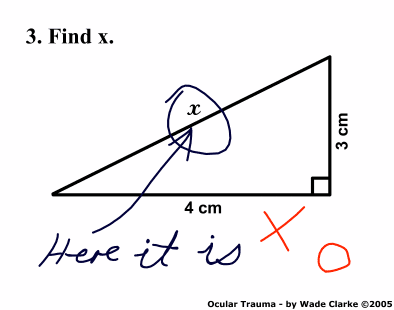
Find x
Clearly the best answer to a geometry problem ever.
Dialog Button Text
I was reading p.g.o today, and came across this little snippet from Murray Cumming:
Show how much better [Save] is than [Yes] in a “Do you want to save changes?” dialog, with a “Really Discard Changes?” dialog as the punchline. This emphasizes our attention to detail, and to the user experience, so they don’t need to pay attention.
I've given this a bit of thought on various occasions over the past 8 months or so, and I can't really come up with a conclusion as to which I like better.
I think, for users unfamiliar with a new piece of software, using descriptive titles ("Save" instead of "Yes" in the above example), is good: it helps prevent possible data loss, and removes any amount of confusion. It also helps in the case where multiple applications have different conventions: perhaps one says "do you want to save changes?" and another says "really discard changes?", and you haven't used either of them enough to quickly remember which is which. Having a "Save" button in the former dialog, and a "Discard" button in the latter quickly disambiguates and avoids confusion. (Although, you could make the case here that app developers shouldn't use the negative form ever, and should always use the more positive, data-saving "do you want to save changes?" form.)
However, for the advanced user with a good memory, this is a pain in the ass. I know which apps ask what on close. For some applications, I get into the habit of using the keyboard to press the buttons. When I want to quit the app and ditch what I'm doing, I hit ctrl+q, which then brings up the "save changes?" dialog, where I press 'n'. Or if I do want to save, I hit 'y'.
Now, maybe that's not such a big deal. I guess it's ok to remember to hit 's' or 'c' instead.
But the situation changes when you bring in a bunch of other dialogs. Perhaps I'm using a file manager. If we had the "old" way, I'd have 'y' for affirmative actions ("yes, delete that file", "yes, move that file"), and 'n' for negative actions. Now I have a bunch of different keys: 'd' for delete, 'r' for rename, 'm' for move, 's' for save. And it's not just the file manager: these dialogs with a bunch of different keyboard shortcuts are a pain in the ass. Not to mention that there are still "old-style" apps around that use 'y' and 'n'.
So I'm still on the fence. Designing for general usability seems to indicate that the new way is better, so that's what I'll follow in any apps I work on. But a small part of the advanced, keyboard-shortcut-loving user in me dies every time.