Xfce Settings 4.13.8 Released
As we prepare to release Xfce 4.14, each component receives another review and polish round. Xfce Settings 4.13.8 includes many fixes and translations, forming a solid foundation for the Xfce desktop.
What’s New?
General
- display: Disable auto-enabling profiles by default (4.13.7)
- display: Sync display when applying config
- display: Use current display
Bug Fixes
- color: Fix crash when launching GNOME Color Manager in the Settings Manager window (4.13.7) (Xfce #15426)
- color: Set the correct icon in color dialogs (4.13.7)
- display: Add mnemonics to minimal dialog buttons (4.13.7) (Xfce #15449)
- display: Replace deprecated icon (4.13.7) (Xfce #15416)
- settings-manager: Fix missing icons on resize/add/remove (4.13.7) (Xfce #15428, #15613)
- xfsettingsd: Fix numlock state restoration (4.13.7) (Xfce #15642)
- xfsettingsd: Start settings before complete startup (Xfce #15725)
- xsettings: Grab and sync XServer on startup (Xfce #15725)
Translation Updates
Armenian (Armenia), Belarusian, Danish, English (Australia), Finnish, Finnish, French, Indonesian, Lithuanian, Norwegian Bokmål, Portuguese (Brazilian), Serbian, Turkish, Ukrainian
Downloads
Source tarball ( md5, sha1, sha256)
Xfce Settings 4.13.8 is included in Xubuntu 19.10 “Eoan Ermine,” installed with the xfce4-settings package.
Xfce Screensaver 0.1.7 Released
We’ve worked hard optimizing Xfce’s screensaver to give users the best possible lock and screensaver experience in Xfce. With Xfce Screensaver 0.1.7, we’ve dropped even more legacy code while implementing a long-requested feature: per-screensaver configuration!
What’s New?
New Features
- Added support for on-screen keyboards. This option adds a button to the login window to show and hide the keyboard at the bottom of the screen.
- Added per-screensaver configuration. The available options are pulled from the xscreensaver theme file and are stored via Xfconf.
- Improved background drawing when using 2x scaling.
Bug Fixes
- Fixed flickering within the password dialog (0.1.6)
- Fixed various display issues with the password dialog; all themes should now render xfce4-screensaver identically to lightdm-gtk-greeter (0.1.6)
- Fixed confusion between screensaver and lock timeouts (Xfce #15726)
- Removed reference to pkg-config (.pc) file (0.1.6) (Xfce #15597)
Code Cleanup
- Cleaned up kdb-indicator logic (0.1.6)
- Consolidated debug function calls (0.1.6)
- Dropped libXxf86 dependency (MATE Screensaver #199)
- Dropped lots of unused or unneeded code, significantly streamlining the codebase
- Migrated xfce4-screensaver-command to GDBus
- Moved job theme processing out of gs-manager (0.1.6)
- Removed full-screen window shaking on failed login
- Simplified handling of user preferences (0.1.6)
- Simplified lock screen and screensaver activation code
Translation Updates
Armenian (Armenia), Belarusian, Bulgarian, Catalan, Chinese (China), Chinese (Taiwan), Czech, Danish, Dutch, Finnish, French, Galician, German, Hebrew, Hungarian, Italian, Lithuanian, Malay, Norwegian Bokmål, Polish, Portuguese, Portuguese (Brazil), Russian, Spanish, Turkish
Downloads
Source tarball ( md5, sha1, sha256)
Xfce Screensaver 0.1.7 is included in Xubuntu 19.10 “Eoan Ermine,” installed with the xfce4-screensaver package.
Exo 0.12.6 Released
With Xfce 4.14 rapidly approaching, development efforts have shifted to bug fixes. Exo 0.12.6 is no exception, with several old and new bugs finally meeting their end.
What’s New?
Did you miss the release announcement for Exo 0.12.5? Click here to check it out!
Bug Fixes
- Add trailing “;” to mimeapps.list (Xfce #15087)
- Clear bad entries from mimeapps.list (Xfce #15046, #15238)
- Synchronize default applications to gio-mime (Xfce #14633)
- Disable emoji menu in type-ahead search (Xfce #15451)
- Enable dismissal of “Failed to open default” dialogs
- Related Issue: Brave Browser #4142
- If the error can be safely ignored, the user can dismiss it. After changing defaults, the dismissal is forgotten.
Translation Updates
Albanian, Armenian (Armenia), Bulgarian, Chinese (China), Chinese (Taiwan), Croatian, Danish, French, Galician, German, Hungarian, Icelandic, Interlingue, Italian, Polish, Portuguese, Portuguese (Brazil), Russian, Spanish, Thai, Turkish
Downloads
Download Exo 0.12.6 from the link below.
Source tarball ( md5, sha1, sha256)
Xfce Screensaver 0.1.5 Released
A new version of the Xfce Screensaver is now available! Xfce Screensaver 0.1.5 fixes many bugs while making the codebase leaner and more efficient. Check it out!
What’s New?
New Features
- Added support for elogind (Xfce #15243)
- Added support for profile images from AccountsService (Xfce #15235)
General
- Removed a lot of unused code (2,700+ lines)
- Simplified monitor-handling logic
- More consistent spacing in makefiles
Bug Fixes
-
Added categories to display in the Settings Manager (Xfce #15507)
-
Added a fallback idle timer for when X11 screensaver doesn’t notify
-
Fixed warning during configure stage (Xfce #15552)
-
Fixed Inhibitor lock (Xfce #15551)
-
Hid screensaver themes from “Open with” options (Xfce #15531)
-
Made numerous cppcheck, cpplint, and Coverity Scan fixes
- Constant variables guarding dead code
- Dereferencing before/after null
- Unchecked return values
- Unused variables
- Memory leaks
Translation Updates
Albanian, Basque, Belarusian, Bulgarian, Catalan, Chinese (China), Chinese (Taiwan), Czech, Danish, Dutch, English (Australia), French, German, Hebrew, Hungarian, Icelandic, Italian, Korean, Lithuanian, Malay, Polish, Portuguese (Brazil), Serbian, Slovak, Spanish, Swedish, Turkish
Downloads
Download Xfce Screensaver 0.1.5 at the link below.
Source tarball ( md5, sha1, sha256)
Parole Media Player 1.0.2 Released
A new (more) stable version of the Xfce media player is now available! Parole Media Player 1.0.2 fixes several bugs and improves packaged releases for distributions.
What’s New?
Bug fixes. So… many… fixes!
Build Fixes
- Fixed compiler error -Wcast-function-type with GCC 8
- Fixed Appstream validation by removing tags from translations (Xfce #14260)
- Resolved g_type_class_add_private warnings (Xfce #15014)
Playback
- Fixed play button sensitivity items are added to the playlist (Xfce #13724, LP #1705243)
- Improved support for missing Gstreamer plugin installers (Xfce #14529)
Plugins Manager
- Fixed crash when opening files after disabling plugins (LP #1698540)
- Fixed disabling plugins enabled by distributions (e.g., MPRIS2 in Xubuntu)
- Fixed display of active/inactive plugins when reopening the Plugins Manager
Translation Updates
Albanian, Arabic, Asturian, Basque, Belarusian, Bulgarian, Catalan, Chinese (China), Chinese (Taiwan), Croatian, Czech, Danish, Dutch, English (Australia), Finnish, French, Galician, German, Greek, Hebrew, Hungarian, Icelandic, Indonesian, Italian, Japanese, Kazakh, Korean, Lithuanian, Malay, Norwegian Bokmal, Occitan (post 1500), Polish, Portuguese, Portuguese (Brazil), Russian, Serbian, Slovak, Slovenian, Spanish, Swedish, Telugu, Thai, Turkish, Uighur, Ukrainian
Downloads
Parole Media Player 1.0.2 is included in Xubuntu 19.04, with other distributions likely adding it soon. If you can’t wait or want to install it from the source, download it below.
Source tarball ( md5, sha1, sha256)
Xfce Screensaver 0.1.4 Released
With numerous performance improvements and an improved low-power resource footprint, Xfce Screensaver 0.1.4 continues improving screen locking on Xfce.
What’s New?
Features
- We have added support for screen locking when the system goes to sleep (Xfce #15001) via a shared preference with Xfce Power Manager. To accommodate this, a new configuration option, “Lock Screen with System Sleep,” was added to the Screensaver Preferences dialog.
Bug Fixes
- Fixed password entry after forcefully grabbing input focus (Xfce #15042)
General
- Faster screen locking when activated
- Faster rendering of the authentication prompt
- Improved handling of monitor (dis-)connection events
- Improved screensaver and locking activation when idle
- Improved laptop lid support: The lock screen is now displayed immediately when the laptop lid is open instead of requiring a wake event from the keyboard or mouse
- Improved low-power state: Screensavers are now suspended when monitors are powered off via DPMS (Debian #921835)
Translation Updates
Basque, Belarusian, Catalan, Czech, Danish, Galician, Lithuanian, Malay, Portuguese, Russian, Serbian, Spanish, Swedish
Downloads
This is the second beta release of Xfce Screensaver. If you’re feeling adventurous, check it out and report bugs so we can continue building an awesome screen-locking tool for Xfce. Download Xfce Screensaver 0.1.4 at the link below.
Source tarball ( md5, sha1, sha256)
Catfish 1.4.7 Released
With tighter desktop integration, improved performance, and fixes for old and new bugs, Catfish 1.4.7 makes desktop search faster and easier.
What’s New?
General
- Cleaner, easier-to-read manpage contents
- Information about the
--pathcommand-line flag was added to help and the manpage - Updated AppStream components to align with the latest specification
- Replaced project URLs with HTTPS where possible
Desktop Integration
-
The window layout now respects the current desktop ( Xfce #14486)
-
A headerbar layout is used for Budgie, GNOME, and Pantheon
-
All other desktops use the traditional title bar layout
-
This option can be overridden using the use-headerbar option
in the Catfish configuration file (~/.config/catfish/catfish.rc)
-
Files can now be dragged into other applications ( Xfce #14492)
-
For file managers, the files will usually be copied to that location
-
For other applications, the files will be opened by the application
Performance
- Thumbnails will now only be generated when the thumbnail view is active ( Xfce #14689)
- Added /dev to list of standard excluded directories
- Files within /dev can still be searched if explicitly selected by the user
Bug Fixes
- Quoted search strings now allow for searching for specific phrases instead of searching for actual quote characters ( Xfce #14501)
- The file context menu can now be opened multiple times ( Xfce #14621)
- Fix crash at startup when Catfish enables multi-file selection ( LP #1753163)
Translation Updates
Albanian, Belarusian, Bulgarian, Catalan, Chinese (China), Chinese (Taiwan), Croatian, Czech, Danish, Dutch, English (Australia), French, Galician, German, Greek, Hebrew, Hungarian, Icelandic, Indonesian, Italian, Japanese, Korean, Lithuanian, Malay, Norwegian Nynorsk, Polish, Portuguese, Portuguese (Brazil), Russian, Serbian, Sinhala, Spanish, Swedish, Thai, Turkish, Ukrainian
Downloads
Source tarball ( md5, sha1, sha256)
Exo 0.12.4 Released
Exo 0.12.4 is now available with an improved icon view, better icon rendering, and reduced disk usage. Come and get it!
What’s New?
General
- Exo again uses the same thumbnail directories as other applications ( Xfce #14799), reducing disk usage.
- Where everything else moved to ~/.cache/thumbnails quite some time ago, Exo continued to use ~/.thumbnails. Enjoy all the extra disk space!
Bug Fixes
- ExoCellRendererIcon: Fix highlight rendering with GTK 3 ( Xfce #14971)
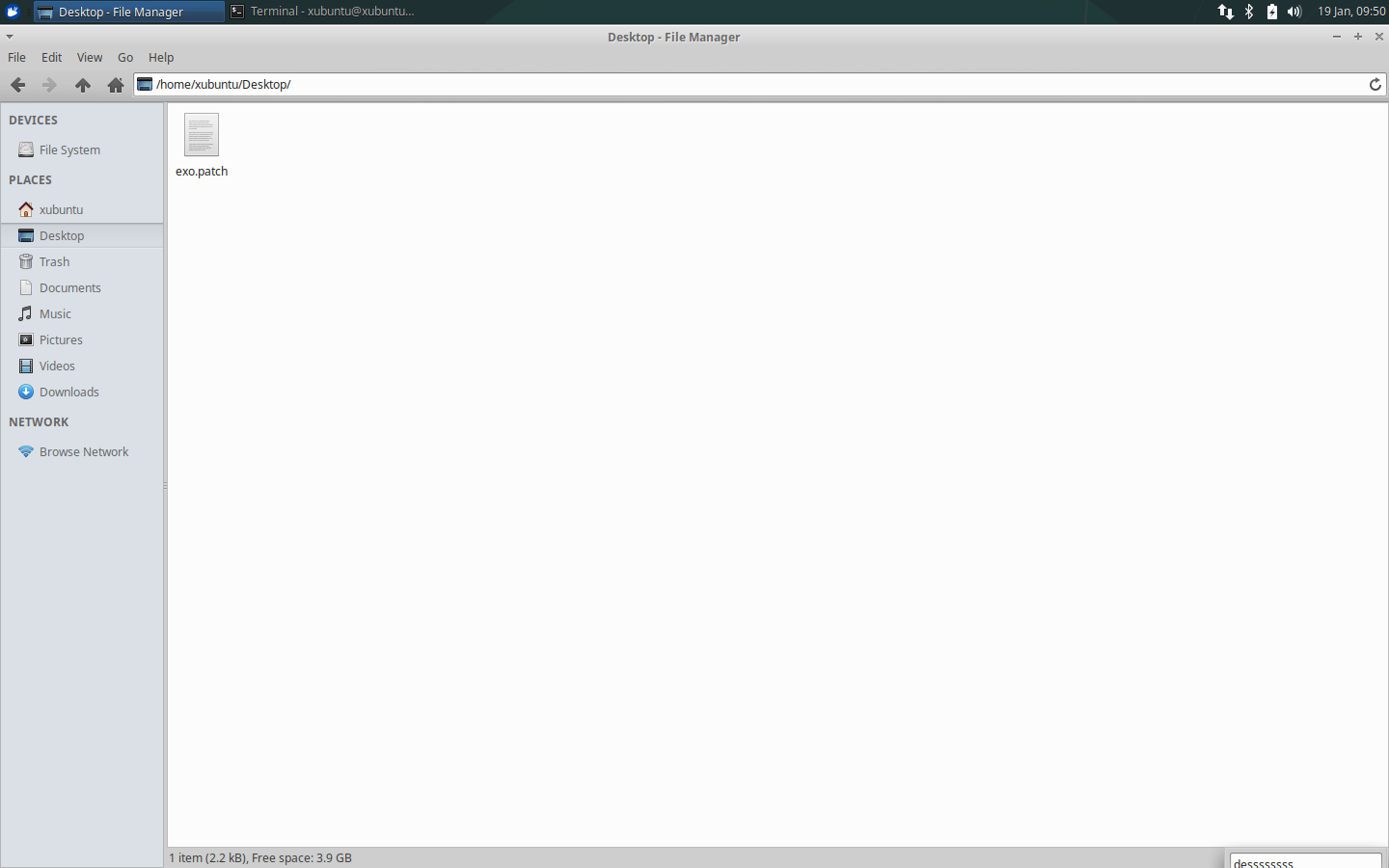
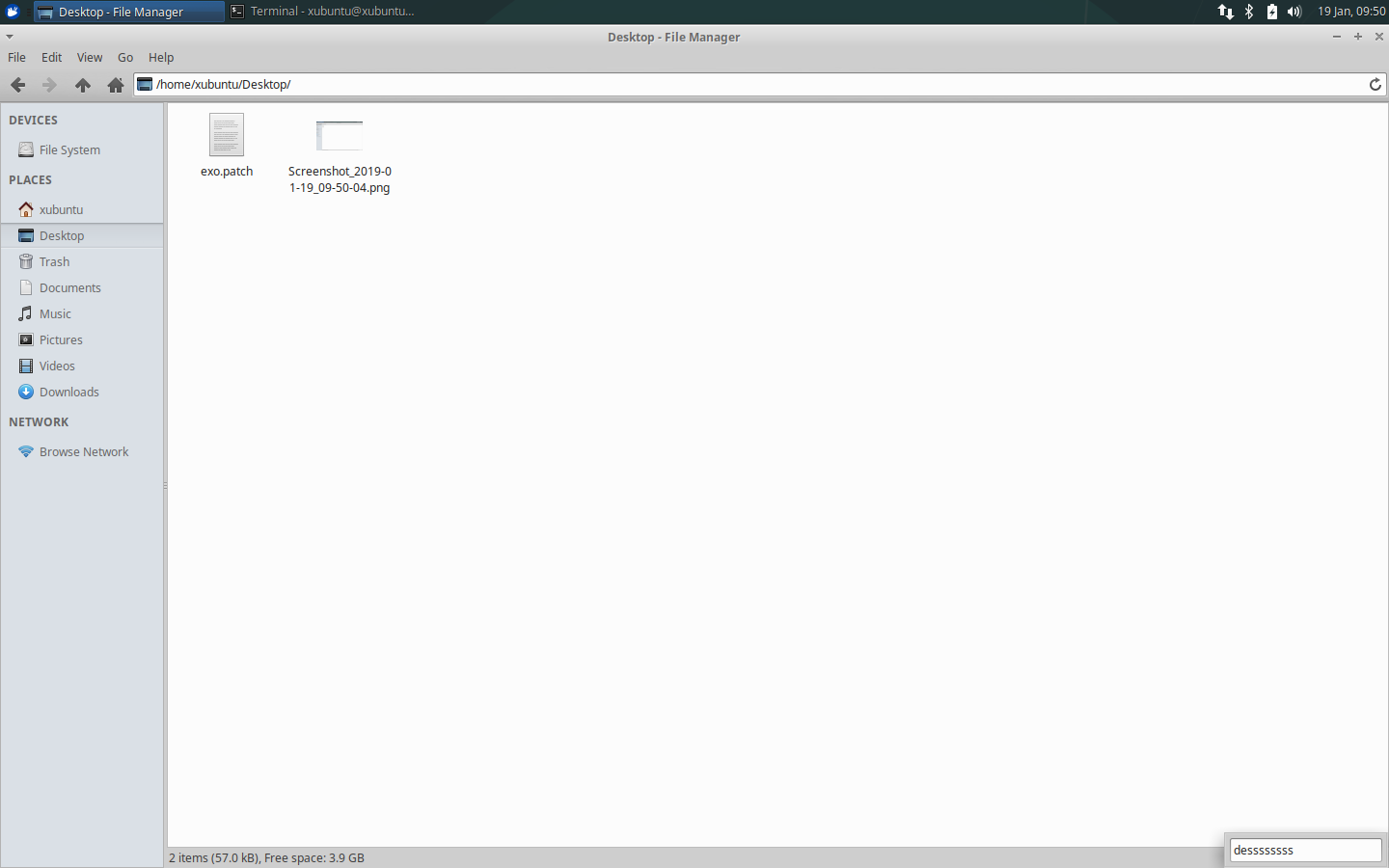
- ExoIconView: Fix search popup placement ( Xfce #14994)
- A long-standing bug in which the type-ahead search widget would be drawn partially off the screen for maximized windows has also been fixed!
Translation Updates
Belarusian, Catalan, Chinese (China), German, Hungarian, Icelandic, Italian, Kannada, Korean, Lithuanian, Malay, Portuguese, Portuguese (Brazil), Russian, Serbian, Slovak, Spanish, Thai
Downloads
Download Exo 0.12.4 from the link below.
Source tarball ( md5, sha1, sha256)
Xfce & Xubuntu 2018 Year In Review
2018 has been a busy year for Xfce & Xubuntu. As we enter 2019 and continue to inch closer to Xfce 4.14, let’s look back at one of the busiest development years in a while. Here’s your 2018 year in review!
January
News
- Xubuntu 17.04 “Zesty Zapus” reached End of Life
- Xubuntu 17.10.1 “Artful Aardvark” was released, resolving the Lenovo BIOS corruption bug
Major Releases
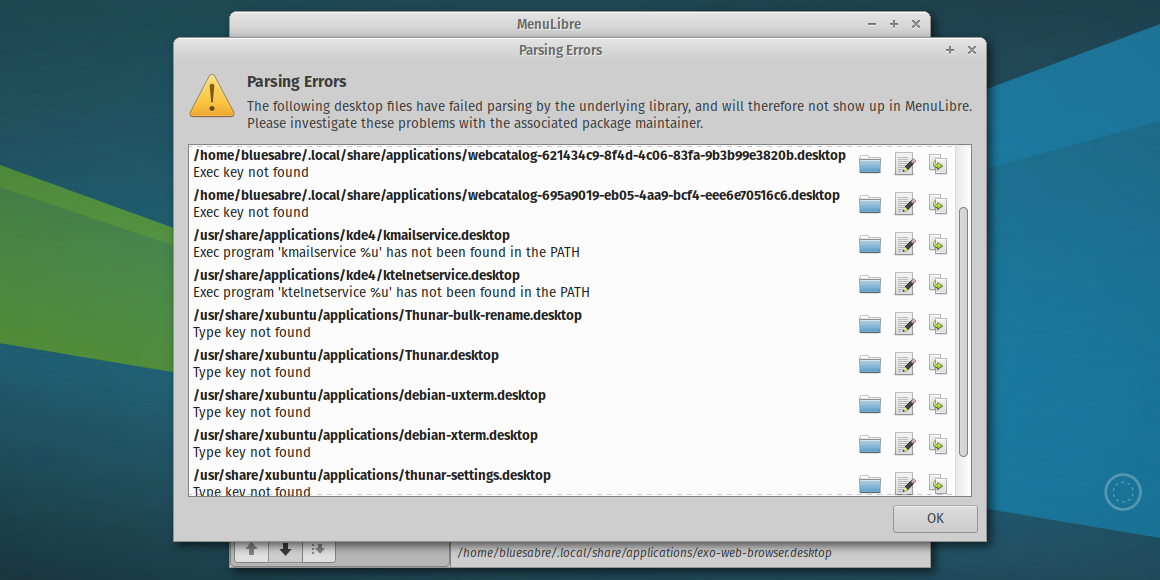
- MenuLibre 2.1.4 introduced some useful new features to the popular menu editor, including a Test Launcher button to try out a launcher before saving and the Parsing Errors dialog to easily identify menu configuration issues.
Other Notable Releases
- Catfish 1.4.4 (performance and error handling improvements)
- Xfce Timer Plugin 1.7.0 (GTK+ 3 port and UI improvements)
February
News
- The State of Xfce Tranlations in Early 2018
- The Xubuntu 18.04 Community Wallpaper Contest was opened
Major Releases
- Exo 0.12.0 was the first stable Xfce 4.14 release for the Xfce application development library. The new release included support for both GTK+ 2 and 3, and added Brave, Geary, Google Chrome, and Vivaldi to the natively supported application defaults.
- MenuLibre 2.1.5 expanded its support of desktop environments. With this release, MenuLibre’s powerful menu editing options are available for Budgie, GNOME, KDE Plasma, LXDE, LXQt, MATE, Pantheon, Unity, and Xfce.
Other Notable Releases
- Thunar 1.6.14 (stable bugfix release)
- Thunar 1.7.1 (development bugfix and feature release)
- Thunar Media Tags Plugin 0.3.0 (GTK+ 3 port)
- thunarx-python 0.5.1 (Python 3 documentation fixes)
- Xfce PulseAudio Plugin 0.3.5 (improved device and media player management)
- Xfce Terminal 0.8.7 / 0.8.7.1 (bugfixes and new configuration options)
- xfce4-volumed-pulse 0.2.3 (GTK+ 3 port)
March
News
Major Releases
- MenuLibre 2.2.0 was finally released with an expansive list of improvements. Key improvements include expanded desktop environment support, easy window identification, launcher testing, and parsing error reporting.
- Parole Media Player 1.0.0 included playback performance updates, automatic video output selection, and improved podcast and live stream support. The new Mini Mode reduces the player to a small window that stays out of the way and within reach.
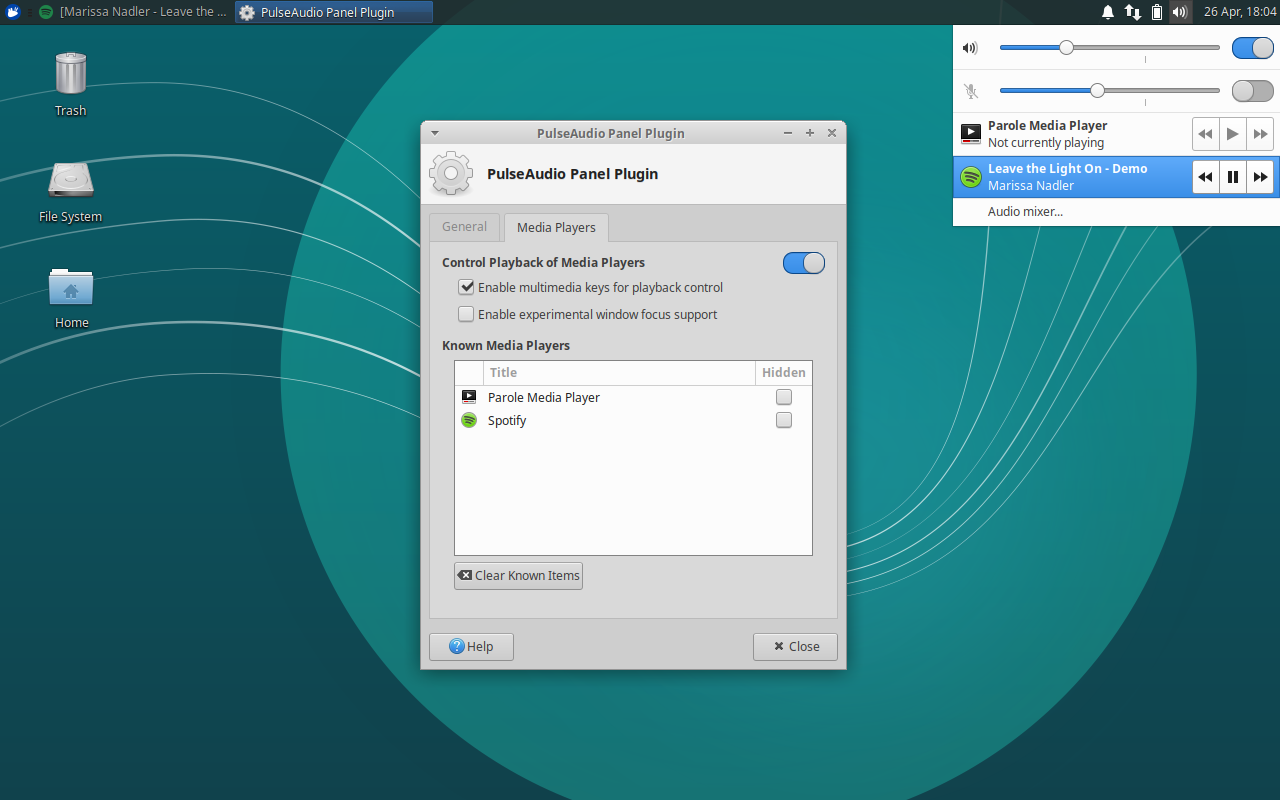
- Xfce PulseAudio Plugin 0.4.0 introduced device management and MPRIS support to the audio management plugin. Available input and output devices can be selected from the plugin menu, immediately moving streams to the new device. MPRIS support adds media player controls for supported applications.
- Xfce Settings 4.12.2, 4.12.3, and 4.13.2 improved multi-monitor support for stable and development releases. The mouse cursor can now be shown with a key press, which can be configured with the Xfce Settings Manager.
Other Notable Releases
- LightDM GTK+ Greeter 2.0.5 (improved defaults and theme support)
- Thunar Shares Plugin 0.3.0 (GTK+ 3 port)
- Tumbler 0.1.33 and 0.2.1 (bugfix releases)
- Xfce Indicator Plugin 2.3.4 (fixed builds with Xfce 4.14 development libraries)
- Xfce Notifications 0.4.2 (improved stability and several bug fixes)
- Xfce Terminal 0.8.7.2 and 0.8.7.3 (bugfix releases)
April
News
- Xubuntu 18.04 Community Wallpaper Contest winners were announced
- Xubuntu 18.04 was released! I featured some screenshots here.
Major Releases
- Xubuntu 18.04 “Bionic Beaver,” an LTS release supported for 3 years, was released with 32-bit and 64-bit downloads available. This release included some new desktop applications: Some MATE components replaced their GNOME counterparts for improved desktop consistency; the Xfce PulseAudio Plugin replaced the Sound Indicator; and the Xfce Notifications plugin, featuring a new Do Not Disturb mode, was added to the panel.
Other Notable Releases
- Parole Media Player 1.0.1 (translations)
- Thunar 1.6.15 and 1.7.2 (bugfix releases)
- Xfce PulseAudio Plugin 0.4.1 (translations)
- Xfce Verve Plugin 1.1.1 (GTK+ 2, translations and feature release)
- Xfce Verve Plugin 2.0.0 (GTK+ 3 port)
- Xfce Whisker Menu Plugin 2.1.6 and 2.1.7 (translations and bug fixes)

May
This was the first month I started publishing monthly news roundups. Check out the June Development Update for an in-depth look at May’s development progress.
News
- New Xubuntu Testers Wiki Pages, written by the testers themselves, were announced
- The last of Xubuntu’s repositories were migrated from Bazaar to Git
- The codename for Ubuntu 18.10, “Cosmic Cuttlefish,” was announced
- Kubuntu, Ubuntu Budgie, Ubuntu Kylin, Ubuntu MATE, and Ubuntu Studio announced that they would no longer provide 32-bit ISOs for 18.10 and forward
- I chatted about Xfce and Xubuntu on Destination Linux and Late Night Linux Extra
Notable Releases
- Xfce CPU Frequency Plugin 1.2.0 (GTK+ 3 port)
- Xfce Screenshooter 1.9.2 (various enhancements and dropped Zimagez support)
- Xfce Sensors Plugin 1.3.0 (bug fixes and code quality improvements)
- Xfce Panel 4.13.3 (bug fixes and usability improvements)
- Xfce Terminal 0.8.7.4 (bugfix and feature release)
- Xfce Whisker Menu Plugin 2.2.0 (performance and usability improvements)
June
Major Releases
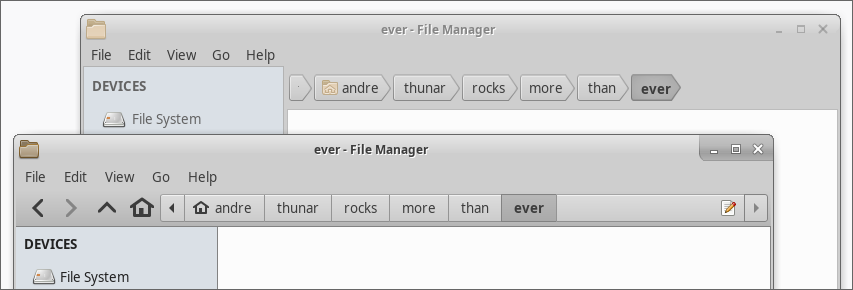
- Thunar 1.8.0 and 1.8.1 were the first stable GTK+ 3 releases of the Xfce file manager, offering major usability and developer-friendly improvements. The pathbar now includes navigation buttons and a much tidier location selector. GObject Introspection for Thunar’s plugin library makes it possible to develop plugins in a number of programming languages.
- Xfce Settings 4.12.4 and 4.13.4 featured improvements to display manufacturer recognition. The mappings were updated and various manufacturer names were simplified for better screen real estate. 4.13.4 introduced Xrandr display scaling, making it possible to scale the X display and all applications.
Other Notable Releases
- Exo 0.12.2 (performance improvements and support for the latest GCC)
- libxfce4util 4.13.2 (support for Vala bindings and improved documentation builds
- Mousepad 0.4.1 (bugfix release)
- Ristretto 0.8.3 (Port to GDBus and various bug fixes)
- Thunar VCS Plugin 0.1.90 (GTK+ 3 port)
- Xfce Desktop 4.13.2 (support for the Thunarx-3 API and various bug fixes)
- Xfce Dictionary 0.8.1 (appearance improvements)
- Xfce Task Manager 1.2.1 (bug fixes and a new –start-hidden command line flag)
- Xfconf 4.13.5 (bugfix release)
July
News
- Xubuntu 17.10 is now End of Life
- Xubuntu 18.04.1 was released
- Catfish and Xfce Panel Profiles became official Xfce projects
Major Releases
- Xubuntu 18.04.1, the first point release in the Bionic Beaver series, became available. At this time, users of a prior release should have received an upgrade notice. This release included several stability and performance improvements.
- Xfwm 4.13.1 included massive updates, including a full port to GTK+ 3 and various fixes. This component is one of the critical pieces of the Xfce 4.14 release, so it’s great to see it humming along.
Other Notable Releases
- Catfish 1.4.6 (improved thumbnailer and various bug fixes)
- Thunar VCS Plugin 0.2.0 (GTK+ 3 port)
- Xfce Mount Plugin 1.1.3 (translation updates)
- Xfce Panel Profiles 1.0.8 (bugfix release)
- Xfce Whisker Menu Plugin 2.2.1 (bugfix release)
- Xfwm 4.12.5 (bugfix release)
August
Notable Releases
- Mugshot 0.4.1 (bug fixes and code quality improvements)
- Xfce Appfinder 4.13.1 (bug fixes and usability improvements)
- Xfce Screenshooter 1.9.3 (bugfix and feature release)
- Xfce Session 4.13.1 (numerous bug fixes and code quality improvements)
September
September & October Development Roundup
News
- Elementary Xfce 0.13 switched to Manila folder icons, following upstream
Notable Releases
- Thunar 1.8.2 (bugfix release)
- Tumbler 0.2.2 and 0.2.3 (bug fixes and performance improvements)
- Xfce Battery Plugin 1.1.1 (bug fixes and appearance improvements)
- Xfce Cpufreq Plugin 1.2.1 (bug fixes and appearance improvements)
- Xfce Weather Plugin 0.9.0 (GTK+ 3 port)

October
September & October Development Roundup
News
Major Releases
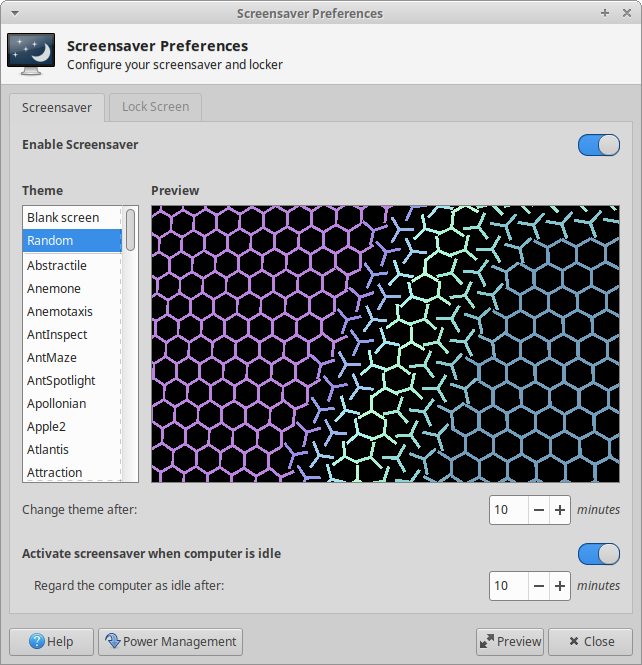
- Xubuntu 18.10 “Cosmic Cuttlefish” featured several appearance updates and Xfce 4.14 components. Our icon theme, elementary-xfce, was updated with new Manila folder icons and optimized, resulting in a smaller install size and improved performance. Many more GTK+ 3 Xfce applications were included.
- Xfce Screensaver 0.1.0 (and 0.1.1) was announced as a new screen locker and screensaver for Xfce. This application is a port of MATE Screensaver, adapted to integrate tightly with the Xfce desktop. It shares theming with LightDM GTK+ Greeter to guarantee users a consistent login and lock experience.
- Xfce Settings 4.13.5 featured the new display profiles: saved multi-monitor layouts automatically applied when a new monitor configuration is detected. This works with multi-monitor layouts and switches a laptop to use only the external display when connected.
Other Notable Releases
- Exo 0.12.3 (bug fixes and appearance improvements)
- Gigolo 0.4.90 (GTK+ 3 port)
- Xfce Clipman Plugin 1.4.3 (bug fix and appearance improvements)
- Xfce Notifications 0.4.3 (bugfix release)
- Xfce Sensors Plugin 1.3.90 (bug fixes and appearance improvements)
- Xfce Whisker Menu Plugin 2.3.0 (bug fixes and appearance improvements)
November
Major Releases
- Xfce Screensaver 0.1.3 is the first beta release of the new Xfce Screensaver. It features an expanded configuration dialog, better support for X11 Screensaver and XDG Screensaver, and fully documented functionality. With a focus on improved code quality, contributors should have a much easier time with the project going forward.
Other Notable Releases
- Xfce Screensaver 0.1.2 (bugfix release)
- Thunar Volume Manager 0.9.1 (bug fixes, appearance improvements, and Blu-Ray media support)
- Xfce Dictionary 0.8.2 (bug fixes and appearance improvements)
- Xfce System Load Plugin 1.2.2 (bug fixes and appearance improvements)
December
News
- Lubuntu and Xubuntu announced they will no longer ship 32-bit ISOs for Ubuntu 19.04 and onwards. Ubuntu 18.04 will continue to be supported for the 3-year LTS support window.
- André Miranda published The Ultimate Contributor’s Guide to Xfce, which is definitely a worthwhile read for new and existing contributors.
Notable Releases
- Garcon 0.6.2 (bugfix release)
- Xfce Appfinder 4.13.2 (bugfix release)
- Xfce MPC Plugin 0.5.1 (bug fixes and appearance improvements)
- Xfce Task Manager 1.2.2 (bug fixes and usability improvements)
Cheers to 2019
Look out for Xfce 4.14—we’re so close! Look out for more updates in the coming months.
Xfce Screensaver 0.1.3 Released
After 3 weeks of dedicated development, the Xfce Screensaver 0.1.3, the first beta release, is now available! With better event handling, a significantly upgraded preferences dialog, and a tidier codebase, the new version is nearly ready for prime time. 🎉
What’s New?
Features
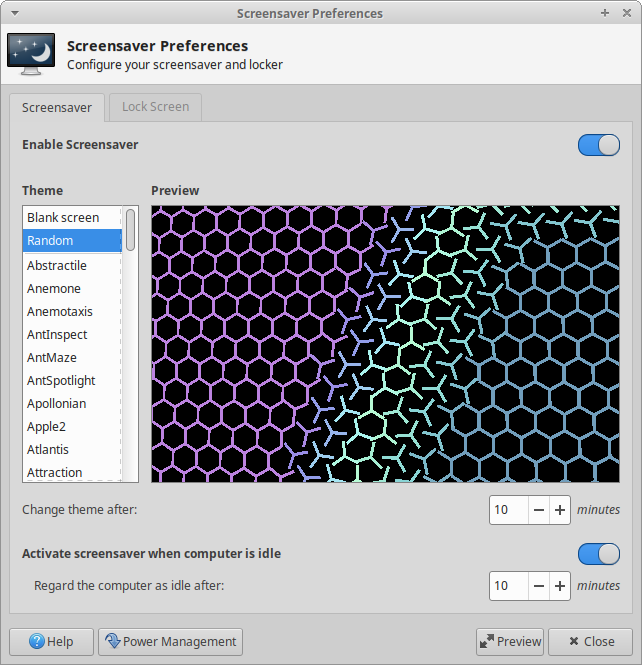
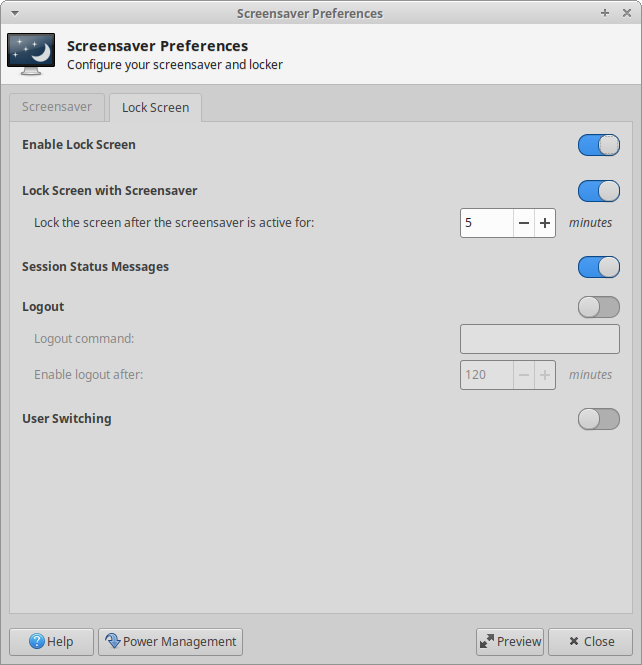
- All available configuration options are now available in the Preferences dialog, boosting the easily accessible options from 4 to 13!
- Idle time is now based on the X11 Screensaver plugin instead of the GNOME Session Manager.
- Xfce Screensaver now respects the xdg-screensaver state, inhibiting the screensaver when using apps like Caffeine or watching a fullscreen video.
- Screensaver and lock screen functionality can easily now be toggled separately.
General
-
All deprecated DBUS methods and signals have been removed from the documentation.
-
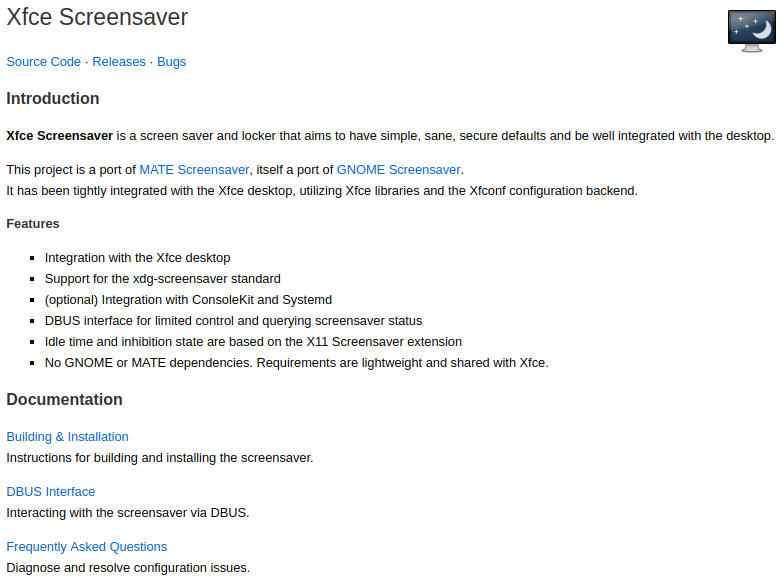
Documentation has been written and is available on the Xfce Docs site. Available docs include:
Preferences
- Dropped unused configuration options [ 1, 2, 3]
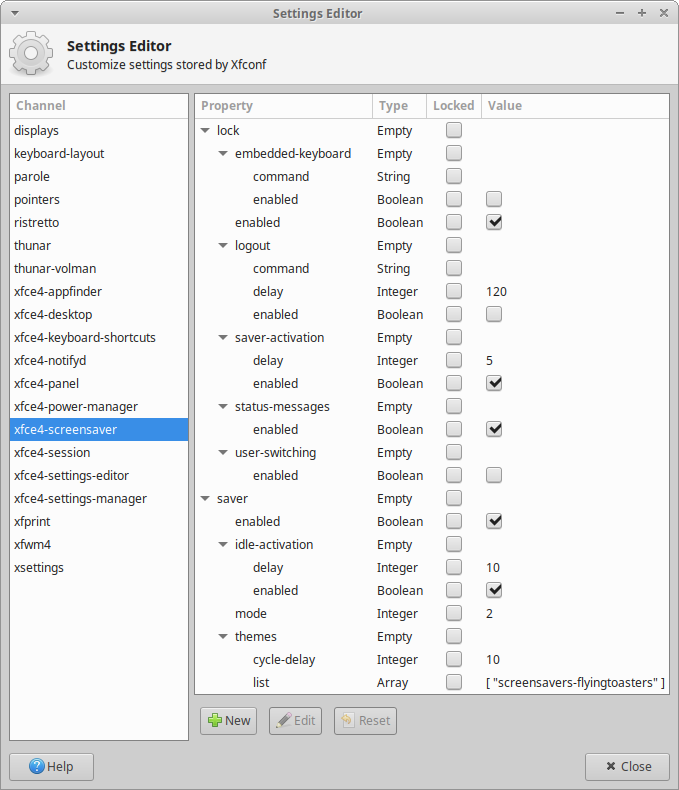
- Renamed all Xfconf properties for improved clarity and easier maintenance [ 1, 2]
Bug Fixes
- Replaced the Help link with a link to the Xfce Docs (Xfce #14877)
- Added /usr/lib and /usr/libexec as trusted engine paths, enabling local installs on Linux with access to existing screensavers (Xfce #14883)
- Fixed screen blanking and locking on FreeBSD and OpenBSD (Xfce #14846)
- Fixed lock screen crash on laptop lid-close events (GTK #1466)
- Fixed daemon crash when scrolling through available themes
- Improved window size resizing for smaller displays
- Renamed included screensavers to avoid conflicts with MATE Screensaver
- Reduced flicker rate when multiple keyboard layouts are available (still not fully fixed, but greatly improved)
Build Improvements
- Silenced warning: ar: ‘u’ modifier ignored since ‘D’ is the default
- Fixed warning: Target given more than once in the same rule
Code Quality
- Applied cpplint fixes and added cpplint configuration file
- Cleaned up unused variables, trailing spaces, and deprecated code
- Glade templates were cleaned up and organized for easier maintenance
Translation Updates
Albanian, Basque, Chinese (China), Chinese (Taiwan), Danish, French, Galician, Hebrew, Icelandic, Italian, Korean, Malay, Polish, Russian, Slovak, Turkish
Screenshots
Downloads
This is the first beta release of Xfce Screensaver. While still not recommended for production machines, this is a great time to test and report bugs so we can assemble an awesome stable release soon.
Source tarball ( md5, sha1, sha256)
Xubuntu users (18.04, 18.10, and 19.04) can grab the package from the Xubuntu QA Experimental PPA.
sudo add-apt-repository ppa:xubuntu-dev/experimental
sudo apt-get update
sudo apt-get install xfce4-screensaver
Remember also to remove or exit light-locker and start xfce4-screensaver (or log out and back in) and add support for xfce4-screensaver to the xflock4 script.
Thanks, and enjoy!