Catfish 1.4.8 Released
Catfish 1.4.8 has been released! This release improves integration with OpenBSD, Wayland, Xfce, and numerous other desktop configurations.
The post Catfish 1.4.8 Released appeared first on Sean Davis.
Catfish 1.4.8 Released
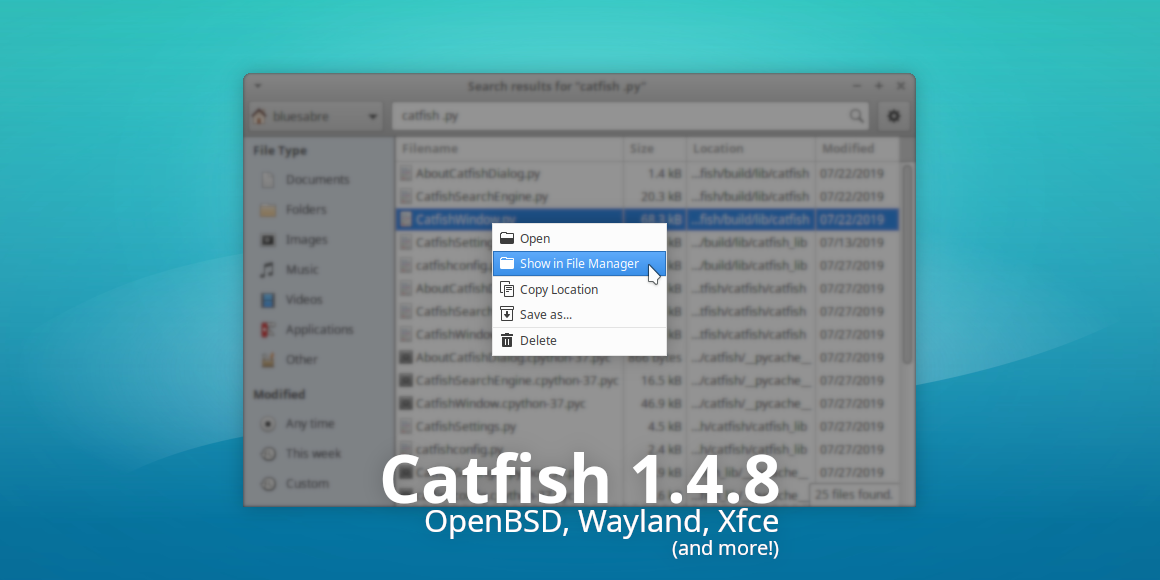
Catfish 1.4.8 is now available. This latest release improves integration with OpenBSD, Wayland, Xfce, and numerous other desktop configurations. It also features many translation updates to improve Catfish’s international support.
What’s New?
Desktop Integration / Enhanced Thunar Support
A long-requested feature ( requested 2+ years ago), navigating directly to a file in Thunar, is now possible. Right-click on a file and select “Show in File Manager.” Thunar will open it immediately, scroll to it, and select the requested file. Folder spelunkers, rejoice! (Xfce #14494)
Bug Fixes
- Automatically adjust locate arguments to accommodate the host OS, improving support for OpenBSD
- Fixed crash at startup on Wayland (Xfce #15297)
- Fixed directory support when XDG_CURRENT_DESKTOP in unavailable (Xfce #15099)
- Fixed search exclusion of non-standard paths (~/.cache, ~/.gvfs, /dev) (Xfce #15206)
Translation Updates
- Added ‘translator-credits’ string to .po files (Xfce #15564)
- Changed “…” to “…” for consistency with other Xfce apps (Xfce #15407)
- Marked the “Search for files” string translatable (Xfce #15097)
Albanian, Arabic, Armenian (Armenia), Basque, Belarusian, Bulgarian, Catalan, Chinese (China), Chinese (Taiwan), Croatian, Czech, Danish, Dutch, English (Australia), Finnish, French, Galician, German, Greek, Hebrew, Hungarian, Icelandic, Indonesian, Interlingue, Italian, Japanese, Korean, Lithuanian, Malay, Norwegian Bokmål, Norwegian Nynorsk, Polish, Portuguese, Portuguese (Brazil), Russian, Serbian, Sinhala, Slovak, Spanish, Swedish, Thai, Turkish, Ukrainian
Downloads
Download Catfish 1.4.8 from the link below.
Source tarball ( md5, sha1, sha256)
Xfce Settings 4.13.8 Released
As we prepare to release Xfce 4.14, each component is receiving another round of reviews and polish. Xfce Settings 4.13.8 includes a bevy of fixes and translations, and forms a solid foundation for the Xfce desktop.
What’s New?
General
- display: Disable auto-enabling profiles by default (4.13.7)
- display: Sync display when applying config
- display: Use current display
Bug Fixes
- color: Fix crash when launching GNOME Color Manager in the Settings Manager window (4.13.7) (Xfce #15426)
- color: Set the correct icon in color dialogs (4.13.7)
- display: Add mnemonics to minimal dialog buttons (4.13.7) (Xfce #15449)
- display: Replace deprecated icon (4.13.7) (Xfce #15416)
- settings-manager: Fix missing icons on resize/add/remove (4.13.7) (Xfce #15428, #15613)
- xfsettingsd: Fix numlock state restoration (4.13.7) (Xfce #15642)
- xfsettingsd: Start settings prior to complete startup (Xfce #15725)
- xsettings: Grab and sync XServer on startup (Xfce #15725)
Translation Updates
Armenian (Armenia), Belarusian, Danish, English (Australia), Finnish, Finnish, French, Indonesian, Lithuanian, Norwegian Bokmål, Portuguese (Brazilian), Serbian, Turkish, Ukrainian
Downloads
Source tarball (md5, sha1, sha256)
Xfce Settings 4.13.8 is included in Xubuntu 19.10 “Eoan Ermine”, installed with the xfce4-settings package.
Xfce Settings 4.13.8 Released
What’s New?
General
- display: Disable auto-enabling profiles by default (4.13.7)
- display: Sync display when applying config
- display: Use current display
Bug Fixes
- color: Fix crash when launching GNOME Color Manager in the Settings Manager window (4.13.7) (Xfce #15426)
- color: Set the correct icon in color dialogs (4.13.7)
- display: Add mnemonics to minimal dialog buttons (4.13.7) (Xfce #15449)
- display: Replace deprecated icon (4.13.7) (Xfce #15416)
- settings-manager: Fix missing icons on resize/add/remove (4.13.7) (Xfce #15428, #15613)
- xfsettingsd: Fix numlock state restoration (4.13.7) (Xfce #15642)
- xfsettingsd: Start settings prior to complete startup (Xfce #15725)
- xsettings: Grab and sync XServer on startup (Xfce #15725)
Translation Updates

Armenian (Armenia), Belarusian, Danish, English (Australia), Finnish, Finnish, French, Indonesian, Lithuanian, Norwegian Bokmål, Portuguese (Brazilian), Serbian, Turkish, Ukrainian
Downloads
Source tarball (md5, sha1, sha256)
Xfce Settings 4.13.8 is included in Xubuntu 19.10 “Eoan Ermine”, installed with the xfce4-settings package.
Xfce Settings 4.13.8 Released
What’s New?
General
- display: Disable auto-enabling profiles by default (4.13.7)
- display: Sync display when applying config
- display: Use current display
Bug Fixes
- color: Fix crash when launching GNOME Color Manager in the Settings Manager window (4.13.7) (Xfce #15426)
- color: Set the correct icon in color dialogs (4.13.7)
- display: Add mnemonics to minimal dialog buttons (4.13.7) (Xfce #15449)
- display: Replace deprecated icon (4.13.7) (Xfce #15416)
- settings-manager: Fix missing icons on resize/add/remove (4.13.7) (Xfce #15428, #15613)
- xfsettingsd: Fix numlock state restoration (4.13.7) (Xfce #15642)
- xfsettingsd: Start settings prior to complete startup (Xfce #15725)
- xsettings: Grab and sync XServer on startup (Xfce #15725)
Translation Updates
Armenian (Armenia), Belarusian, Danish, English (Australia), Finnish, Finnish, French, Indonesian, Lithuanian, Norwegian Bokmål, Portuguese (Brazilian), Serbian, Turkish, Ukrainian
Downloads
Source tarball (md5, sha1, sha256)
Xfce Settings 4.13.8 is included in Xubuntu 19.10 “Eoan Ermine”, installed with the xfce4-settings package.
Xfce Settings 4.13.8 Released

As we prepare to release Xfce 4.14, each component receives another review and polish round. Xfce Settings 4.13.8 includes many fixes and translations, forming a solid foundation for the Xfce desktop.
What’s New?
General
- display: Disable auto-enabling profiles by default (4.13.7)
- display: Sync display when applying config
- display: Use current display
Bug Fixes
- color: Fix crash when launching GNOME Color Manager in the Settings Manager window (4.13.7) (Xfce #15426)
- color: Set the correct icon in color dialogs (4.13.7)
- display: Add mnemonics to minimal dialog buttons (4.13.7) (Xfce #15449)
- display: Replace deprecated icon (4.13.7) (Xfce #15416)
- settings-manager: Fix missing icons on resize/add/remove (4.13.7) (Xfce #15428, #15613)
- xfsettingsd: Fix numlock state restoration (4.13.7) (Xfce #15642)
- xfsettingsd: Start settings before complete startup (Xfce #15725)
- xsettings: Grab and sync XServer on startup (Xfce #15725)
Translation Updates
Armenian (Armenia), Belarusian, Danish, English (Australia), Finnish, Finnish, French, Indonesian, Lithuanian, Norwegian Bokmål, Portuguese (Brazilian), Serbian, Turkish, Ukrainian
Downloads
Source tarball ( md5, sha1, sha256)
Xfce Settings 4.13.8 is included in Xubuntu 19.10 “Eoan Ermine,” installed with the xfce4-settings package.
Xfce Screensaver 0.1.7 Released
We’ve been hard at work optimizing Xfce’s screensaver to give users the best possible lock and screensaver experience in Xfce. With 0.1.6 and 0.1.7, we’ve dropped even more legacy code, while implementing a long-requested feature, per-screensaver configuration!
What’s New?
New Features
- Added support for on-screen keyboards. This option adds a button to the login window to show and hide the keyboard at the bottom of the screen.
- Added per-screensaver configuration. The available options are pulled from the xscreensaver theme file and are stored via Xfconf.
- Improved background drawing when using 2x scaling.
Bug Fixes
- Fixed flickering within the password dialog (0.1.6)
- Fixed various display issues with the password dialog, all themes should now render xfce4-screensaver identically to lightdm-gtk-greeter (0.1.6)
- Fixed confusion between screensaver and lock timeouts (Xfce #15726)
- Removed reference to pkg-config (.pc) file (0.1.6) (Xfce #15597)
Code Cleanup
- Cleaned up kdb-indicator logic (0.1.6)
- Consolidated debug function calls (0.1.6)
- Dropped libXxf86 dependency (MATE Screensaver #199)
- Dropped lots of unused or unneeded code, significantly streamlining the codebase
- Migrated xfce4-screensaver-command to GDBus
- Moved job theme processing out of gs-manager (0.1.6)
- Removed full-screen window shaking on failed login
- Simplified handling of user preferences (0.1.6)
- Simplified lock screen and screensaver activation code
Translation Updates
Armenian (Armenia), Belarusian, Bulgarian, Catalan, Chinese (China), Chinese (Taiwan), Czech, Danish, Dutch, Finnish, French, Galician, German, Hebrew, Hungarian, Italian, Lithuanian, Malay, Norwegian Bokmål, Polish, Portuguese, Portuguese (Brazil), Russian, Spanish, Turkish
Downloads
Source tarball (md5, sha1, sha256)
Xfce Screensaver is included in Xubuntu 19.10 “Eoan Ermine”, installed with the xfce4-screensaver package.
Xfce Screensaver 0.1.7 Released
What’s New?
New Features
- Added support for on-screen keyboards. This option adds a button to the login window to show and hide the keyboard at the bottom of the screen.
- Added per-screensaver configuration. The available options are pulled from the xscreensaver theme file and are stored via Xfconf.
- Improved background drawing when using 2x scaling.
Bug Fixes
- Fixed flickering within the password dialog (0.1.6)
- Fixed various display issues with the password dialog, all themes should now render xfce4-screensaver identically to lightdm-gtk-greeter (0.1.6)
- Fixed confusion between screensaver and lock timeouts (Xfce #15726)
- Removed reference to pkg-config (.pc) file (0.1.6) (Xfce #15597)
Code Cleanup
- Cleaned up kdb-indicator logic (0.1.6)
- Consolidated debug function calls (0.1.6)
- Dropped libXxf86 dependency (MATE Screensaver #199)
- Dropped lots of unused or unneeded code, significantly streamlining the codebase
- Migrated xfce4-screensaver-command to GDBus
- Moved job theme processing out of gs-manager (0.1.6)
- Removed full-screen window shaking on failed login
- Simplified handling of user preferences (0.1.6)
- Simplified lock screen and screensaver activation code
Translation Updates

Armenian (Armenia), Belarusian, Bulgarian, Catalan, Chinese (China), Chinese (Taiwan), Czech, Danish, Dutch, Finnish, French, Galician, German, Hebrew, Hungarian, Italian, Lithuanian, Malay, Norwegian Bokmål, Polish, Portuguese, Portuguese (Brazil), Russian, Spanish, Turkish
Downloads
Source tarball (md5, sha1, sha256)
Xfce Screensaver is included in Xubuntu 19.10 “Eoan Ermine”, installed with the xfce4-screensaver package.
Xfce Screensaver 0.1.7 Released
What’s New?
New Features
- Added support for on-screen keyboards. This option adds a button to the login window to show and hide the keyboard at the bottom of the screen.
- Added per-screensaver configuration. The available options are pulled from the xscreensaver theme file and are stored via Xfconf.
- Improved background drawing when using 2x scaling.
Bug Fixes
- Fixed flickering within the password dialog (0.1.6)
- Fixed various display issues with the password dialog, all themes should now render xfce4-screensaver identically to lightdm-gtk-greeter (0.1.6)
- Fixed confusion between screensaver and lock timeouts (Xfce #15726)
- Removed reference to pkg-config (.pc) file (0.1.6) (Xfce #15597)
Code Cleanup
- Cleaned up kdb-indicator logic (0.1.6)
- Consolidated debug function calls (0.1.6)
- Dropped libXxf86 dependency (MATE Screensaver #199)
- Dropped lots of unused or unneeded code, significantly streamlining the codebase
- Migrated xfce4-screensaver-command to GDBus
- Moved job theme processing out of gs-manager (0.1.6)
- Removed full-screen window shaking on failed login
- Simplified handling of user preferences (0.1.6)
- Simplified lock screen and screensaver activation code
Translation Updates
Armenian (Armenia), Belarusian, Bulgarian, Catalan, Chinese (China), Chinese (Taiwan), Czech, Danish, Dutch, Finnish, French, Galician, German, Hebrew, Hungarian, Italian, Lithuanian, Malay, Norwegian Bokmål, Polish, Portuguese, Portuguese (Brazil), Russian, Spanish, Turkish
Downloads
Source tarball (md5, sha1, sha256)
Xfce Screensaver is included in Xubuntu 19.10 “Eoan Ermine”, installed with the xfce4-screensaver package.
Xfce Screensaver 0.1.7 Released
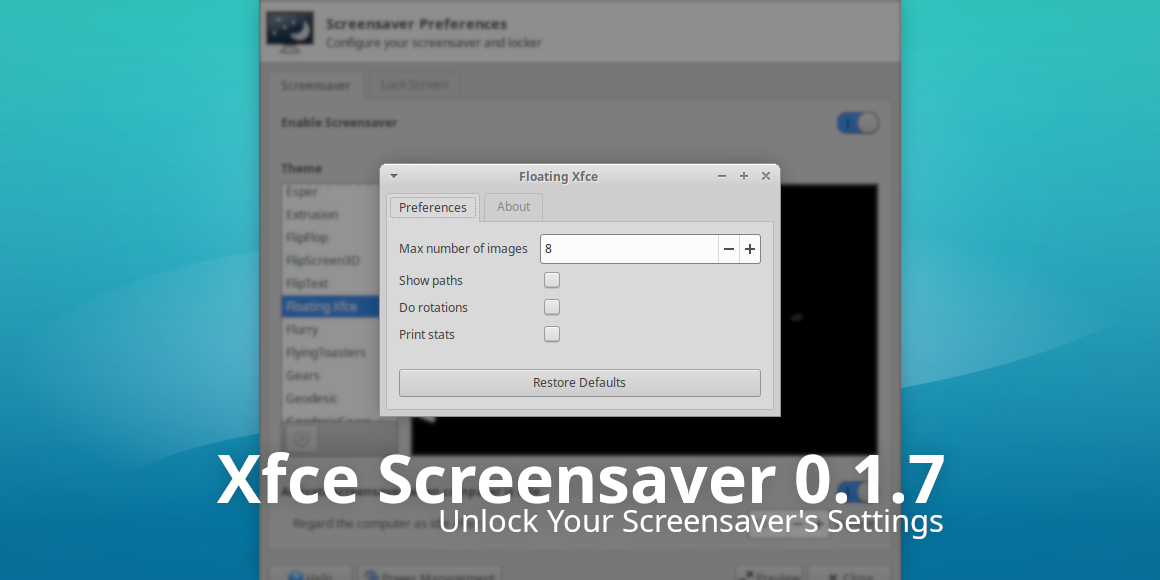
We’ve worked hard optimizing Xfce’s screensaver to give users the best possible lock and screensaver experience in Xfce. With Xfce Screensaver 0.1.7, we’ve dropped even more legacy code while implementing a long-requested feature: per-screensaver configuration!
What’s New?
New Features
- Added support for on-screen keyboards. This option adds a button to the login window to show and hide the keyboard at the bottom of the screen.
- Added per-screensaver configuration. The available options are pulled from the xscreensaver theme file and are stored via Xfconf.
- Improved background drawing when using 2x scaling.
Bug Fixes
- Fixed flickering within the password dialog (0.1.6)
- Fixed various display issues with the password dialog; all themes should now render xfce4-screensaver identically to lightdm-gtk-greeter (0.1.6)
- Fixed confusion between screensaver and lock timeouts (Xfce #15726)
- Removed reference to pkg-config (.pc) file (0.1.6) (Xfce #15597)
Code Cleanup
- Cleaned up kdb-indicator logic (0.1.6)
- Consolidated debug function calls (0.1.6)
- Dropped libXxf86 dependency (MATE Screensaver #199)
- Dropped lots of unused or unneeded code, significantly streamlining the codebase
- Migrated xfce4-screensaver-command to GDBus
- Moved job theme processing out of gs-manager (0.1.6)
- Removed full-screen window shaking on failed login
- Simplified handling of user preferences (0.1.6)
- Simplified lock screen and screensaver activation code
Translation Updates
Armenian (Armenia), Belarusian, Bulgarian, Catalan, Chinese (China), Chinese (Taiwan), Czech, Danish, Dutch, Finnish, French, Galician, German, Hebrew, Hungarian, Italian, Lithuanian, Malay, Norwegian Bokmål, Polish, Portuguese, Portuguese (Brazil), Russian, Spanish, Turkish
Downloads
Source tarball ( md5, sha1, sha256)
Xfce Screensaver 0.1.7 is included in Xubuntu 19.10 “Eoan Ermine,” installed with the xfce4-screensaver package.