News from xfce 4.12, part 2 !
Update 19/02/2015 : A new post is available !
Following my first post about the Xfce development status 4 months ago (you can (re) read it here), let’s go for a bunch of reviews of the last commits.
A little clarifications about comments on my 1st post : I’m NOT a core xfce dev, I’m just a small contributor, who try to help as much as I can.
Note: You can see lots of screenshots about all theses news features on the xfce forum, in the What’s New in Xfce topic from ToZ.
xfce4-power-manager :
- A new xfce4-power-manager release (compatible with xfce 4.10), thanks to Eric Koegell and Simon Steinbeiss
- Provide a better support of systemd and upower
- Brightness plugin has been merged into the battery indicator plugin so a new plugin is born, “Power Manager plugin”
- Some design changes, see screenshots
- The roadmap to 1.5 : https://wiki.xfce.org/design/power-manager
xfdesktop :
- Add a –next option to force wallpaper changes
- Add a move to trash menu option
- Add an –enable-debug option added to xfdesktop-settings
- Add optional blurring on shadow on text of icons, see Screenshots
xfce4-panel :
- Implementation of a intelligent auto-hide functionality by Jannis Pohlmann !
- Whenever the active window changes or whenever the geometry of an already active window changes, the algorithm checks whether the active window and the panel overlap. If this is the case, the panel is hidden. Otherwise, it is made or remains visible.
- A quick demo (only available in git version for now)
xfce4-session :
- Add logind runtime detection to support suspend/hibernate
- Support for upower 0.99
- Add DragonflyBSD to host check
xfce4-settings :
- Reapply settings when external keyboard connects
- New display settings dialog
- Add support for upower 0.99
Thunar :
- Default application not respected with glib >= 2.4
- Check for thumbnails in the location
- Add appdata file
- Add pkexec policy. This way if the user of a desktop system wants to use thunar to modify files as root and has the proper credentials they can.
Apps / Plugins :
- Mousepad and Parole have been ported to gtk3 !
- Partial rewrite of squeeze (Archive manager)
- Multiples releases/bugfixes of xfce4-netload-plugin, xfce4-weather-plugin, xfce4-equake-plugin
Development Releases of core components :
- xfdesktop 4.11.8 : https://mail.xfce.org/pipermail/xfce4-dev/2014-August/030823.html
- xfwm4 4.11.2 : https://mail.xfce.org/pipermail/xfce-announce/2014-July/000329.html
- xfce4-settings 4.11.3 : https://mail.xfce.org/pipermail/xfce-announce/2014-August/000333.html
Maintenances/New Releases (for xfce 4.10 ) :
- Xfce4-power-manager 1.4.1 : see above in this post. http://git.xfce.org/xfce/xfce4-power-manager/tree/NEWS
- xfdesktop 4.10.3 : Release of a maintenance version which fix a lot of bugs. https://mail.xfce.org/pipermail/xfce4-dev/2014-November/030941.html, thanks to Eric Koegel
Others :
- A side note about light-locker, a simple session-locker for lightdm, which work really great with xfce :). If you want a nice and modern locker, try it !
- Debian Jessie will use xfce 4.10 (as 4.12 is not ready on 5th November, the date of Debian Freeze)
- If you are an ArchLinux user, and want to test the devel version of xfce, you can use my [xfce411] repo. NO WARRANTY, support or whatever ! Use it at your own risks. Read the README ;)
- Last minute : A reorganisation of the team is running, to list our current force, identify weak spots (where we urgently need new contributors), welcome new members etc. See https://mail.xfce.org/pipermail/xfce4-dev/2014-November/030946.html for more informations !
Sources :
- Thanks to ToZ on the xfce forum
- The #xfce-dev IRC chan on Freenode, the best way to be involved in Xfce development
- Xfce4 dev list
News from xfce 4.12, part 2 !
Update 19/02/2015 : A new post is available !
Following my first post about the Xfce development status 4 months ago (you can (re) read it here), let's go for a bunch of reviews of the last commits.
A little clarifications about comments on my 1st post : I'm NOT a core xfce dev, I'm just a small contributor, who try to help as much as I can.
Note: You can see lots of screenshots about all theses news features on the xfce forum, in the What's New in Xfce topic from ToZ.
xfce4-power-manager :
- A new xfce4-power-manager release (compatible with xfce 4.10), thanks to Eric Koegell and Simon Steinbeiss
- Provide a better support of systemd and upower
- Brightness plugin has been merged into the battery indicator plugin so a new plugin is born, "Power Manager plugin"
- Some design changes, see screenshots
- The roadmap to 1.5 : https://wiki.xfce.org/design/power-manager
xfdesktop :
- Add a --next option to force wallpaper changes
- Add a move to trash menu option
- Add an --enable-debug option added to xfdesktop-settings
- Add optional blurring on shadow on text of icons, see Screenshots
xfce4-panel :
- Implementation of a intelligent auto-hide functionality by Jannis Pohlmann !
- Whenever the active window changes or whenever the geometry of an already active window changes, the algorithm checks whether the active window and the panel overlap. If this is the case, the panel is hidden. Otherwise, it is made or remains visible.
- A quick demo (only available in git version for now)
xfce4-session :
- Add logind runtime detection to support suspend/hibernate
- Support for upower 0.99
- Add DragonflyBSD to host check
xfce4-settings :
- Reapply settings when external keyboard connects
- New display settings dialog
- Add support for upower 0.99
Thunar :
- Default application not respected with glib >= 2.4
- Check for thumbnails in the location
- Add appdata file
- Add pkexec policy. This way if the user of a desktop system wants to use thunar to modify files as root and has the proper credentials they can.
Apps / Plugins :
- Mousepad and Parole have been ported to gtk3 !
- Partial rewrite of squeeze (Archive manager)
- Multiples releases/bugfixes of xfce4-netload-plugin, xfce4-weather-plugin, xfce4-equake-plugin
Development Releases of core components :
- xfdesktop 4.11.8 : https://mail.xfce.org/pipermail/xfce4-dev/2014-August/030823.html
- xfwm4 4.11.2 : https://mail.xfce.org/pipermail/xfce-announce/2014-July/000329.html
- xfce4-settings 4.11.3 : https://mail.xfce.org/pipermail/xfce-announce/2014-August/000333.html
Maintenances/New Releases (for xfce 4.10 ) :
- Xfce4-power-manager 1.4.1 : see above in this post. http://git.xfce.org/xfce/xfce4-power-manager/tree/NEWS
- xfdesktop 4.10.3 : Release of a maintenance version which fix a lot of bugs. https://mail.xfce.org/pipermail/xfce4-dev/2014-November/030941.html, thanks to Eric Koegel
Others :
- A side note about light-locker, a simple session-locker for lightdm, which work really great with xfce :). If you want a nice and modern locker, try it !
- Debian Jessie will use xfce 4.10 (as 4.12 is not ready on 5th November, the date of Debian Freeze)
- If you are an ArchLinux user, and want to test the devel version of xfce, you can use my [xfce411] repo. NO WARRANTY, support or whatever ! Use it at your own risks. Read the README ;)
- Last minute : A reorganisation of the team is running, to list our current force, identify weak spots (where we urgently need new contributors), welcome new members etc. See https://mail.xfce.org/pipermail/xfce4-dev/2014-November/030946.html for more informations !
Sources :
- Thanks to ToZ on the xfce forum
- The #xfce-dev IRC chan on Freenode, the best way to be involved in Xfce development
- Xfce4 dev list
News from Xfce !
Update 19/11/2014 : A new post is available !
Some news from Xfce, my favourite Desktop Environment, that I use since something like 2006.
The development is relatively slow (the last stable version, 4.10 was released in April 2012). There is not so many developers, 1 or 2 “core” devs, and less than 10 contributors (who are generally distributions maintainers, from debian, xubuntu, gentoo, arch, thanks to them !).
There was a roadmap for 4.12, where it was planned to release 4.12 mid-2013. But, hey, it’s open source, it will be out when “it will be ready” :-).
Some weeks ago, it was decided to establish a list of “critical bugs” to be eradicated in order to release xfce 4.12.
You can find the list here : https://wiki.xfce.org/releng/4.12/roadmap/critical-bugs.
Xfce 4.12 will still use gtk2, with some support of gtk3 for better integration.
Port to gtk3 will maybe be done for the next version.
What will be new in xfce 4.12 ?
All major components are already available in development version (4.11), here are a small list of what to expect :
xfwm4 :
- Zoom mode. I wrote about this cool new feature in december
- New, themable tabwin (alt+tab)

- Changelog at http://git.xfce.org/xfce/xfwm4/tree/NEWS
xfce4-settings :
- The display settings have been much improved with supporting extended desktop mode for 2 monitors and an improve minimal dialog.
- Changelog at http://git.xfce.org/xfce/xfce4-settings/tree/NEWS
xfdesktop :
- Lot of works on xfdesktop, already 6 pre releases!
- Per-workspace wallpapers support (finally !)
- Better multi monitor handling
- Changelog at http://git.xfce.org/xfce/xfdesktop/tree/NEWS
xfce4-panel :
- Support of gtk3 plugins
- Better behavior of buttons/menus
- Changelog at http://git.xfce.org/xfce/xfce4-panel/tree/NEWS
And lot of works on other components, like xfce4-power-manager (systemd support), xfburn, xfce4-mixer etc There is still some works/tests to be done on upower or systemd support for example.
Update : You can see lot of screenshots of new features on the Xfce forum, by ToZ : https://forum.xfce.org/viewtopic.php?id=8945
Buildbot
A new buildbot based on jenkins is available since few days on http://buildbot.xfce.org
Bountysource
It’s easier to copy the mail from Simon Steinbeiß to explain this part :
To get to the point: we see bountysource[2] as an easy way to offer
the community with a way to financially support Xfce. There are two
avenues a backer can choose from.
1) Set a bounty on a specific bug (we've pulled in all the reports for
many components already, so you can easily find them on
bountysource.com)
2) Back the Xfce team
Update: More explanations about bountysource: https://mail.xfce.org/pipermail/xfce4-dev/2014-July/030807.html
So if you are interested yo help Xfce, go to the contribute wiki page !
News from Xfce !
Update 19/11/2014 : A new post is available !
Some news from Xfce, my favourite Desktop Environment, that I use since something like 2006.
The development is relatively slow (the last stable version, 4.10 was released in April 2012). There is not so many developers, 1 or 2 “core” devs, and less than 10 contributors (who are generally distributions maintainers, from debian, xubuntu, gentoo, arch, thanks to them !).
There was a roadmap for 4.12, where it was planned to release 4.12 mid-2013. But, hey, it’s open source, it will be out when “it will be ready” :-).
Some weeks ago, it was decided to establish a list of “critical bugs” to be eradicated in order to release xfce 4.12.
You can find the list here : https://wiki.xfce.org/releng/4.12/roadmap/critical-bugs.
Xfce 4.12 will still use gtk2, with some support of gtk3 for better integration.
Port to gtk3 will maybe be done for the next version.
What will be new in xfce 4.12 ?
All major components are already available in development version (4.11), here are a small list of what to expect :
xfwm4 :
- Zoom mode. I wrote about this cool new feature in december
- New, themable tabwin (alt+tab)
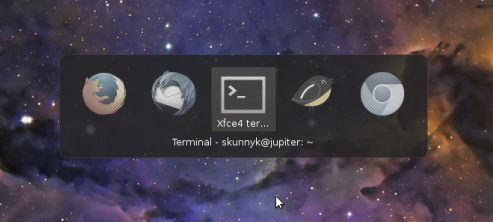
- Changelog at http://git.xfce.org/xfce/xfwm4/tree/NEWS
xfce4-settings :
- The display settings have been much improved with supporting extended desktop mode for 2 monitors and an improve minimal dialog.
- Changelog at http://git.xfce.org/xfce/xfce4-settings/tree/NEWS
xfdesktop :
- Lot of works on xfdesktop, already 6 pre releases!
- Per-workspace wallpapers support (finally !)
- Better multi monitor handling
- Changelog at http://git.xfce.org/xfce/xfdesktop/tree/NEWS
xfce4-panel :
- Support of gtk3 plugins
- Better behavior of buttons/menus
- Changelog at http://git.xfce.org/xfce/xfce4-panel/tree/NEWS
And lot of works on other components, like xfce4-power-manager (systemd support), xfburn, xfce4-mixer etc There is still some works/tests to be done on upower or systemd support for example.
Update : You can see lot of screenshots of new features on the Xfce forum, by ToZ : https://forum.xfce.org/viewtopic.php?id=8945
Buildbot
A new buildbot based on jenkins is available since few days on http://buildbot.xfce.org
Bountysource
It’s easier to copy the mail from Simon Steinbeiß to explain this part :
To get to the point: we see bountysource[2] as an easy way to offer
the community with a way to financially support Xfce. There are two
avenues a backer can choose from.
1) Set a bounty on a specific bug (we've pulled in all the reports for
many components already, so you can easily find them on
bountysource.com)
2) Back the Xfce team
Update: More explanations about bountysource: https://mail.xfce.org/pipermail/xfce4-dev/2014-July/030807.html
So if you are interested yo help Xfce, go to the contribute wiki page !
News from Xfce !
Update 19/11/2014 : A new post is available !
Some news from Xfce, my favourite Desktop Environment, that I use since something like 2006.
The development is relatively slow (the last stable version, 4.10 was released in April 2012). There is not so many developers, 1 or 2 "core" devs, and less than 10 contributors (who are generally distributions maintainers, from debian, xubuntu, gentoo, arch, thanks to them !).
There was a roadmap for 4.12, where it was planned to release 4.12 mid-2013. But, hey, it's open source, it will be out when "it will be ready" :-).
Some weeks ago, it was decided to establish a list of "critical bugs" to be eradicated in order to release xfce 4.12.
You can find the list here : https://wiki.xfce.org/releng/4.12/roadmap/critical-bugs.
Xfce 4.12 will still use gtk2, with some support of gtk3 for better integration.
Port to gtk3 will maybe be done for the next version.
What will be new in xfce 4.12 ?
All major components are already available in development version (4.11), here are a small list of what to expect :
xfwm4 :
- Zoom mode. I wrote about this cool new feature in december
- New, themable tabwin (alt+tab)
- Changelog at http://git.xfce.org/xfce/xfwm4/tree/NEWS
xfce4-settings :
- The display settings have been much improved with supporting extended desktop mode for 2 monitors and an improve minimal dialog.
- Changelog at http://git.xfce.org/xfce/xfce4-settings/tree/NEWS
xfdesktop :
- Lot of works on xfdesktop, already 6 pre releases!
- Per-workspace wallpapers support (finally !)
- Better multi monitor handling
- Changelog at http://git.xfce.org/xfce/xfdesktop/tree/NEWS
xfce4-panel :
- Support of gtk3 plugins
- Better behavior of buttons/menus
- Changelog at http://git.xfce.org/xfce/xfce4-panel/tree/NEWS
And lot of works on other components, like xfce4-power-manager (systemd support), xfburn, xfce4-mixer etc There is still some works/tests to be done on upower or systemd support for example.
Update : You can see lot of screenshots of new features on the Xfce forum, by ToZ : https://forum.xfce.org/viewtopic.php?id=8945
Buildbot
A new buildbot based on jenkins is available since few days on http://buildbot.xfce.org
Bountysource
It's easier to copy the mail from Simon Steinbeiß to explain this part :
To get to the point: we see bountysource[2] as an easy way to offer
the community with a way to financially support Xfce. There are two
avenues a backer can choose from.
1) Set a bounty on a specific bug (we've pulled in all the reports for
many components already, so you can easily find them on
bountysource.com)
2) Back the Xfce team
Update: More explanations about bountysource: https://mail.xfce.org/pipermail/xfce4-dev/2014-July/030807.html
So if you are interested yo help Xfce, go to the contribute wiki page !
Parole Media Player 0.6.1 Released
Parole Media Player 0.6.1 improves the user experience, upgrades playlist search, and includes fixes for DVD device enumeration and M3U file loading.
What’s New?
This release builds on the changes from 0.5.90 and 0.5.91.
General Improvements
- Added “Contents” menu item in the Help menu. Goes to online documentation.
- Removed redundant settings button from the playlist
- Improved search in the playlist
- Plugin API documentation updates
Bug Fixes
- Properly use the specified device, and use the correct URI ( LP: #1098323)
- Fixed crash for m3u files with all absolute paths
Parole Media Player has also been patched in Ubuntu 14.04 to load plugins again properly! ( LP: #1286046, LP: #1168810, Xfce #9904)
Screenshots
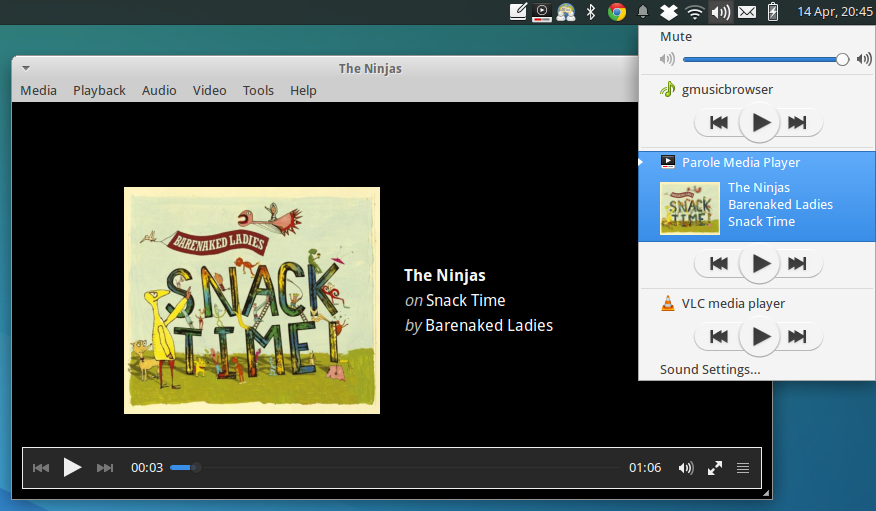
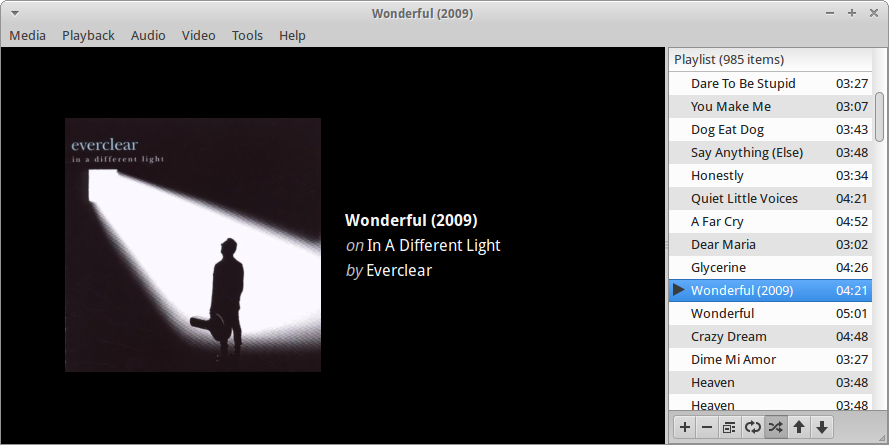

Getting Parole Media Player
Ubuntu 14.04 users will find Parole Media Player 0.6.1 in the repositories.
sudo apt-get update
sudo apt-get install parole
The source files can be downloaded from Parole’s download page for other distributions.
Catfish 1.0.2 Released
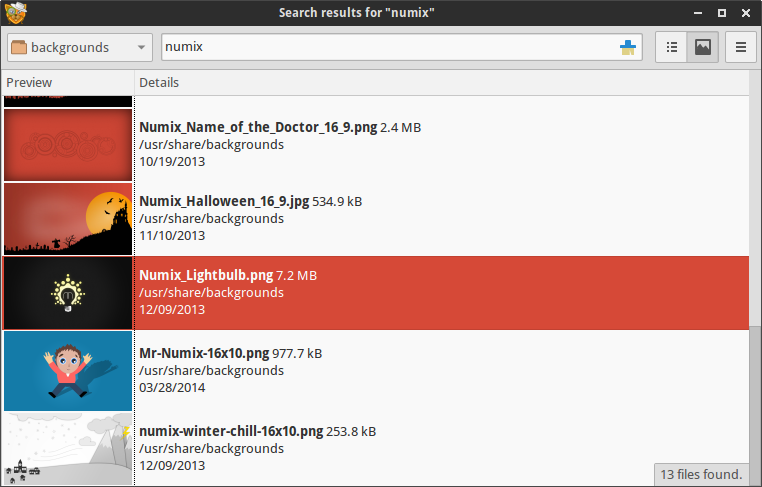
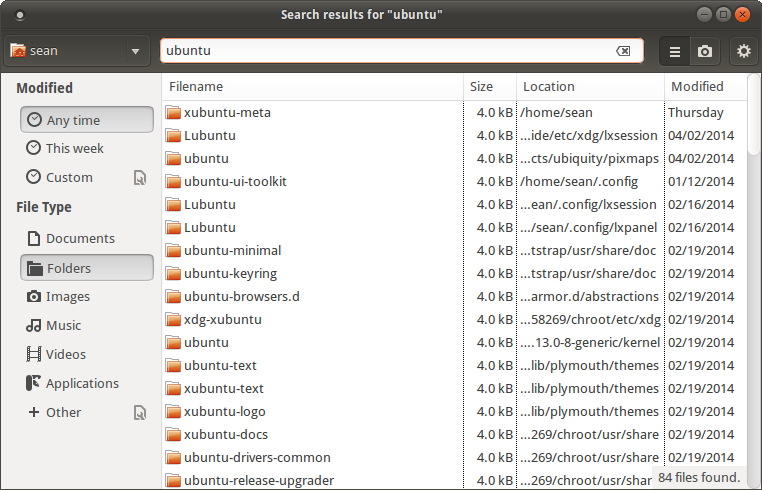
Catfish 1.0.2 has been released with easily accessible view modes and a new search filter for matching directories. More than 20 bug fixes and general improvements round out the release.
What’s New?
I thought the delay in previous release announcements was embarrassing… but several stable releases have been since my last post (0.6.1). I’ll try to keep this brief.
New Features
- Switch to toggle standard and preview modes
- Search filter for directories
General Improvements
- Full Python3 support
- Improved locale and encoding support
- Updated to support the latest PyGObject APIs (minimum 3.6)
- Introduced SudoDialog to handle user authentication (shared with Mugshot)
- Code cleanup, removed unused template code, improved installer
- Improved list logic with item selection
- Interface refresh, mimicking common gnome applications
- Improved handling of symbolic icons
- Improved strings
Bug Fixes
- Fixed CVE-2014-2093 CVE-2014-2094 CVE-2014-2095 CVE-2014-2096 ( Debian #739958, Fedora #1069396)
- Fixed multiple-selection regression ( LP: #1283726)
- Fixed “–thumbnail” startup option ( LP: #1230245)
- Removed embedded copy of pexpect ( LP: #1257500)
- Fixed image loading issues, use icon names available in gnome-icon-theme ( LP: #1258713)
- Fixed untranslatable strings ( LP: #1261181)
- Fixed sidebar width ( LP: #1261185)
- Fixed sidebar coloration ( LP: #1261188)
- Fixed searching mounted shares ( LP: #1274378)
- Fixed PyGObject deprecation warning ( LP: #1228440)
- Fixed python2/3 error that prevented installation ( LP: #1217507)
- Remember sidebar visibility and hidden files toggled ( LP: #1188954)
- Enhanced image thumbnailer ( LP: #1193311)
- Use pexpect and SudoDialog to replace gksu dependency ( LP: #1202085)
- Made Search terms placeholder text translatable ( LP: #1175201)
- Made command line options translateable ( LP: #1175204)
- Fixed crash when directory in PATH does not exist ( LP: #1166079)
- Fixed case sensitivity in search backend ( LP: #1166214)
- Fixed infinite loop when searching for * ( LP: #1165727)
- Fixed executable-not-elf-or-script lintian warnings for Debian packaging
Screenshots
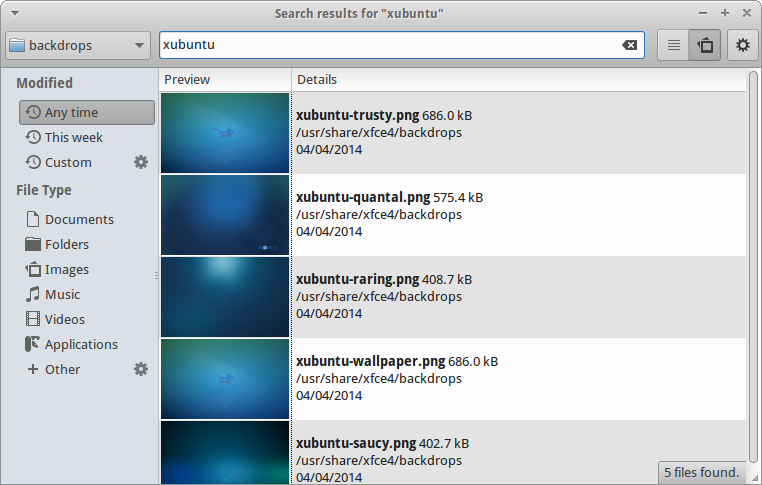
Getting Catfish
Ubuntu Users
If you’re running Ubuntu 12.10 or 13.10, Catfish 1.0.2 is available from the Catfish Stable PPA.
sudo add-apt-repository ppa:catfish-search/catfish-stable
sudo apt-get update
sudo apt-get install catfish
If you’re running Ubuntu 14.04 or newer, Catfish 1.0.2 is available in the Ubuntu repositories.
sudo apt-get update
sudo apt-get install catfish
Everyone Else
You can download the latest source package from the Catfish downloads page if you’re running another Linux distribution.
The bright future of Foresight Linux
Refining Foresight
Why
Foresight is what I use for almost a decade now (and that means almost the whole time since it was created by Ken Vandine).
It was originally based on rPath Linux and Foresight 2.0 still is.
So rpath doesn’t exist anymore (it was aquired by SAS a while ago) and our existing base is getting outdated to a point where maintenance is getting a burden.
How
There were several options to solve this issue.
1) build foresight 3 from scratch
2) rebuild an existing distribution from source and use it as a base
3) base on an existing (vital) distribution
Which one
Actually we discussed all these, but given our manpower we chose to base our new shiny Foresight on Fedora as is, so that we can focus again on providing a stable modern rolling binary distribution.
The Plan and Progress
So what we’re doing is importing all! of Fedora20 into our own repositories using a tool called mirrorball
It will create Sourcepackages for conary containing the matching rpms and srpms and build conary packages from them.
I’m not going into the details here. You can look some up on our foresight-devel mailinglist
The initial import and built is already done and we’re now in the process of creating conary groups from the information of the comps.xml
when that is done it should be possible already to adopt a fresh install of fedora20 for use with conary packagemanager.
Next step will be doing regular updates and imports of the fedora20 repository.
Then we will build foresight on top of this.
Creating groups like we want them, adding artwork and extras. Import rpmfusion repositories until we have a foresight that matches our needs.
And of course finding a way to easily install foresight and convert existing fedora installations.
Why not…
…just use fedora?
Well first we all got to love foresight as a distribution and a community.
And we love conary. Conary is pretty strict when it comes to dependency resolution. We already found packaging issues of fedora20 just by importing and rebuilding it with conary. foresight is a rolling distribution and we hope that with the adopting of fedora we can make it possible to just roll from fedora20 to fedora21 painlessly. Conary has rollbacks since it’s beginning and it’s a great packagemanager that helped us maintaining a rolling binary distribution for almost 10 years now.
The bright future of Foresight Linux
Refining Foresight
Why
Foresight is what I use for almost a decade now (and that means almost the whole time since it was created by Ken Vandine).
It was originally based on rPath Linux and Foresight 2.0 still is.
So rpath doesn’t exist anymore (it was aquired by SAS a while ago) and our existing base is getting outdated to a point where maintenance is getting a burden.
How
There were several options to solve this issue.
1) build foresight 3 from scratch
2) rebuild an existing distribution from source and use it as a base
3) base on an existing (vital) distribution
Which one
Actually we discussed all these, but given our manpower we chose to base our new shiny Foresight on Fedora as is, so that we can focus again on providing a stable modern rolling binary distribution.
The Plan and Progress
So what we’re doing is importing all! of Fedora20 into our own repositories using a tool called mirrorball
It will create Sourcepackages for conary containing the matching rpms and srpms and build conary packages from them.
I’m not going into the details here. You can look some up on our foresight-devel mailinglist
The initial import and built is already done and we’re now in the process of creating conary groups from the information of the comps.xml
when that is done it should be possible already to adopt a fresh install of fedora20 for use with conary packagemanager.
Next step will be doing regular updates and imports of the fedora20 repository.
Then we will build foresight on top of this.
Creating groups like we want them, adding artwork and extras. Import rpmfusion repositories until we have a foresight that matches our needs.
And of course finding a way to easily install foresight and convert existing fedora installations.
Why not…
…just use fedora?
Well first we all got to love foresight as a distribution and a community.
And we love conary. Conary is pretty strict when it comes to dependency resolution. We already found packaging issues of fedora20 just by importing and rebuilding it with conary. foresight is a rolling distribution and we hope that with the adopting of fedora we can make it possible to just roll from fedora20 to fedora21 painlessly. Conary has rollbacks since it’s beginning and it’s a great packagemanager that helped us maintaining a rolling binary distribution for almost 10 years now.
The bright future of Foresight Linux
Refining Foresight
Why
Foresight is what I use for almost a decade now (and that means almost the whole time since it was created by Ken Vandine).
It was originally based on rPath Linux and Foresight 2.0 still is.
So rpath doesn’t exist anymore (it was aquired by SAS a while ago) and our existing base is getting outdated to a point where maintenance is getting a burden.
How
There were several options to solve this issue.
1) build foresight 3 from scratch
2) rebuild an existing distribution from source and use it as a base
3) base on an existing (vital) distribution
Which one
Actually we discussed all these, but given our manpower we chose to base our new shiny Foresight on Fedora as is, so that we can focus again on providing a stable modern rolling binary distribution.
The Plan and Progress
So what we’re doing is importing all! of Fedora20 into our own repositories using a tool called mirrorball
It will create Sourcepackages for conary containing the matching rpms and srpms and build conary packages from them.
I’m not going into the details here. You can look some up on our foresight-devel mailinglist
The initial import and built is already done and we’re now in the process of creating conary groups from the information of the comps.xml
when that is done it should be possible already to adopt a fresh install of fedora20 for use with conary packagemanager.
Next step will be doing regular updates and imports of the fedora20 repository.
Then we will build foresight on top of this.
Creating groups like we want them, adding artwork and extras. Import rpmfusion repositories until we have a foresight that matches our needs.
And of course finding a way to easily install foresight and convert existing fedora installations.
Why not…
…just use fedora?
Well first we all got to love foresight as a distribution and a community.
And we love conary. Conary is pretty strict when it comes to dependency resolution. We already found packaging issues of fedora20 just by importing and rebuilding it with conary. foresight is a rolling distribution and we hope that with the adopting of fedora we can make it possible to just roll from fedora20 to fedora21 painlessly. Conary has rollbacks since it’s beginning and it’s a great packagemanager that helped us maintaining a rolling binary distribution for almost 10 years now.