Remote notifications
This post explains how to get notifications (libnotify) from a remote system. Typically this is useful with an IRC client accessible through SSH.
Prerequisites:
- A notification daemon! (dunst, xfce4-notifyd, etc.)
- socat
- notify-send
apt-get install socat libnotify-bin
On the client, modify the SSH configuration to introduce two elements:
- forward a TCP port,
- execute a local command.
Example entry for ~/.ssh/config:
Host remote-host
    Hostname remote-host.gandi.net
    RemoteForward 12000 localhost:12000
    PermitLocalCommand yes
    LocalCommand socat -u tcp4-listen:12000,reuseaddr,fork,bind=127.0.0.1 exec:$HOME/.local/bin/notify-remote.sh 2>/dev/null &
The fowarded TCP port will be used to netcat notification messages to the local system.
socat is used to bind a port on the local system, it will take the notifcation messages, and write them to the executed shell script notify-remote.sh.
The shell script will then simply call notify-send to display a notification with the default notification daemon.
notify-remote.sh:
#!/bin/sh
delay="5000"

read line
summary="$line"
read line
msg="$line"
read line

if [ "$line" = "" ] && [ "$summary" != "" ]; then
  [ -x "$(which notify-send)" ] && notify-send -u critical -t "$delay" -- "$summary" "$msg"
fi
Now it is possible to connect to the remote host and “write” notifications:
local$ ssh remote-host
remote-host$ echo -e 'SummarynBodynn' | nc 127.0.0.1 12000
Integrate into irssi
Copy the irssi script available bellow to get notifications from hilights, and private messages.
Once the script is copied, execute /script load rnotify.pl inside irssi.
~/.irssi/scripts/autorun/rnotify.pl:
# shamelessly copied from http://git.esaurito.net/?p=godog/bin.git;a=blob;f=rnotify.pl
use strict;
use Irssi;
use HTML::Entities;
use vars qw($VERSION %IRSSI);

$VERSION = "0.01";

%IRSSI = (
    authors     => 'Luke Macken, Paul W. Frields',
    contact     => 'lewk@csh.rit.edu, stickster@gmail.com',
    name        => 'rnotify',
    description => 'Use libnotify to alert user to hilighted messages',
    license     => 'GNU General Public License',
    url         => 'http://lewk.org/log/code/irssi-notify',
);

Irssi::settings_add_str('misc', $IRSSI{'name'} . '_port', '12000');
Irssi::settings_add_bool('misc', $IRSSI{'name'} . '_if_away', 0);

sub is_port_owner {
    my ($port, $uid) = @_;
    my $wanted = sprintf("0100007F:%04X", $port);

    # XXX linux-specific
    open HANDLE, "< /proc/net/tcp" || return 0;
    while(<HANDLE>){
        #   sl  local_address rem_address   st tx_queue rx_queue tr tm->when retrnsmt   uid  timeout inode
        my @splitted = split /s+/;
        my $local = $splitted[2];
        my $remote = $splitted[3];
        my $uid = $splitted[8];

        return 1 if $local eq $wanted and $uid == $<;
    }
    close HANDLE;
    return 0;
}

sub notify {
    my ($server, $summary, $message) = @_;

    $message = HTML::Entities::encode($message);
    $summary = HTML::Entities::encode($summary);

    # echo  escaping
    $message =~ s/\/\\/g;
    $summary =~ s/\/\\/g;

    my $port = Irssi::settings_get_str($IRSSI{'name'} . '_port');

    return if ! is_port_owner($port, $<);

    # check for being away in every server?
    return if $server->{usermode_away} &&
              (Irssi::settings_get_bool($IRSSI{'name'} . '_if_away') == 0);

    # XXX test for other means of doing TCP
    #print("echo '$summaryn$messagenn' | /bin/nc 127.0.0.1 $port");
    system("echo '$summaryn$messagenn' | /bin/nc 127.0.0.1 $port &");

    #my $pid = open(FH, "|-");
    #if( $pid ){
    #    print FH "$summaryn$messagenn";
    #    close(FH) || warn "exited $?";
    #}else{
    #    exec("/bin/nc 127.0.0.1 $port") || warn "can't exec $!";
    #}
}

sub print_text_notify {
    my ($dest, $text, $stripped) = @_;
    my $server = $dest->{server};

    return if (!$server || !($dest->{level} & MSGLEVEL_HILIGHT));
    my $sender = $stripped;
    $sender =~ s/^<.([^>]+)>.+/1/ ;
    $stripped =~ s/^<.[^>]+>.// ;
    my $summary = "Message on $dest->{target}";
    notify($server, $summary, $stripped);
}

sub message_private_notify {
    my ($server, $msg, $nick, $address) = @_;

    return if (!$server);
    notify($server, "Private message from ".$nick, $msg);
}

sub dcc_request_notify {
    my ($dcc, $sendaddr) = @_;
    my $server = $dcc->{server};

    return if (!$dcc);
    notify($server, "DCC ".$dcc->{type}." request", $dcc->{nick});
}

Irssi::signal_add('print text', 'print_text_notify');
Irssi::signal_add('message private', 'message_private_notify');
Irssi::signal_add('dcc request', 'dcc_request_notify');

# vim: et
Remote notifications
This post explains how to get notifications (libnotify) from a remote system. Typically this is useful with an IRC client accessible through SSH.
Prerequisites:
- A notification daemon! (dunst, xfce4-notifyd, etc.)
- socat
- notify-send
apt-get install socat libnotify-bin
On the client, modify the SSH configuration to introduce two elements:
- forward a TCP port,
- execute a local command.
Example entry for ~/.ssh/config:
Host remote-host
    Hostname remote-host.gandi.net
    RemoteForward 12000 localhost:12000
    PermitLocalCommand yes
    LocalCommand socat -u tcp4-listen:12000,reuseaddr,fork,bind=127.0.0.1 exec:$HOME/.local/bin/notify-remote.sh 2>/dev/null &
The fowarded TCP port will be used to netcat notification messages to the local system.
socat is used to bind a port on the local system, it will take the notifcation messages, and write them to the executed shell script notify-remote.sh.
The shell script will then simply call notify-send to display a notification with the default notification daemon.
notify-remote.sh:
#!/bin/sh
delay="5000"

read line
summary="$line"
read line
msg="$line"
read line

if [ "$line" = "" ] && [ "$summary" != "" ]; then
  [ -x "$(which notify-send)" ] && notify-send -u critical -t "$delay" -- "$summary" "$msg"
fi
Now it is possible to connect to the remote host and “write” notifications:
local$ ssh remote-host
remote-host$ echo -e 'Summary\nBody\n\n' | nc 127.0.0.1 12000
Integrate into irssi
Copy the irssi script available bellow to get notifications from hilights, and private messages.
Once the script is copied, execute /script load rnotify.pl inside irssi.
~/.irssi/scripts/autorun/rnotify.pl:
# shamelessly copied from http://git.esaurito.net/?p=godog/bin.git;a=blob;f=rnotify.pl
use strict;
use Irssi;
use HTML::Entities;
use vars qw($VERSION %IRSSI);

$VERSION = "0.01";

%IRSSI = (
    authors     => 'Luke Macken, Paul W. Frields',
    contact     => 'lewk@csh.rit.edu, stickster@gmail.com',
    name        => 'rnotify',
    description => 'Use libnotify to alert user to hilighted messages',
    license     => 'GNU General Public License',
    url         => 'http://lewk.org/log/code/irssi-notify',
);

Irssi::settings_add_str('misc', $IRSSI{'name'} . '_port', '12000');
Irssi::settings_add_bool('misc', $IRSSI{'name'} . '_if_away', 0);

sub is_port_owner {
    my ($port, $uid) = @_;
    my $wanted = sprintf("0100007F:%04X", $port);

    # XXX linux-specific
    open HANDLE, "< /proc/net/tcp" || return 0;
    while(<HANDLE>){
        #   sl  local_address rem_address   st tx_queue rx_queue tr tm->when retrnsmt   uid  timeout inode
        my @splitted = split /\s+/;
        my $local = $splitted[2];
        my $remote = $splitted[3];
        my $uid = $splitted[8];

        return 1 if $local eq $wanted and $uid == $<;
    }
    close HANDLE;
    return 0;
}

sub notify {
    my ($server, $summary, $message) = @_;

    $message = HTML::Entities::encode($message);
    $summary = HTML::Entities::encode($summary);

    # echo \ escaping
    $message =~ s/\\/\\\\/g;
    $summary =~ s/\\/\\\\/g;

    my $port = Irssi::settings_get_str($IRSSI{'name'} . '_port');

    return if ! is_port_owner($port, $<);

    # check for being away in every server?
    return if $server->{usermode_away} &&
              (Irssi::settings_get_bool($IRSSI{'name'} . '_if_away') == 0);

    # XXX test for other means of doing TCP
    #print("echo '$summary\n$message\n\n' | /bin/nc 127.0.0.1 $port");
    system("echo '$summary\n$message\n\n' | /bin/nc 127.0.0.1 $port &");

    #my $pid = open(FH, "|-");
    #if( $pid ){
    #    print FH "$summary\n$message\n\n";
    #    close(FH) || warn "exited $?";
    #}else{
    #    exec("/bin/nc 127.0.0.1 $port") || warn "can't exec $!";
    #}
}

sub print_text_notify {
    my ($dest, $text, $stripped) = @_;
    my $server = $dest->{server};

    return if (!$server || !($dest->{level} & MSGLEVEL_HILIGHT));
    my $sender = $stripped;
    $sender =~ s/^\<.([^\>]+)\>.+/\1/ ;
    $stripped =~ s/^\<.[^\>]+\>.// ;
    my $summary = "Message on $dest->{target}";
    notify($server, $summary, $stripped);
}

sub message_private_notify {
    my ($server, $msg, $nick, $address) = @_;

    return if (!$server);
    notify($server, "Private message from ".$nick, $msg);
}

sub dcc_request_notify {
    my ($dcc, $sendaddr) = @_;
    my $server = $dcc->{server};

    return if (!$dcc);
    notify($server, "DCC ".$dcc->{type}." request", $dcc->{nick});
}

Irssi::signal_add('print text', 'print_text_notify');
Irssi::signal_add('message private', 'message_private_notify');
Irssi::signal_add('dcc request', 'dcc_request_notify');

# vim: et
Parole Media Player 0.5.91 Released
Today I wrap up my week-long “staycation” with the release of Parole Media Player 0.5.91. The media player with the curious name (“parole” means “lyrics” in Italian) continues its steady march towards 0.6 with a new plugin and several fixes.
Release Notes
- Added a new MPRIS2 plugin, thanks to Matias and Hakan (of Pragha fame)
- Added RealMedia video to supported video mime types (bug #10434)
- Fixed untranslatable strings (bug #10418)
- Fixed loading of playlists with relative paths (bug #10436)
- Fixed plugin installation on some platforms (bugs #10142, #10441)
- Fixed failing debug builds on some platforms (bug #10525)
- Fixed broken “Remove Duplicates” functionality
- Fixed playlist searching
- Started Plugin API documentation updates (more on this ahead)
New MPRIS2 Plugin
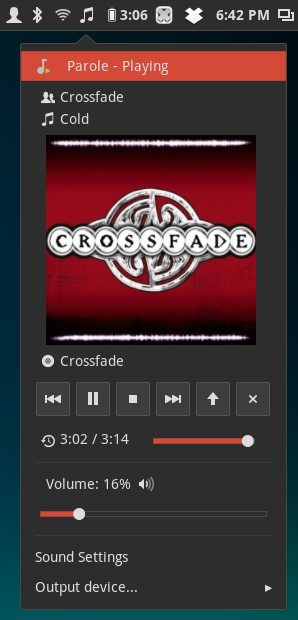
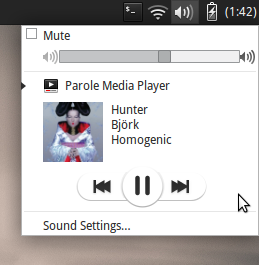
This latest addition is thanks to the hard work of Matias and Hakan, who provided the majority of the effort to create the MPRIS2 plugin. The Media Player Remote Interface Specification (MPRIS) is a standard DBUS interface for controlling media players.
Implementations can be found in most desktop environments, such as the Ubuntu Sound Indicator, the GNOME Shell Media Player extension, and the upcoming Xfce Sound Panel Applet.
Download and Installation
Source packages of Parole Media Player can be downloaded from the Xfce archives. Parole Media Player 0.5.91 can be downloaded directly from here.
Additionally, updated packages should soon arrive in the Xfce 4.12 PPA for Ubuntu users. Exercise caution in enabling this PPA as it contains development packages not meant for the everyday user.
If you encounter any bugs, please report them following our bug reporting guidelines.
Looking for Help
Are you familiar with Gtk documentation tools (gtk-doc)? We’re trying to complete our Plugin API documentation and can use some more experienced individuals to help us out. If interested, let us know in the comments or even send us a merge request. Any help is appreciated!
Relaunch
I finally decided to redo my website, and ditch WordPress in favor of a
static site generator (I decided to use Jekyll).
I also took the opportunity to simplify the design.
There’s a bit more to do, and likely some broken links here and there
(not to mention some broken WP-to-markdown conversion), but it’s time I
finally got this done.
In theory, I’ll start blogging again as well, but… we’ll see.
Relaunch
I finally decided to redo my website, and ditch WordPress in favor of a
static site generator (I decided to use Jekyll).
I also took the opportunity to simplify the design.
There's a bit more to do, and likely some broken links here and there
(not to mention some broken WP-to-markdown conversion), but it's time I
finally got this done.
In theory, I'll start blogging again as well, but… we'll see.
Xfce – Xfwm4 zoom mode in 4.12
Xfce is my main desktop environment since more than 6 years, and I really like it. I try to make some patch from time to time, and if you search a project to contribute, it’s here ;-)
The core team is really small (2 or 3 people), so development evolves rather slowly, and the 4.12 will be released when it is ready.
One of the latest feature is the implementation of a compositor zoom, like the compiz ezoom plugin, from an external developper ( see this thread).
Here a little video with latest git version ( from http://git.xfce.org/xfce/xfwm4/ ). You just need to press ALT and scroll up/down to zoom in/out.
(yeah, it’s an excuse to test the html5 <video> balise with ogv file ;)).
I will try to make some blog posts about new features in xfce world for the upcoming 4.12 (in 2014 I hope!), stay tuned !
Xfce – Xfwm4 zoom mode in 4.12
Xfce is my main desktop environment since more than 6 years, and I really like it. I try to make some patch from time to time, and if you search a project to contribute, it’s here ;-)
The core team is really small (2 or 3 people), so development evolves rather slowly, and the 4.12 will be released when it is ready.
One of the latest feature is the implementation of a compositor zoom, like the compiz ezoom plugin, from an external developper ( see this thread).
Here a little video with latest git version ( from http://git.xfce.org/xfce/xfwm4/ ). You just need to press ALT and scroll up/down to zoom in/out.
(yeah, it’s an excuse to test the html5 <video> balise with ogv file ;)).
I will try to make some blog posts about new features in xfce world for the upcoming 4.12 (in 2014 I hope!), stay tuned !
Xfce – Xfwm4 zoom mode in 4.12
Xfce is my main desktop environment since more than 6 years, and I really like it. I try to make some patch from time to time, and if you search a project to contribute, it’s here ;-)
The core team is really small (2 or 3 people), so development evolves rather slowly, and the 4.12 will be released when it is ready.
One of the latest feature is the implementation of a compositor zoom, like the compiz ezoom plugin, from an external developper ( see this thread).
Here a little video with latest git version ( from http://git.xfce.org/xfce/xfwm4/ ). You just need to press ALT and scroll up/down to zoom in/out.
(yeah, it’s an excuse to test the html5 <video> balise with ogv file ;)).
I will try to make some blog posts about new features in xfce world for the upcoming 4.12 (in 2014 I hope!), stay tuned !
Xfce – Xfwm4 zoom mode in 4.12
Xfce is my main desktop environment since more than 6 years, and I really like it. I try to make some patch from time to time, and if you search a project to contribute, it's here ;-)
The core team is really small (2 or 3 people), so development evolves rather slowly, and the 4.12 will be released when it is ready.
One of the latest feature is the implementation of a compositor zoom, like the compiz ezoom plugin, from an external developper ( see this thread).
Here a little video with latest git version ( from http://git.xfce.org/xfce/xfwm4/ ). You just need to press ALT and scroll up/down to zoom in/out.
(yeah, it's an excuse to test the html5
I will try to make some blog posts about new features in xfce world for the upcoming 4.12 (in 2014 I hope!), stay tuned !
Parole Media Player 0.5.90 Released
It’s been a while since my most recent post. Since then, I’ve become an official Ubuntu member, Ubuntu (and family) 13.10 was released, and I’ve been hacking on Parole Media Player. Today’s news, however, is all about Parole.
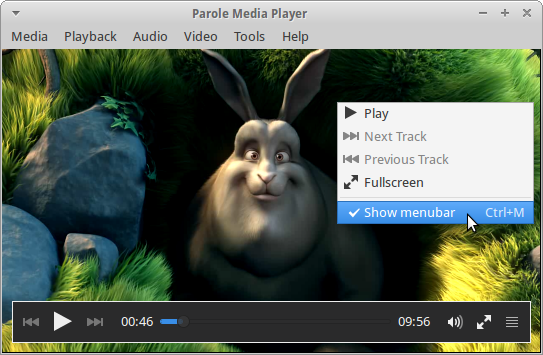
GTK+ 3, GStreamer 1.0, and Bug Fixes Galore
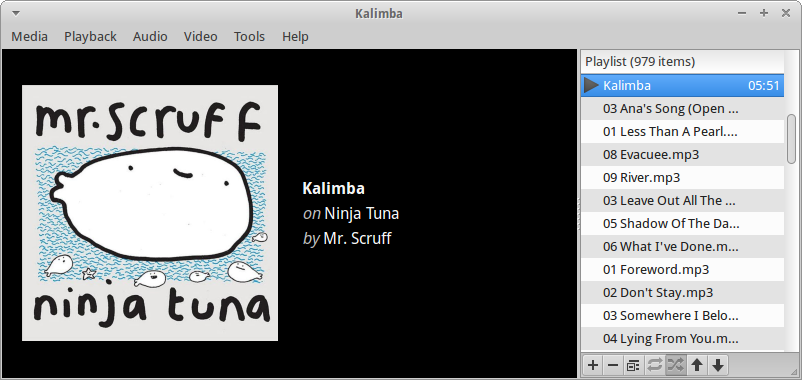
Today marks the first development release of Parole Media Player 0.6 (version 0.5.90). Over the past few weeks, Simon Steinbeiß and I have been focusing our development efforts on bringing together a shiny new version of Parole. We’ve completed porting and refreshing the interface to GTK+ 3, improved GStreamer 1.0 support to the point that we now recommend it instead of 0.10, and fixed many long-standing issues. Here’s the Changelog…
Completed port to GTK+ 3
- Removed deprecated GTK+ 2 symbols
- Use GtkOverlay for the playback controls
- Use symbolic icons for menus and plugins
Improve window maximization
- Window dimensions are no longer saved when maximizing the window
- Added a new Xfconf setting, “window-maximized” to keep your preferred maximization across sessions
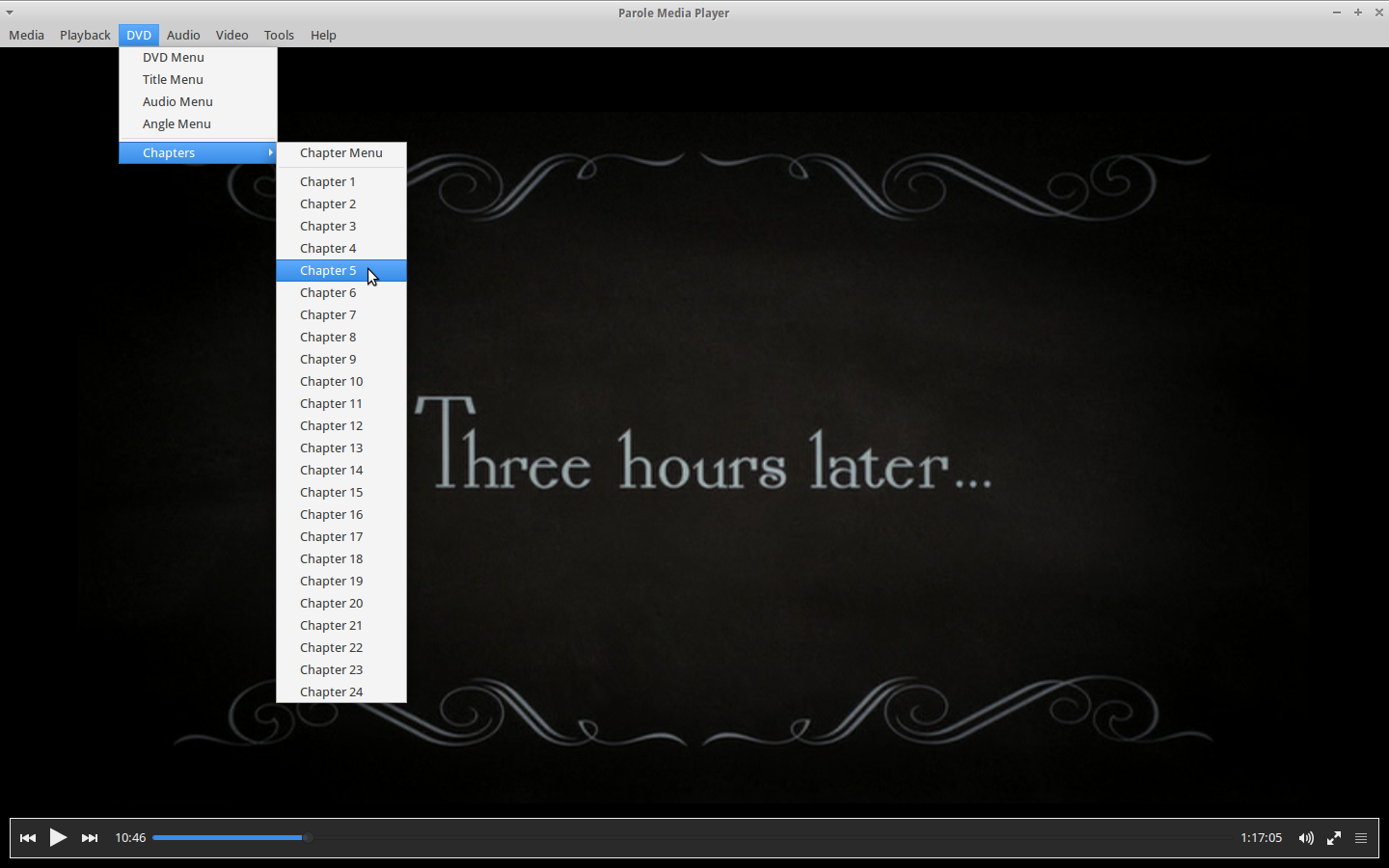
Rearranged and improved the menubar
- Renamed the “Edit” menu to “Playback”
- Renamed the “Languages” menu item to “Audio Track”
- Added a new “Tools” menu; moved the “Plugins” and “Preferences” menu items to the “Tools” menu
- Added a new “DVD” menu, which houses DVD playback controls and is only shown when a disc is being played
- Added the “Save Playlist” menu item to the “Media” menu
- Added the “Report Bug” menu item to the “Help” menu
Improved the playlist
- Use an inline toolbar for a more streamlined experience
- Removed the redundant Settings button
- Added Move Up/Down buttons to make reorganizing the playlist easier
Added Previous/Next track actions to the Tray and Notification plugins
Other improvements
- Updated artwork (background image, icons)
- Fixed GStreamer 1.0 support
- Added ability to play DVD ISO files from the Open Dialog
- Improved plugin failure detection so users know something has gone wrong
Bugs fixed
- Missing option to open DVD from ISO ( Bugzilla #10300)
- Allow a playlist to be sorted and/or items to be moved ( Bugzilla #10066)
- Remember playlist option in GUI is not working ( Bugzilla #10269)
- Parole shows irritating edge ( Bugzilla #10081)
Build Requirements
Parole Media Player now has the following requirements (please correct me if I am wrong):
- GTK+ 3.2 or above
- GLib 2.32 or above
- Gio 2.28 or above
- DBus 0.60 or above
- DBus Glib 0.70 or above
- GStreamer: base, video, interface and GStreamer X version 0.10.24 or above
- libxfce4ui 4.11.0 or above
- libxfce4util 4.11.0 or above
Screenshots
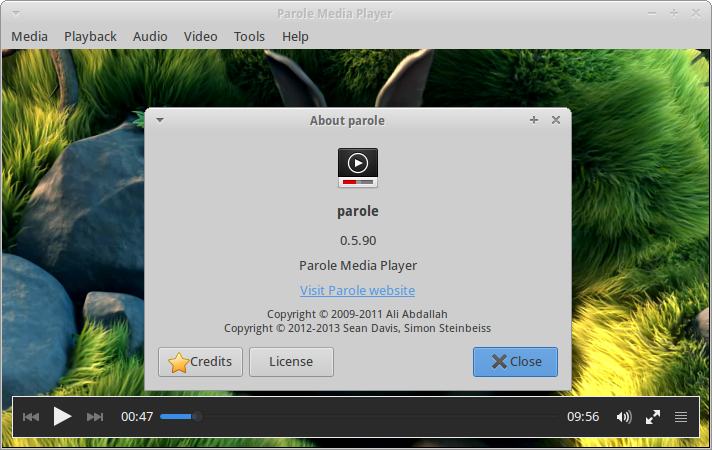

How Do Get It?
To get Parole 0.5.90, download the source files from here. Take notice of the new build requirements listed above.
For Ubuntu users, you can get Parole Media Player from my daily PPA:
sudo add-apt-repository ppa:smd-seandavis/xfce-4.12-daily
sudo apt-get update
sudo apt-get install parole
What about GTK+ 2?
All future development efforts will be focused on Parole 0.6 and GTK+ 3. Bug fixes will be provided for the last GTK+ 2 version 0.5.x in the 0.5 branch.
Feedback Requested
We’re doing everything to make Parole 0.6.0 the best release yet. But we need your feedback.
- Found a bug? Please report it at the Xfce Bugzilla, but check here first.
- Do you have a suggestion or question, or want to let us know how we’re doing? Leave a comment, find me on Google+, or contact me on Launchpad.