Moving from Unique to GtkApplication
A new class has been introduced in GTK+3 that is GtkApplication, and GApplication with GIO 2.28. A common use case is to have a single window present every time the same application or command line is run, that is also known as process uniqueness. This is already possible with Unique that was especially developed for single instance applications. This very basic post will show an example in C with Unique, and also how to do it with GtkApplication, where you will see that GtkApplication makes things even easier.First of all, the documentation available from the GIO source code doesn't give a concrete example for process uniqueness with GApplication. There are mainly examples about using GApplication with GSimpleAction, that is pretty cool since it lets you easily define actions to run on the primary instance outside of the process, either with the same program or a different one.
Single window with Unique
In the following example, a UniqueApp class is instantiated, then it's checked against another running instance. If not, a window is created and a handle is connected to the UniqueApp object to react on received messages. Otherwise a message is sent, and the existing instance will execute the connected handle and put the window in front.#include <unique/unique.h>
#include <gtk/gtk.h>
static UniqueResponse
cb_unique_app (UniqueApp *app,
gint command,
UniqueMessageData *message_data,
guint time_,
gpointer user_data)
{
GtkWidget *window = user_data;
if (command != UNIQUE_ACTIVATE)
{
return UNIQUE_RESPONSE_PASSTHROUGH;
}
gtk_window_present (GTK_WINDOW (window));
return UNIQUE_RESPONSE_OK;
}
gint main (gint argc, gchar *argv[])
{
GtkWidget *window;
UniqueApp *app;
gtk_init (&argc, &argv);
app = unique_app_new ("info.mmassonnet.UniqueExample", NULL);
if (unique_app_is_running (app))
{
if (unique_app_send_message (app, UNIQUE_ACTIVATE, NULL) == UNIQUE_RESPONSE_OK)
{
g_object_unref (app);
return 0;
}
}
window = gtk_window_new (GTK_WINDOW_TOPLEVEL);
gtk_widget_show (window);
gtk_main ();
return 0;
}
Single window with GtkApplication
In this example, a GtkApplication class is instantiated. This one is then registered, and a check is done to know if the running process is the primary one or a remote one. Just like in the previous example, either the process is the main one and a window is created and shown, otherwise a signal is sent and the connected handle will put the window in front. The handle used here is directly a GTK function that presents the window which spares the need to write a custom handler.#include <gtk/gtk.h>In both examples there is just one difference, it is how the primary process is seen. With Unique there is a function to know if another instance is running, while with GtkApplication there is a function to know if the current process is not the primary one e.g. a remote instance. I prefer the second approach, since with Unique if there is only one instance running, the is_running property will tell you false but the primary instance is running, isn't it? But anyhow, as you can see, it is possible to implement painlessly what is done by Unique with GtkApplication.
gint main (gint argc, gchar *argv[])
{
GtkWidget *window;
GtkApplication *app;
GError *error = NULL;
gtk_init (&argc, &argv);
app = gtk_application_new ("info.mmassonnet.GtkExample", 0);
g_application_register (G_APPLICATION (app), NULL, &error);
if (error != NULL)
{
g_warning ("Unable to register GApplication: %s", error->message);
g_error_free (error);
error = NULL;
}
if (g_application_get_is_remote (G_APPLICATION (app)))
{
g_application_activate (G_APPLICATION (app));
g_object_unref (app);
return 0;
}
window = gtk_window_new (GTK_WINDOW_TOPLEVEL);
gtk_widget_show (window);
g_signal_connect_swapped (app, "activate", G_CALLBACK (gtk_window_present), dialog);
gtk_main ();
return 0;
}
Catfish 0.6.1 Released
It’s been out for a while now and seems to work well for everyone who’s tested it. Catfish 0.6.1 has been released and is the greatest and fastest version yet.
What’s New in the Catfish 0.6 Series?
Considering I never “officially” announced the 0.6.0 release, there’s quite a bit to go on. Here are some updates from the Changelog.
- Rewritten from the ground up, with an emphasis on speed and maintainability.
- Replaced the ‘find’ system command with Python’s own os.walk.
- The interface has been revamped, improving the 0.4 series and bringing a styled sidebar and symbolic icons.
- Thumbnail support has been improved.
- Filenames can be dragged and dropped from the Catfish application.
- Files can now be deleted directly from the application interface.
- Operations can now be performed on multiple files simultaneously (including the two new features mentioned above).
- Improved wildcard support.
- Simplified strings for easier translation.
- And finally, Python versions 2 or 3 can be used.
Demo Video
Screenshots are boring and don’t show the power and speed of Catfish 0.6.1. So here’s the latest version in a great demo video.
PPA Available for Ubuntu 12.04, 12.10, and 13.04
If you want to install the latest version of Ubuntu (or Lubuntu, Kubuntu, Xubuntu, Mint, etc.), add the Catfish-Stable PPA.
sudo add-apt-repository ppa:catfish-search/catfish-stable
sudo apt-get update
sudo apt-get install catfish
Xfdesktop 4.10.2
Xfdesktop 4.10.1 introduced a regression which triggered 100% CPU usage when using a solid color as background. This is fixed with this new release, sorry for the inconvenience.
Full changelog:
- Fix hang when no backdrop image is selected (Bug #9892).
- Fix tiling for some images.
Xfdesktop 4.10.2
Xfdesktop 4.10.1 introduced a regression which triggered 100% CPU usage when using a solid color as background. This is fixed with this new release, sorry for the inconvenience.
Full changelog:
- Fix hang when no backdrop image is selected (Bug #9892).
- Fix tiling for some images.
Xfdesktop 4.10.2
Xfdesktop 4.10.1 introduced a regression which triggered 100% CPU usage when using a solid color as background. This is fixed with this new release, sorry for the inconvenience.
Full changelog:
- Fix hang when no backdrop image is selected (Bug #9892).
- Fix tiling for some images.
Parole Media Player 0.5.0 Released
Parole Media Player 0.5.0 has been released, several bugs have been fixed, and new features have been introduced. With each release, Parole becomes more stable and user-friendly.
What’s New?
This release mostly addresses a number of bugs that have been plaguing users and introduces a few new features and refinements.
- Fixed some build errors and concerns (bugs #9728 and #9744).
- The show/hide playlist button is now stationary. The window expands and shrinks to accommodate the playlist (bug #9755).
- The mute button now works as a “Toggle Mute On/Off” button (bug #9760).
- The playlist is no longer manipulable while hidden (bug #9762).
- Added full webm file support (bug #9798).
- Fixed aspect ratio calculation (bug #9872).
- Fixed some previously untranslatable strings (bug #9868).
- The timer now updates immediately when seeking (bug #9761).
- Fixed the playlist menu opening offscreen.
- Improved the tray and notifications plugins.
- Locale names are now displayed instead of the codes for audio tracks and subtitles.
- Added (optional) GStreamer 1.0 support.
- Added theming to the player control when in fullscreen (see screenshot below).
- Removed the Power Manager plugin now that Parole has full power-manager support built-in.
- Removed the scrollwheel event from the progress scale.
- Additional minor improvements.
New Feature Screenshots
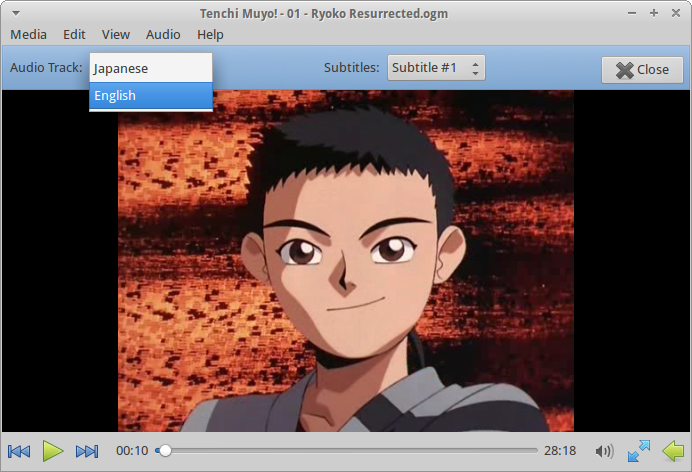


Download Parole Media Player 0.5.0
Ubuntu 13.04 users, rejoice! Parole is now available in the repositories. Everyone else, you can download the source code from the following links.
- http://archive.xfce.org/src/apps/parole/0.5/parole-0.5.0.tar.bz2
- http://archive.xfce.org/src/apps/parole/0.5/parole-0.5.0.tar.bz2.md5
- http://archive.xfce.org/src/apps/parole/0.5/parole-0.5.0.tar.bz2.sha1
SHA1 checksum: c34a33f92534a93c4cb1b92c4c8ab09f36871fe6
MD5 checksum: d8adad20ee95dfca3082812ca44be122
Contributing
If you’re interested in helping out with the development of Parole Media Player, there’s a number of ways you can help. The easiest, by far, is by reporting bugs at the Xfce Bugzilla. If you’re having difficulties, there’s a good possibility you’re not alone. So go ahead, and let us know what’s up! Similarly, we’re always in need of development support. If you’ve got some programming chops, head on over to the git repository! Finally, one of our (perhaps lofty) goals for the next version of Parole is documentation. If you’re experienced at creating useful and understandable documentation, or if you’re just ready to start, we’ve got a clean canvas waiting for you are the Xfce Documenation site.
So, what do you think of the latest Parole? Is it good? Bad? Let us know in the comments!
Xfdesktop 4.10.1
I just released Xfdesktop 4.10.1 which contains some bug fixes and updated translations which had been there for months. Congratulations to Eric Koegel who committed most of them!
Amongst others, fixed background cycling and improved menu icons' loading are appreciated.
Changelog
- Add a tabs width of padding for tooltip text (Bug #9162).
- Fix theming of removable devices' icons (Bug #8977).
- SVG images are no longer pixilated when scaled up.
- Improve menu icon loading (Bug #8795).
- Fix background cycling (Bug #8962).
- Fix a crash when minimized window icons are resized (Bug #8963).
- Fix use after free error in xfdesktop_regular_file_icon_peek_tooltip (Bug #9059).
- Translation updates: Arabic, Bulgarian, Croatian, Dutch, Greek, Korean, Polish, Russian, Serbian, Turkish and Uyghur.
Xfdesktop 4.10.1
I just released Xfdesktop 4.10.1 which contains some bug fixes and updated translations which had been there for months. Congratulations to Eric Koegel who committed most of them!
Amongst others, fixed background cycling and improved menu icons' loading are appreciated.
Changelog
- Add a tabs width of padding for tooltip text (Bug #9162).
- Fix theming of removable devices' icons (Bug #8977).
- SVG images are no longer pixilated when scaled up.
- Improve menu icon loading (Bug #8795).
- Fix background cycling (Bug #8962).
- Fix a crash when minimized window icons are resized (Bug #8963).
- Fix use after free error in xfdesktop_regular_file_icon_peek_tooltip (Bug #9059).
- Translation updates: Arabic, Bulgarian, Croatian, Dutch, Greek, Korean, Polish, Russian, Serbian, Turkish and Uyghur.
Xfdesktop 4.10.1
I just released Xfdesktop 4.10.1 which contains some bug fixes and updated translations which had been there for months. Congratulations to Eric Koegel who committed most of them!
Amongst others, fixed background cycling and improved menu icons' loading are appreciated.
Changelog
- Add a tabs width of padding for tooltip text (Bug #9162).
- Fix theming of removable devices' icons (Bug #8977).
- SVG images are no longer pixilated when scaled up.
- Improve menu icon loading (Bug #8795).
- Fix background cycling (Bug #8962).
- Fix a crash when minimized window icons are resized (Bug #8963).
- Fix use after free error in xfdesktop_regular_file_icon_peek_tooltip (Bug #9059).
- Translation updates: Arabic, Bulgarian, Croatian, Dutch, Greek, Korean, Polish, Russian, Serbian, Turkish and Uyghur.
Xfdesktop 4.10.1
I just released Xfdesktop 4.10.1 which contains some bug fixes and updated translations which had been there for months. Congratulations to Eric Koegel who committed most of them!
Amongst others, fixed background cycling and improved menu icons' loading are appreciated.
Changelog
- Add a tabs width of padding for tooltip text (Bug #9162).
- Fix theming of removable devices' icons (Bug #8977).
- SVG images are no longer pixilated when scaled up.
- Improve menu icon loading (Bug #8795).
- Fix background cycling (Bug #8962).
- Fix a crash when minimized window icons are resized (Bug #8963).
- Fix use after free error in xfdesktop_regular_file_icon_peek_tooltip (Bug #9059).
- Translation updates: Arabic, Bulgarian, Croatian, Dutch, Greek, Korean, Polish, Russian, Serbian, Turkish and Uyghur.