Catfish 0.6 Released
Catfish 0.6 features a complete rewrite, easier translations, and better-than-ever stability and performance. It also needs your help if you speak a language other than English.
What’s New in Catfish 0.6?
- Completely rewritten from the ground up.
- The UNIX ‘find’ command has been replaced with Python’s os.walk. This makes everything faster and more responsive. The “Deep Search” button is also gone.
- The sidebar now uses the theme style and symbolic icons (when available).
- The interface has also had a number of other tweaks, further refining it into a professional-grade application.
- File names can now be dragged from the search results into other applications.
- Files can now be deleted from the results window.
- To speed things up, these above items and other file actions can now be performed simultaneously on multiple files.
- Strings have been simplified and made clearer, making the application easier to translate into other languages.
- Last but not least, this is the first version of Catfish that can be run with either Python 2 or 3.
Translations Needed
With the newly optimized interface and strings, there’s a need for new translations. There are more strings than ever before, and I think the number of users is growing as well. As such, there is a growing need for more localizations than ever before. And all of the old translations are no longer compatible.
So, if you or a friend are interested in contributing, improving, or suggesting translations for the next release, check out the Launchpad translations page! With their handy interface, creating and modifying translations is really as simple as can be. And hurry because this next release will likely happen this weekend and will include all completed translations!
What About the Code?
If you’re interested in looking at or testing the code, you can check it out here. If you find any bugs, be sure to report them on the Launchpad bugs page.
Thanks for your interest in Catfish! What do you think? Let me know in the comments!
Parole 0.4.0 is out!
A new awesome release of the Parole media player for Xfce is out and ships all the hard work of Sean Davis and Simon Steinbeiss.
Sean wrote an extensive description of this new release on his blog, with tons of screenshots. As stated there, do not hesitate to give them feedback on this new release and to file any issue you may have on the Xfce Bugzilla.
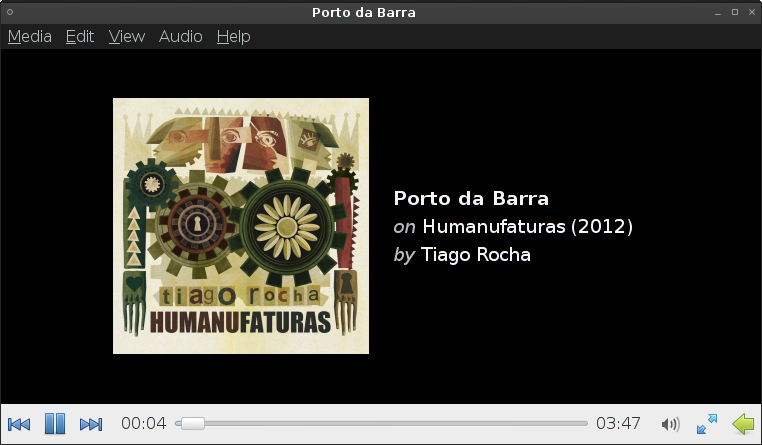
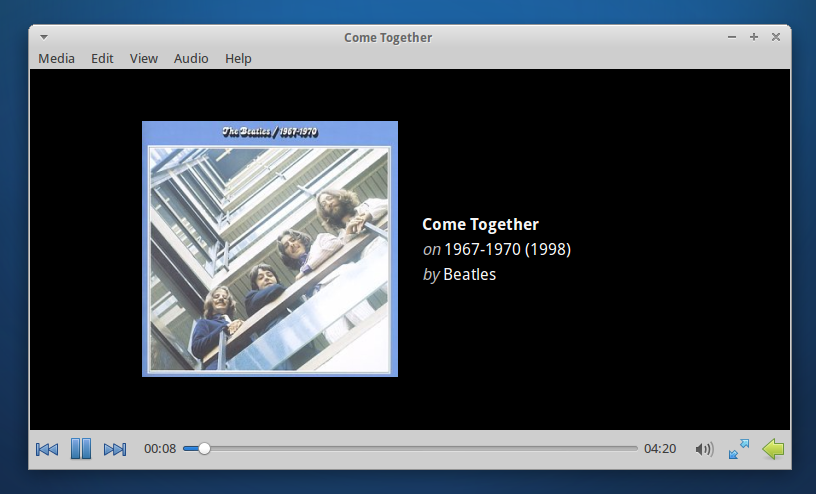
Here is a screenshot of the new very nice main view while playing an audio file:
Congratulations to Sean and Simon for this excellent work!
Parole Media Player 0.4.0 Released
Parole Media Player 0.4.0 has finally been released, with many new features and fixes. Here’s what’s new and what it should do.
Bug Fixes
- Fixed compilation bugs #9219 and #9226.
- Fullscreen controls are now displayed on the proper monitor (bug #9270).
- Fixed screensaver inhibition (bug #7407).
- Fixed a bug where Parole would freeze on some subtitles (bug #9194).
- Fixed a bug where Parole would skip every second ogg-vorbis file in the playlist (bug #9562).
New Features and Fixes
- File and location history
- Embedded mode
- Missing codec detection and installation
- Custom subtitle loading
- CD and DVD playlist support
- DVD navigation
- New look for audio formats
- New notification plugin
- Configuration ported to Xfconf
- Improved keyboard shortcuts
File and Location History
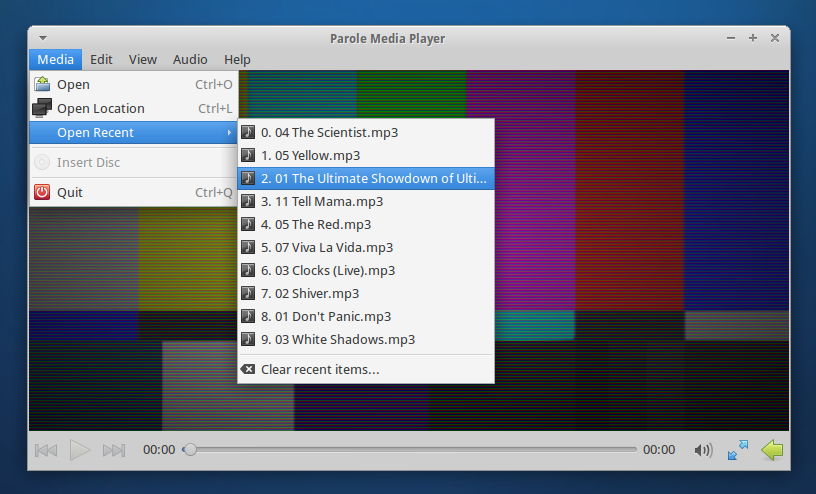
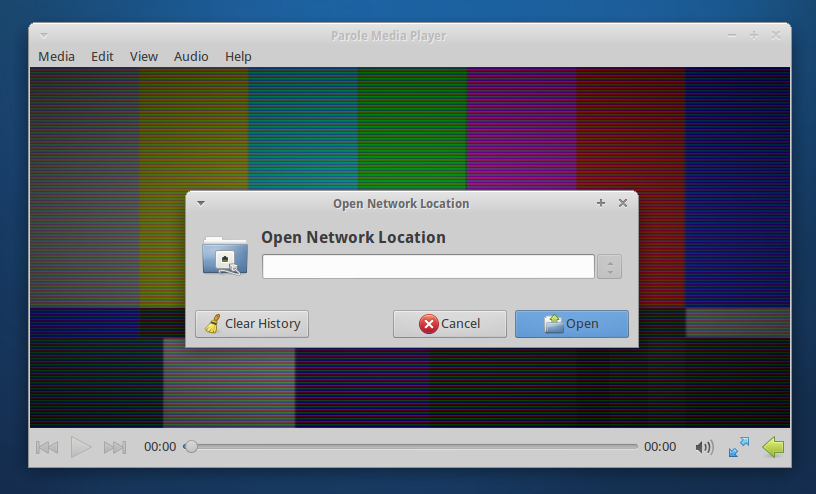
Recent files are now easily accessible. “Recent files” has been added to the Media menu. The “Open Location” dialog has also been greatly improved. Additionally, history can be easily cleared.
Embedded Mode
“Embedded Mode” has been a long-requested feature that would trim away bits of the interface for embedding into other applications (e.g. web browsers). To start Parole in embedded mode, simply use the following command: parole --embedded
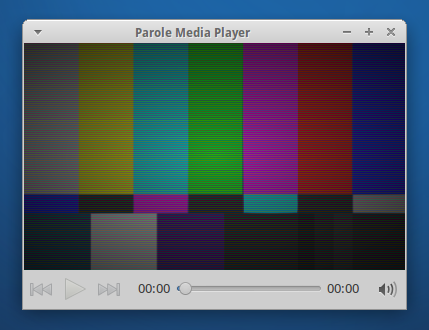
Missing Codec Detection and Installation
Another long-requested feature, Parole can now detect if your system is missing a necessary codec and install it as well.
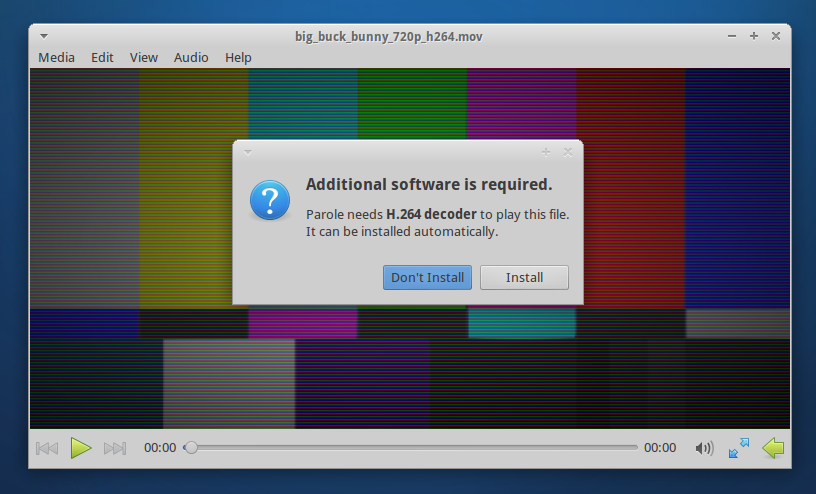
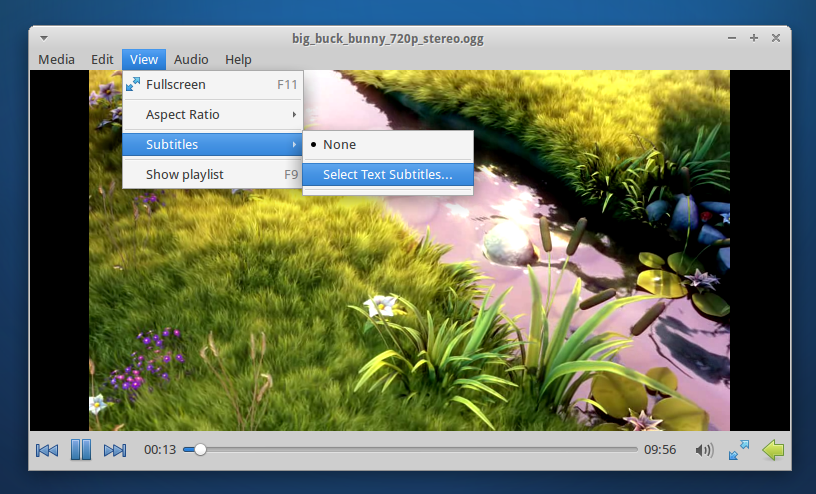
Custom Subtitle Loading
Previously, Parole would only open subtitles that were embedded in video files or that had matching file names. Now, you can select any subtitle file for Parole to load with your video.
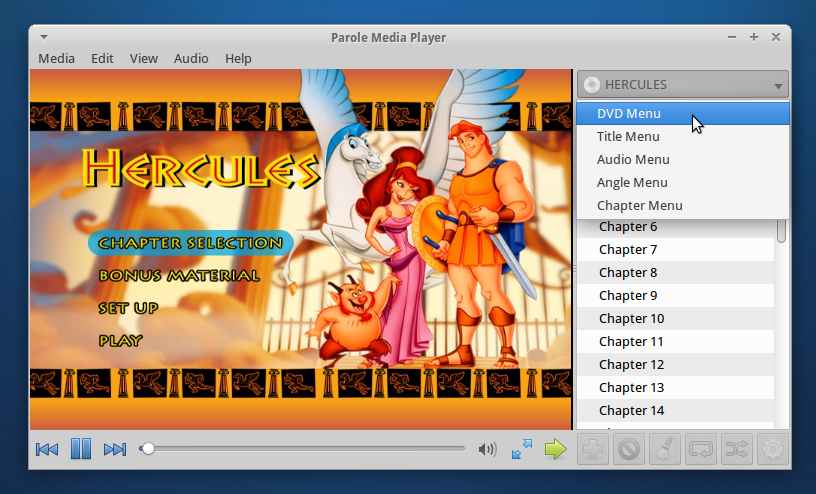
CD and DVD Playlist Support
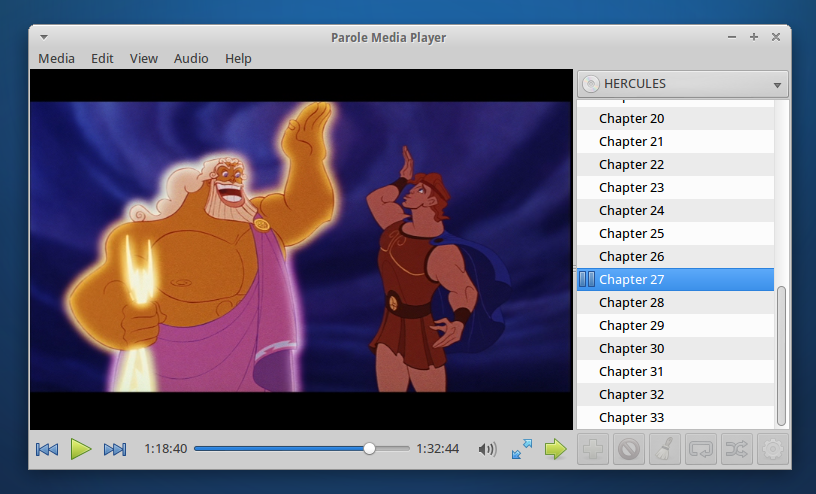
CD and DVD tracks have now been added to the playlist, making it easier than ever to quickly jump to your favorite track or scene. DVD navigation has also been added to the playlist so you can move quickly via DVD menus.
New Look for Audio Formats
This is where Parole gets fancy. We’ve added a whole new look for audio tracks, showing off beautiful album art and track details. We’re pretty proud of this latest feature, so be sure to check it out.
New Notification Plugin
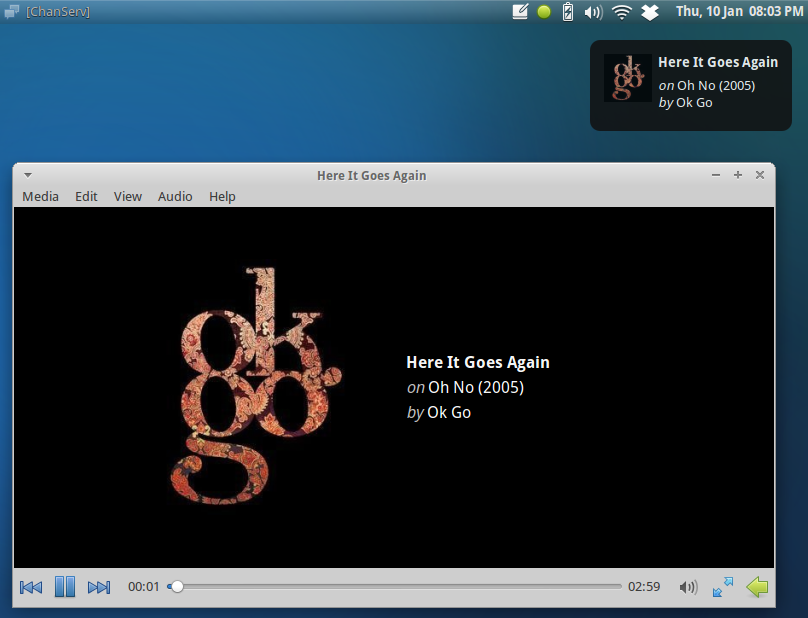
Now that we have album art, we’ve also added it to the newly introduced notification plugin. Notifications were previously part of the tray icon plugin, but since their functionality is separate, it only makes sense for the plugins to be as well.
Configuration Ported to Xfconf
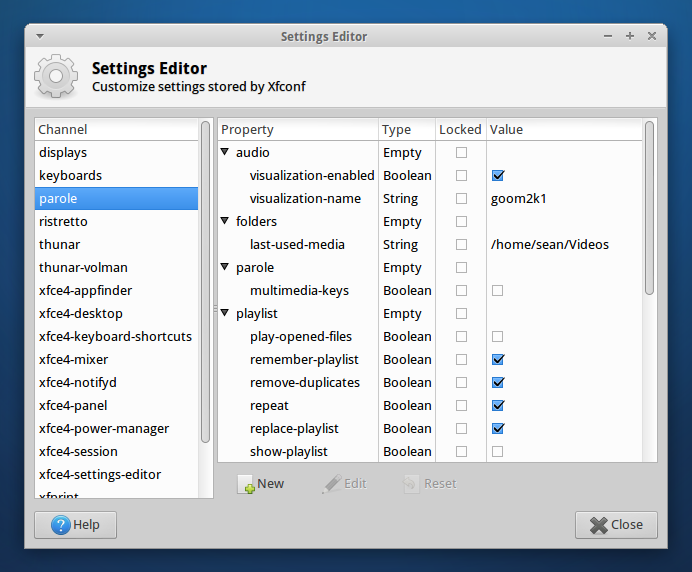
Configuration has moved away from settings files and has been integrated with Xfce Settings. This means easier deployment of preferred settings and the ability to reset settings if something goes awry quickly.
Improved Keyboard Shortcuts
Keyboard shortcuts were a major topic for this release and have been improved significantly. You’ll find all the shortcuts below.
General
| Combination | What it does |
|---|---|
| Ctrl+O | Open Dialog |
| Ctrl+L | Open Location Dialog |
| Ctrl+Q | Quit Parole |
Playlist
| Combination | What it does |
|---|---|
| F9 | Show/Hide playlist |
| Up | Navigate Playlist Up |
| Down | Navigate Playlist Down |
Playback
| Combination | What it does |
|---|---|
| F11 | Enter Fullscreen |
| Escape | Exit Fullscreen |
| Left/Right | Seek Media Backwards/Forwards 10 seconds |
| Ctrl+Left/Right | Seek Media Backwards/Forwards 1 minute |
| 0 (zero) | Mute Volume |
| – (minus) | Decrease Volume |
| + (plus), = (equals) | Increase Volume |
Where Do I Get It?
Parole’s source code can be downloaded here. Ubuntu 13.04 users can download it straight from the Ubuntu Software Center. If you’re running Ubuntu 12.04 or 12.10, Parole can be installed from the Xfce 4.12 PPA below (12.04 users also need the 4.10 PPA).
sudo add-apt-repository ppa:xubuntu-dev/xfce-4.12
sudo apt-get update
sudo apt-get install parole
Please test Parole 0.4 and report any bugs you find at the Xfce Bugzilla. So, what do you think of the latest and greatest Xfce media player? Let me know in the comments!
Xfce4-terminal 0.6.x keyboard shortcuts
A lot of users seem to be wondering how to edit keyboard shortcuts in xfce4-terminal 0.6.x. The built-in shortcut editor is indeed gone and the application now uses editable GTK+ accelerators like other GTK+ applications. This is more consistent and allows to drop the exo dependency which makes the application lighter.
The FAQ of the Xfce documentation has a guide on how to edit GTK+ accelerators of xfce4-terminal. You'll get your custom shortcuts back in no time!
PS: xfce4-terminal 0.6.1 is out and has a killer "drop-down" mode ala guake / tilda. See Nick's Google+ page for screenshots.
Looking Forward to 2013
Tomorrow marks the beginning of a new year and refreshed expectations of what’s to come from the free software world. What can we look forward to, and what will I work on?
Ubuntu: Games, TVs, Smartphones, and Surprises
By 14.04 LTS Ubuntu will power tablets, phones, TVs and smart screens from the car to the office kitchen, and it will connect those devices cleanly and seamlessly to the desktop, the server and the cloud.
2012 has been a whirlwind year for Ubuntu. With the announcement of (and even progress towards) Ubuntu for Android, Ubuntu TV, and Ubuntu across multiple platforms, 2013 will set the stage for a unified platform across all devices. And with the latest countdown, time will only tell what else Ubuntu has in store for 2013.
The other huge news that came out of 2012 was the Value and Ubuntu partnership to bring Steam and many popular games to the Linux platform. This was something often alluded to, leaked, and denied, and then it happened. Now Steam for Linux is available as an open beta for anybody to try out. As this becomes more stable and more games come to Ubuntu, more gamers may as well.
Finally, 2013 also means two more Ubuntu-family releases ( Raring Ringtail, anyone) featuring the latest and greatest of Linux and open-source software. Now that’s quite a bit to look forward to, and I’m only getting started!
Xfce 4.12
Xfce 4.12 will be released this year, bringing all sorts of new goodies. The developers have been working hard to fix bugs and introduce new features to the Xfce family of applications. Development releases of Thunar, Mousepad, Xfce Settings, Terminal, and more offer great new features while maintaining minimalism in appearance and memory usage.
The development branch of Thunar, the Xfce file manager, introduces tabbed browsing (a long-requested feature), gphoto integration (offering better support for Android devices and digital cameras), and additional improvements all around. The latest versions of Exo and Tumbler further improve Thunar and Xfdesktop.
There’s plenty more to write about, but I can imagine that most people aren’t as excited about this stuff as I am… moving on!
My Current Projects
Finally, I’m caught up on my own projects. I’ve been increasingly busy as of late, further refining Parole Media Player, Catfish, and MenuLibre. Each application is becoming increasingly more stable and feature-full. And with each commit, I get fired up to add, tweak, or fix something else.
Parole Media Player is (probably) lines of code away from a new release. We’ve fixed all long-standing bugs, further refined the interface, and added some awesome new features. Screensaver support is finally fixed, so you can enjoy a full-length movie without wiggling your mouse. Missing codecs can now be easily found and installed from Parole. We’ve added an excellent new audio widget that shows album art and track details. CDs and DVDs can now be quickly and easily navigated by the playlist as well. If you’re interested, please check out the latest code from the git repository and test it out! Report any bugs you find here.
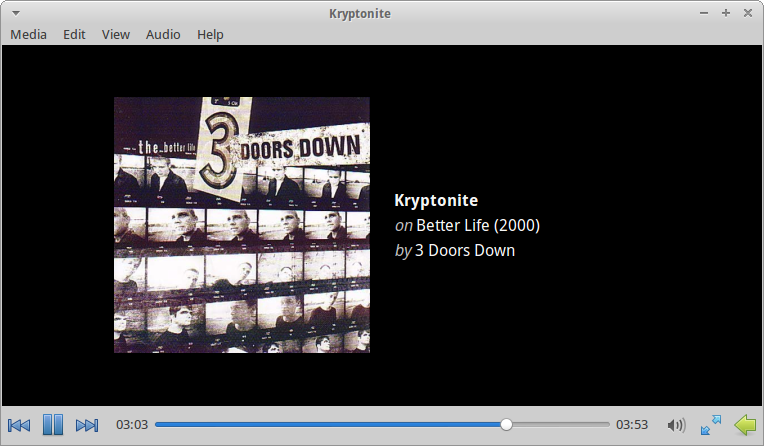
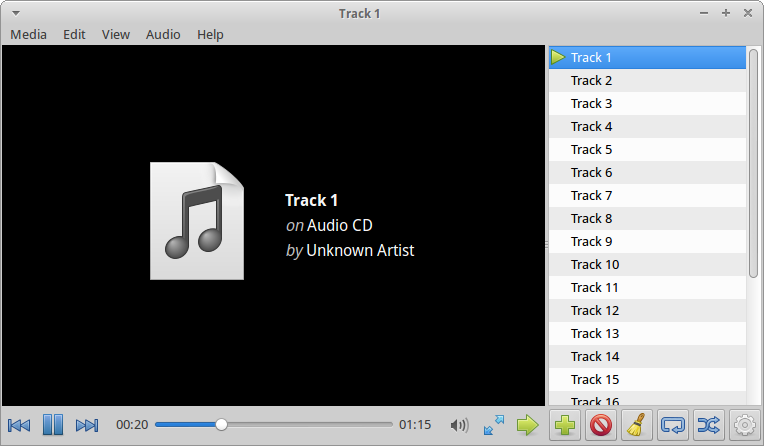
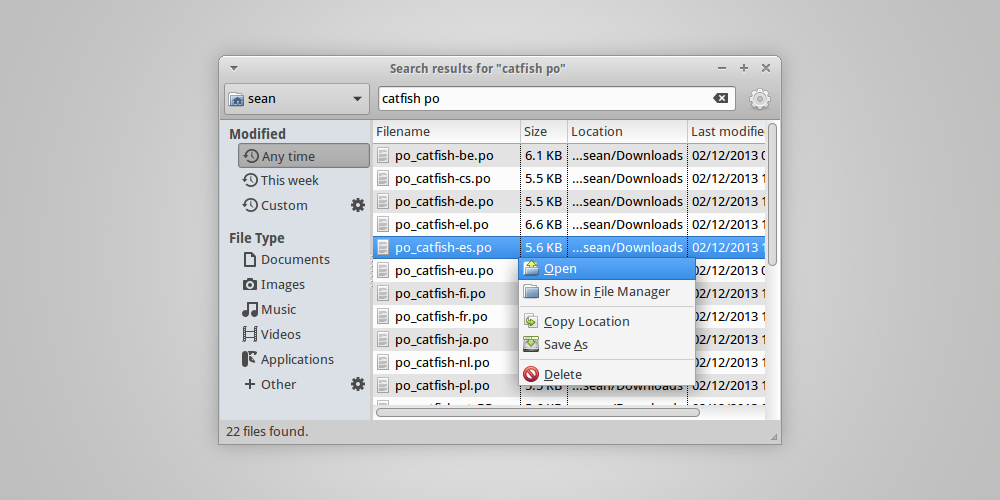
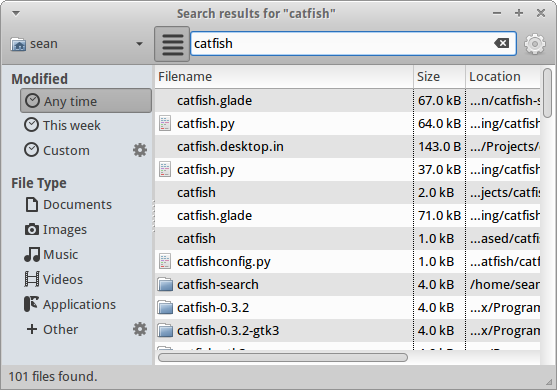
I’ve been hard at work rewriting Catfish from the ground up to be leaner, faster, and more easily extended and maintained. The experimental code is still private, but here’s a sneak peek!
Finally, MenuLibre is being reworked to add classic menu editing capabilities (useful for Xfce, LXDE, and other desktop environments). Hopefully we’ll see this new feature sometime soon in the coming days. As always, if you’re interested in helping out with any of these projects, let me know.
Happy New Year!
So yeah, 2013. It’s going to be huge. You should do all you can to start it off on the right foot and have a good time with friends, family, or strangers. There’s a lot coming up, and it will get here when it gets here, right? Though, if you’re impatient, most of this upcoming software is available online, even in its early development stage. So, why wait?
Do you have any big plans for 2013? Are you looking forward to the next year and everything that’s to come? Let me know in the comments!
Cheers!
Featured image, available under a Creative Commons license from http://www.flickr.com/photos/bayasaa/2693171833/
Keyboard shortcut work landed
After a few user interface improvements and some last bug fixes, the work I described in my last post was merged in the master branches. It is thus available for testing to all users of the Xfce development version.
Feedback on this is welcome, file any bug you find on the Xfce Bugzilla. This will of course be available in the next development release of those components.
Work in progress to improve keyboard shortcuts in Xfce
Long time no blog! I started to hack again last week with the goal of improving keyboard shortcuts handling in Xfce. I touched that during the Xfce 4.10 cycle and this unfortunately seem to have introduced a bunch of bugs that I'm now trying to resolve. I also took this opportunity to try to overhaul the UI and make it more understandable.
This code is available in the jeromeg/keyboard-shortcuts branches of xfwm4, libxfce4ui and xfce4-settings on the Xfce Git server. Some improvements are still planned but most of what I was planning is already implemented.
Here is a list of reported bugs which should be fixed once I merge this:
- Keyboard shortcuts on numeric keypad are ineffective
- Usability issue : the dialog for adding keyboard shortcuts isn't clear
- Unable create keyboard shortcut <Alt>+Print
- Add a button to edit/modify a keybinding
- Control modifier appears as Primary when setting shortcuts
- Keyboard shortcuts of the same shortcut
- Default shortcuts not working
- Keyboard mapping for XF86PowerButton and Ctrl+Insert ineffective
- <Shift> modifier not recognized correctly
- Keyboard shortcuts shipped by Xfce are wrong since the Gtk switch from Control to Primary
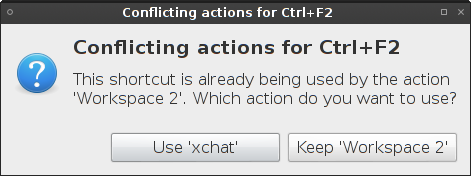
A brief summary: shortcuts now work when Caps Lock is on, shortcuts using Shift or the numeric keypad are handled correctly, a bunch of regressions are fixed, conflict handling is now more reliable and the UI should be better.
Regarding keyboard shortcuts bugs, keyboard shortcuts not working correctly after a reboot or not work working in some other cases seem to occur because of a "wrong" shortcut database often caused by a problem in the migration script in Xfce 4.6. In that case, the easier way to fix this seems to be to revert all keyboard shortcuts to default (in xfwm4-settings and xfce4-keyboard-settings) and to rebind them using the dialogs.
Screenshots
Readable shortcut labels in the UI
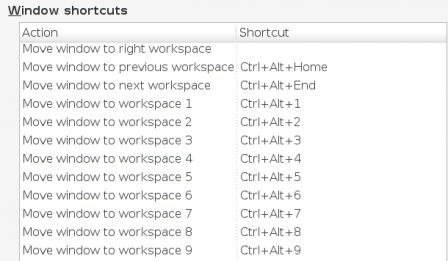
Improved dialogs to add and edit shortcuts
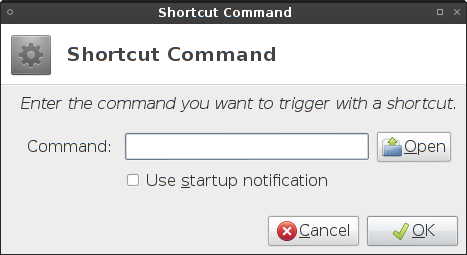
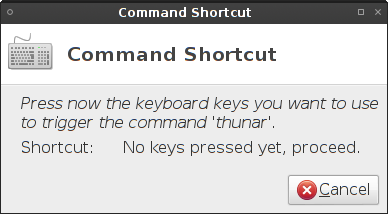
Improved conflict handling
Testing is welcome!
If you know what you are doing, it would be useful if you could test those changes and report me by mail any remaining issues. Suggestions for improvements are also welcome.
Apache restart with Vim autocmd
In order to execute a command right after saving a file in Vim, you can use the :autocmd command. Here is a quick example how it can be useful with Apache files.NB: on my system, Debian in this case, an Apache file is automatically recognized as filetype=apache.
augroup apache
    autocmd BufWritePost */sites-enabled/* !/etc/init.d/apache2 restart
augroup END
Apache restart with Vim autocmd
In order to execute a command right after saving a file in Vim, you can use the :autocmd command. Here is a quick example how it can be useful with Apache files.NB: on my system, Debian in this case, an Apache file is automatically recognized as filetype=apache.
augroup apache
    autocmd BufWritePost */sites-enabled/* !/etc/init.d/apache2 restart
augroup END
How to start contributing to Xfce or any other open source project
It’s been a while since I’ve updated this website and even longer since I’ve written anything useful. But since I’ve received a couple of mails from people looking to contribute to Xfce recently, I thought I’d share some “wisdom” acquired over the past few years while working on Xfce and doing a lot of community work. My thoughts are not limited to Xfce and will apply to a lot of other projects out there as well.
Here’s the bitter truth for those looking for some quick pointers to start contributing to Xfce: you’ll have to find out yourself.
The reason is not that we are lazy or wouldn’t welcome your contributions. In fact, the reason, I believe, is very simple: you will be more excited, motivated and, ultimate, be more successful if you work on something that interests you. We can help you in making the decision what to invest your time in easier, e.g. by listing projects, features or issues that we or our users consider worth working on. Some projects do this very visibly (e.g. through bounties). In Xfce, this information is hidden in the depths of the wiki. Here are a few links that you may find interesting:
- Design SIG - working on improving the user experience of Xfce
- Component wish list - populated by our users
- Panel plugin wish list - populated by our users
Clearly, the above information could be more visible. There could be a prominent link on the Xfce website to a well-maintained and up-to-date list. Would that help people? Maybe.
Perhaps it is a good thing that the information isn’t just one click away. Open source projects have always been about scratching your own itch. This is how I got involved in everything I’ve done over the years. this approach is reflected by what people do and sometimes even by how companies make money. Thinking about it now, it is a concept deeply rooted in the evolution of mankind (think: the invention and improvement of tools, industrialisation and all that shit).
So: scratch your own itch.
If you want to start contributing to a project, try this exercise:
- Look at the project, think about what you don’t like or what you feel could be improved
- Try to collect information on what pieces are involved in e.g. the feature you’re missing or the bug you’ve spotted
- Try to find the place where you could try adding your feature or fixing your bug
- Ask whether developers are interested in the feature or look at whether there already is an item for your issue in the bug tracker
- The rest is communication and coding
It’s not a fast path because you might not be able to contribute something of great value in the beginning. But if you’re dedicated, have enough spare time to make a difference and are keen on improving things step by step, you might eventually reach a point where you take over responsibility for more and more exciting or important tasks.
Good luck!