Xfce 4.8 with Conky
I have been following a short discussion on the IRC channel #xfce regarding an issue with the use of Conky and transparency. I didn’t use Conky for a very long time, but since I knew it was possible to have Conky perfectly running, I gave it a shot again and since I did a fresh reinitialization of Xfce on my workstation, I tweaked the configuration file to my need. Now I have it running in the background and I’ll most probably keep it.
The configuration I was able to get for a good working Conky window with transparency is bellow. Of course I could tell you which combination doesn’t work, with the why, but since there are so many of them I simply put a working one.
own_window yes # create a separate XWindow over the one from Xfdesktop
own_window_type desktop # the window cannot be moved or resized
own_window_hints undecorated,below,sticky,skip_taskbar,skip_pager # make it behave like it belongs to the desktop
own_window_argb_visual yes # true transparency, a compositor has to be active
own_window_argb_value 100 # make the background semi-transparent
double_buffer yes # avoid flickering
Here is a screenshot of the desktop with Conky in the bottom right corner, I made sure there is some I/O activity going on :-)
 |
| Xfce with Conky |
Now if you want you can steal my .conkyrc file.

Xfce mailing lists moved
The Xfce mailing lists moved from foo-projects.org and are now all hosted at mail.xfce.org. Mail addresses were not changed so nobody should experience problems with this, if you do please contact us at postmaster@xfce.org.
We want to thank the foo-projects.org crew (yes you Auke) for excellent support in the last couple of years!
— The Xfce development team.
Analysing a phishing email
I’ve been hit by several phishing emails in a short time the last week. Having time this morning I took the initiative to look at the headers from one email and the phishing location.
The hosting server
The domains DNS zone is hosted on a particular network just like its website. Two different servers actually, but behind it seems to be a lucrative webhosting service where you can get your domain registered although it’s not a registrar. All of this is hosted in Texas.
The email server
The email is originating from Italy. The FROM address is set up to show a truthful email (usually where you put the surname) with an inexistant email address behind that. The email address’ domain name exists however and is hosted in France, but has no relation to the scam, at least the owner of this domain can’t do anything about it.
The Return-Path shows a real email address with a different domain name but same network anyway. The domain name shows a dummy webpage “Under construction”.
Who to contact?
All of them if you care, otherwise just let it go, because phishing pages are set up and down daily…
To contact the webhosting or email server, request the Whois information of the IP address and contact the abuse department, there is always an abuse section in the Whois of an IP address. You can also contact the domain name holder and/or look if the registrar or webhosting sevice has a dedicated abuse website page.
Of course it happens that an abuse email address forwards everything to the trash can. In order to have a chance to stop the scam, it is good to contact as many services as possible.
Analysing a phishing email
I’ve been hit by several phishing emails in a short time the last week. Having time this morning I took the initiative to look at the headers from one email and the phishing location.
The hosting server
The domains DNS zone is hosted on a particular network just like its website. Two different servers actually, but behind it seems to be a lucrative webhosting service where you can get your domain registered although it’s not a registrar. All of this is hosted in Texas.
The email server
The email is originating from Italy. The FROM address is set up to show a truthful email (usually where you put the surname) with an inexistant email address behind that. The email address’ domain name exists however and is hosted in France, but has no relation to the scam, at least the owner of this domain can’t do anything about it.
The Return-Path shows a real email address with a different domain name but same network anyway. The domain name shows a dummy webpage “Under construction”.
Who to contact?
All of them if you care, otherwise just let it go, because phishing pages are set up and down daily…
To contact the webhosting or email server, request the Whois information of the IP address and contact the abuse department, there is always an abuse section in the Whois of an IP address. You can also contact the domain name holder and/or look if the registrar or webhosting sevice has a dedicated abuse website page.
Of course it happens that an abuse email address forwards everything to the trash can. In order to have a chance to stop the scam, it is good to contact as many services as possible.
Irrational behaviour
So, I want a new phone. I really don’t need one, but I want it anyway.
This is my current phone:

And it fits my needs perfectly: water/dust/sand(!)-proof — Leonie and Guido are 3 and 1 year old now, so this is not a useless feature at all ;-) Moreover, it lasts two weeks without recharging and I only use it to make phone calls, so I don’t need anything with more features.
Still, I want this phone:

Basically, I’ve fallen for the pretty pcitures and UI demos, but I tell myself it is because it runs “real” linux.
What’s wrong with me? ;-)
Xfce Design SIG launches
As Jérôme Guelfucci wrote in his blog earlier, a special interest group has been started. The Xfce Design Special Interest Group (or SIG) has a clear purpose (quote from the groups wikipage):
The Xfce Design SIG aims at improving the usability and visual appearance of the Xfce desktop environment. Our goal is to bring interested users, designers and hackers together to ensure neither of them is working in a vacuum. By establishing a context in which they can collaborate on smaller and larger design-related projects we try to increase the chance of the proposed changes to be merged into the official Xfce repositories.
I’m looking forward to working with Xfce directly and more closely after working years with Xubuntu. It’s both easier for us and assures that all Xfce users can enjoy the improvements, not just those who use Xubuntu.
Are you interested specially about Xfce Design? Join us!
Xfce Design Special Interest Group
A special interest group was recently started to improve the usability and visual appearance of the Xfce desktop environment. It is defined on the Xfce wiki as follows:
The Xfce Design SIG aims at improving the usability and visual appearance of the Xfce desktop environment. Our goal is to bring interested users, designers and hackers together to ensure neither of them is working in a vacuum. By establishing a context in which they can collaborate on smaller and larger design-related projects we try to increase the chance of the proposed changes to be merged into the official Xfce repositories.
Everyone is of course welcome to join this group which has already started working on several points and producing very interesting elements! I’ll introduce here two of the main projects we are currently working on for Xfce 4.10. But more will follow soon!
I would like to thank Simon Steinbeiß and Pasi Lallinaho from the Shimmer Project who played a crucial role in starting this SIG.
Thunar shortcuts pane rework
You can see what is being proposed on this page. The main goals are to reduce the visual clutter in the shortcuts pane by sorting items in different categories and to integrate nicely remote file systems (Samba, FTP…) which are supported since Thunar 1.2.0. The current demo we have looks like this:
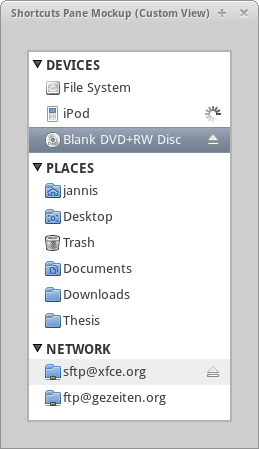
I encourage you to have a look at the Wiki page linked above, which contains a very accurate description of what we want to achieve and how we are going to achieve it.
Merge of xfrun and xfce4-appfinder
You can see what is being proposed on this page. The goal is to produce a single interface allowing to quickly launch applications and to perform actions. We plan add an extension system similar to the Thunar Custom Actions to allow the creation of a tailor-made interface.
This is of course still work in progress, but this is how the two main view currently look. Clicking on the arrow on the right hand-side of the entry switches from one view to the other.

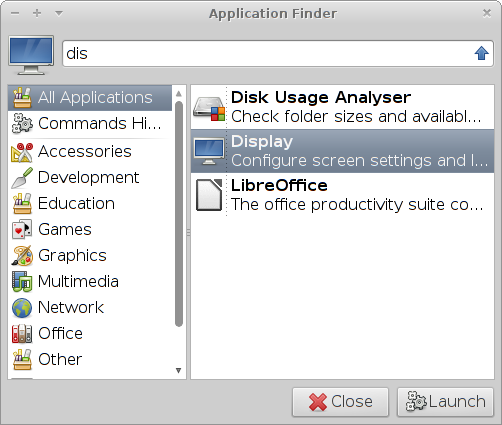
I encourage you to have a look at the Wiki page linked above, which contains a very accurate description of what we want to achieve and how we are going to achieve it.
Don’t worry!
We already received some mails and comments asking whether it meant that we would move towards a Gnome 3 interface. The goal is not (yet :D) to bring a revolution but rather to streamline what we currently have by improving the numerous rough edges. Of course, we might take some inspiration in other desktop environment but we will not copy what is done in Gnome 3 or KDE4, Xfce has its own philosophy which is serving its users well at the moment.
Useful links
Changing PolicyKit settings per user
I have been hit twice by a required authentication on my workstation after the Wifi connection got lost and it is clearly irritating, especially when you are not around. The authentication requests are handled by PolicyKit (polkit for short) and can be tweaked.
The message by which I was hit was the following: “System policy prevents modification of network settings for all users.”
Before you get started, the system wide configuration files that contain the default values reside inside the /usr/share/polkit-1/actions/ directory. In this directory resides the file org.freedesktop.NetworkManager.policy which contains all the default actions. It does also contain the message about the network settings for which the action id is “org.freedesktop.NetworkManager.settings.modify.system.” At this point I was still clueless of what I was supposed to do.
After having search the web for information about PolicyKit I have found one interesting article that helped me getting done with my issue and learning more about this authorization framework. This action being very seldom to perform, I’m summing up everything here.
There are two useful commands to perform tests with PolicyKit, pkcheck and pkaction.
The first interesting command to use is pkcheck. It will trigger an authorization request and prompt you to type in a password, simply return true if no authorization is required otherwise false. For example:
pkcheck --action-id org.freedesktop.NetworkManager.settings.modify.system
    --process `pidof gnome-session` -u `id -u`
You have to adapt the process and user parameters of course.

Next the command pkaction can be used to print the default system values, for example:
pkaction --action-id org.freedesktop.NetworkManager.settings.modify.system
    --verbose
Now to have a custom setting for your user, what has to be done is to create a PolicyKit Local Authority file inside the directory /var/lib/polkit-1/localauthority/. Here is an example:
[Let user mike modify system settings for network]
Identity=unix-user:mike
Action=org.freedesktop.NetworkManager.settings.modify.system
ResultAny=no
ResultInactive=no
ResultActive=yes
I have saved this file under /var/lib/polkit-1/localauthority/50-local.d/10-network-manager.pkla.
There are three main values you can pass to ResultActive that are no, auth_admin or yes. Respectively it will deny the authorization, ask for a password, and give access. For further information about the possible values check the polkit manpage, also don’t miss the pklocalauthority manpage to read more about the localauthority tree structure.
Changing PolicyKit settings per user
I have been hit twice by a required authentication on my workstation after the Wifi connection got lost and it is clearly irritating, especially when you are not around. The authentication requests are handled by PolicyKit (polkit for short) and can be tweaked.
The message by which I was hit was the following: “System policy prevents modification of network settings for all users.”
Before you get started, the system wide configuration files that contain the default values reside inside the /usr/share/polkit-1/actions/ directory. In this directory resides the file org.freedesktop.NetworkManager.policy which contains all the default actions. It does also contain the message about the network settings for which the action id is “org.freedesktop.NetworkManager.settings.modify.system.” At this point I was still clueless of what I was supposed to do.
After having search the web for information about PolicyKit I have found one interesting article that helped me getting done with my issue and learning more about this authorization framework. This action being very seldom to perform, I’m summing up everything here.
There are two useful commands to perform tests with PolicyKit, pkcheck and pkaction.
The first interesting command to use is pkcheck. It will trigger an authorization request and prompt you to type in a password, simply return true if no authorization is required otherwise false. For example:
pkcheck --action-id org.freedesktop.NetworkManager.settings.modify.system \
    --process `pidof gnome-session` -u `id -u`
You have to adapt the process and user parameters of course.
Next the command pkaction can be used to print the default system values, for example:
pkaction --action-id org.freedesktop.NetworkManager.settings.modify.system \
    --verbose
Now to have a custom setting for your user, what has to be done is to create a PolicyKit Local Authority file inside the directory /var/lib/polkit-1/localauthority/. Here is an example:
[Let user mike modify system settings for network]
Identity=unix-user:mike
Action=org.freedesktop.NetworkManager.settings.modify.system
ResultAny=no
ResultInactive=no
ResultActive=yes
I have saved this file under /var/lib/polkit-1/localauthority/50-local.d/10-network-manager.pkla.
There are three main values you can pass to ResultActive that are no, auth_admin or yes. Respectively it will deny the authorization, ask for a password, and give access. For further information about the possible values check the polkit manpage, also don’t miss the pklocalauthority manpage to read more about the localauthority tree structure.

Changing PolicyKit settings per user
I have been hit twice by a required authentication on my workstation after the Wifi connection got lost and it is clearly irritating, especially when you are not around. The authentication requests are handled by PolicyKit (polkit for short) and can be tweaked.
The message by which I was hit was the following: “System policy prevents modification of network settings for all users.”
Before you get started, the system wide configuration files that contain the default values reside inside the /usr/share/polkit-1/actions/ directory. In this directory resides the file org.freedesktop.NetworkManager.policy which contains all the default actions. It does also contain the message about the network settings for which the action id is “org.freedesktop.NetworkManager.settings.modify.system.” At this point I was still clueless of what I was supposed to do.
After having search the web for information about PolicyKit I have found one interesting article that helped me getting done with my issue and learning more about this authorization framework. This action being very seldom to perform, I’m summing up everything here.
There are two useful commands to perform tests with PolicyKit, pkcheck and pkaction.
The first interesting command to use is pkcheck. It will trigger an authorization request and prompt you to type in a password, simply return true if no authorization is required otherwise false. For example:
pkcheck --action-id org.freedesktop.NetworkManager.settings.modify.system \
    --process `pidof gnome-session` -u `id -u`
You have to adapt the process and user parameters of course.
Next the command pkaction can be used to print the default system values, for example:
pkaction --action-id org.freedesktop.NetworkManager.settings.modify.system \
    --verbose
Now to have a custom setting for your user, what has to be done is to create a PolicyKit Local Authority file inside the directory /var/lib/polkit-1/localauthority/. Here is an example:
[Let user mike modify system settings for network]
Identity=unix-user:mike
Action=org.freedesktop.NetworkManager.settings.modify.system
ResultAny=no
ResultInactive=no
ResultActive=yes
I have saved this file under /var/lib/polkit-1/localauthority/50-local.d/10-network-manager.pkla.
There are three main values you can pass to ResultActive that are no, auth_admin or yes. Respectively it will deny the authorization, ask for a password, and give access. For further information about the possible values check the polkit manpage, also don’t miss the pklocalauthority manpage to read more about the localauthority tree structure.