Xfce PulseAudio Plugin 0.4.1 Released
Solid as a rock. Xfce PulseAudio Plugin 0.4.1 is a new stable milestone. This release wraps up the awesome development cycle we’ve had on it over the last few months and is recommended for all users.
What’s New?
Since 0.2.5, the previous stable release.
Device Management
- Added support for audio input devices
- Added support for the XF86AudioMicMute key
- Added ability to switch active audio devices and streams
- Simplified audio volume controls
MPRIS2 Integration
- New optional MPRIS2 support (play/pause, raise, track switching, playlists)
- Added multimedia keyboard support for any MPRIS2-enabled player
- Experimental libwnck support adds support for raising windows that do not otherwise support it (Spotify included)
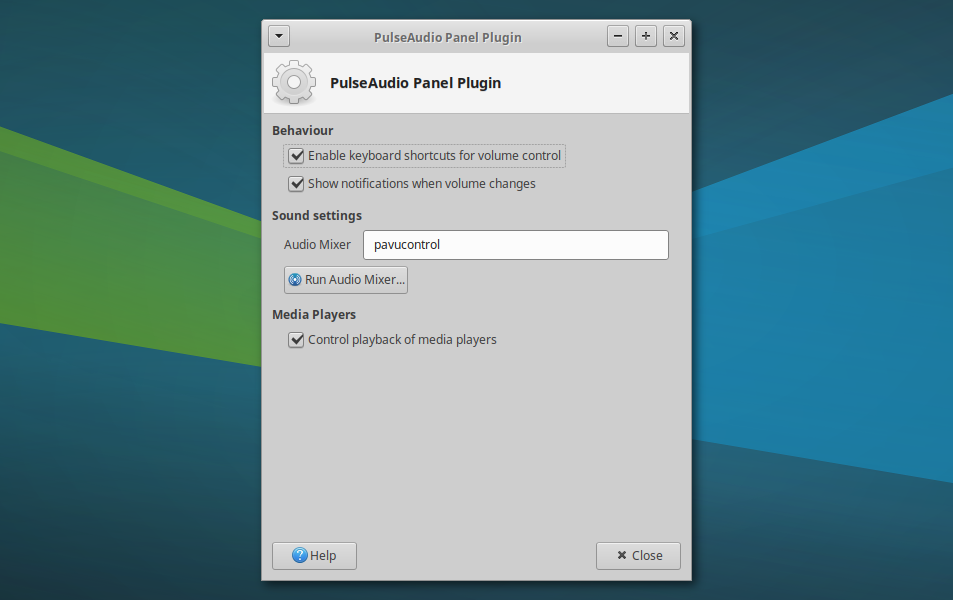
- Players can be selectively hidden from the menu in the preferences dialog
General
- Significant code cleanup, dropping unused IDO support and simplifying widgets
- Improved memory management with numerous memory leaks patched
Translation Updates
Bulgarian, Catalan, Chinese (China), Chinese (Taiwan), Croatian, Czech, Danish, Dutch, English (Australia), French, Galician, German, Greek, Hebrew, Hungarian, Icelandic, Indonesian, Irish, Italian, Japanese, Kazakh, Korean, Lithuanian, Malay, Norwegian Bokmal, Norwegian Bokmål, Occitan (post 1500), Polish, Portuguese, Portuguese (Brazil), Russian, Serbian, Slovak, Slovenian, Spanish, Swedish, Thai, Turkish, Ukrainian
Downloads
Source tarball ( md5, sha1, sha256)
Available on Debian Testing and Ubuntu 18.04 “Bionic Beaver”. Included in Xubuntu 18.04.
Xfce Settings 4.12.3 & 4.13.2 Released
Fixes galore! Xfce Settings 4.12.3 and 4.13.2 were released on March 18th with several improvements, feature parity, and translations.
What’s New?
Both 4.12.3 and 4.13.2: Improvements for Multi-monitor Support
- Visualize all three display configuration states
- Visually note if two displays overlap (mirrored) but are not cloned
- Always draw the active display last so it’s on top
- Fix: Correctly position monitors in extended mode
- Fix: Race condition with monitor connect and disconnect
- Fix: Segfault on monitor reconnect
Xfce Settings 4.13.2
- New: Show the location of the mouse pointer on keypress (Introduced in 4.12.2)
- Fix: syncdaemon not starting with certain locales
- Fix: division by 0 crash from gdk_screen_height_mm()
- Fix: Remove existing socket from socket viewport (Xfce #13847)
- Fix: Use transient notifications for improved logging
- Fix: Do not expand the event sounds section so font scaling is correctly positioned
- Resolved GTK+ 3.22 deprecations (Xfce #14273)
Translation Updates
Amharic, Arabic, Asturian, Basque, Belarusian, Bengali, Bulgarian, Catalan, Chinese (China), Chinese (Hong Kong), Chinese (Taiwan), Croatian, Czech, Danish, Dutch, English (Australia), English (United Kingdom), Finnish, French, Galician, German, Greek, Hebrew, Hungarian, Icelandic, Indonesian, Italian, Japanese, Kazakh, Korean, Lithuanian, Malay, Norwegian Bokmål, Norwegian Nynorsk, Occitan (post 1500), Polish, Portuguese, Portuguese (Brazil), Romanian, Russian, Serbian, Slovak, Slovenian, Spanish, Swedish, Thai, Turkish, Uighur, Ukrainian
Downloads
Xfce Settings 4.12.3
Source tarball ( md5, sha1, sha256)
Available in Debian Unstable and Ubuntu 18.04 “Bionic Beaver”. Included in Xubuntu 18.04.
Xfce Settings 4.13.2
Source tarball ( md5, sha1, sha256)
Available in the Xubuntu QA Experimental PPA
Parole Media Player 1.0.0 Released
It’s here, it’s finally here! Parole Media Player 1.0.0 has finally arrived. This release greatly improves the user experience for users without hardware-accelerated video and includes several fixes.
What’s New?
Parole 0.9.x Developments
If you’ve been following along with the stable release channel, you have a lot of updates to catch up on. Here’s a quick recap. For everybody else, skip to the next header.
- Parole 0.9.0 introduced a new mini mode, boosted X11 playback, and made the central logo clickable. When your playlist is complete, the “play” logo changes to a “replay” logo.
- Parole 0.9.1 improved support for remote files and live stream playback. Older code was stripped away to make Parole even leaner and faster.
- Parole 0.9.2 added a keyboard shortcuts helper (Help > Keyboard Shortcuts), fixed numerous bugs, and included a huge code cleanup and refactor.
Parole 1.0.0 Updates
New Feature, Automatic Video Playback Output
- We’ve finally resolved the long-standing “Could not initialise Xv output” error (Xfce #11950) that has affected many of our users in virtual machines and on real hardware.
- In the past, we were delighted when we implemented the Clutter backend to solve this issue. Still, that API proved unstable and difficult to maintain between releases.
- Now, we are using the “autoimagesink” for our newly defaulted “Automatic” video output option. This sink provides the best available sink (according to GStreamer) for the available environment and should produce great results no matter the setup.
Bug Fixes
- Fixed 32-bit crashes when using the MPRIS2 plugin (LP: #1374887)
- Fixed crash on “Clear History” button press (LP: #1214514)
- Fixed AppData validation (Xfce #13632)
- Fixed full debug builds and resolved implicit-fallthrough build warning
- Replaced stock icon by freedesktop.org compliant option (Xfce #13738)
Translations
Albanian, Arabic, Asturian, Basque, Bulgarian, Catalan, Chinese (China), Chinese (Taiwan), Croatian, Czech, Danish, Dutch, English (Australia), Finnish, French, Galician, German, Greek, Hebrew, Hungarian, Icelandic, Indonesian, Italian, Japanese, Kazakh, Korean, Lithuanian, Malay, Norwegian Bokmål, Occitan (post 1500), Polish, Portuguese, Portuguese (Brazil), Russian, Serbian, Slovak, Spanish, Swedish, Thai, Turkish, Uighur, Ukrainian
Downloads
Parole Media Player 1.0.0 is included in Xubuntu 18.04. Check it out this week when you test out the Beta!
sudo apt update
sudo apt install parole
The latest version of Parole Media Player can always be downloaded from the Xfce archives. Grab version 1.0.0 from the below link.
https://archive.xfce.org/src/apps/parole/1.0/parole-1.0.0.tar.bz2
- SHA-256: 6666b335aeb690fb527f77b62c322baf34834b593659fdcd21d21ed3f1e14010
- SHA-1: ed56ab0ab34db6a5e0924a9da6bf2ee91233da8a
- MD5: d00d3ca571900826bf5e1f6986e42992
Xfce Settings 4.12.2 Released
Xfce Settings 4.12.2 is now available. Xfce has been steadily heading towards its GTK+ 3 future with Xfce 4.14, but that doesn’t mean our current stable users have been left behind. We’ve got some new features, bug fixes, and translations for you!
What’s New?
New Features
- Default monospace font option in the Appearance dialog
- Improved support for embedded DisplayPort connectors on laptops
- Show the location of the mouse pointer on keypress (as seen in the featured image)
Bug Fixes
- Leave monitors where they were if possible (Xfce #14096)
- syncdaemon not starting with certain locales
- division by 0 crash from gdk_screen_height_mm()
Translation Updates
Arabic, Asturian, Basque, Bengali, Bulgarian, Catalan, Chinese (China), Chinese (Hong Kong), Chinese (Taiwan), Croatian, Czech, Danish, Dutch, English (Australia), English (United
Kingdom), Finnish, French, Galician, German, Greek, Hebrew, Hungarian, Icelandic, Indonesian, Italian, Japanese, Kazakh, Korean, Lithuanian, Malay, Norwegian Bokmål, Norwegian Nynorsk, Occitan (post 1500), Polish, Portuguese, Portuguese (Brazil), Romanian, Russian, Serbian, Slovak, Slovenian, Spanish, Swedish, Thai, Turkish, Uighur, Ukrainian
Downloads
The latest version of Xfce Settings can always be downloaded from the Xfce archives. Grab version 4.12.2 from the below link.
- SHA-256: af0e3c0a6501fc99e874103f2597abd1723f06c98f4d9e19a9aabf1842cc2f0d
- SHA-1: 5991f4a542a556c24b6d8f5fe4698992e42882ae
- MD5: 32263f1b704fae2db57517a2aff4232d
Xfce PulseAudio Plugin 0.3.5 Released
Xfce PulseAudio Plugin 0.3.5 is now available. Activity has slowed as the project matures and heads toward the 0.4.0 stable release. With some usability refinements and bug fixes, users will find the latest release easy and convenient.
What’s New?
New Feature: Move Streams on Default Output Change (Xfce #14157)
- Before this update, when a new output device was selected from the plugin menu, only newly opened applications would utilize the selected option.
- With this change, any active output streams will immediately be routed to the newly selected device.
New Feature: Management of Known MPRIS2 Players (Xfce #13903)
- Known media players can now be cleared or selectively hidden from the menu.
Bug Fixes
- Correctly reflect the current volume state at session startup (Xfce #14071, #13677)
- Clear stale data retained after a new Metadata signal (Xfce #14068)
Translation Updates
Catalan, Chinese (China), Croatian, Czech, Danish, Dutch, French, German, Greek, Irish, Japanese, Kazakh, Lithuanian, Malay, Portuguese, Portuguese (Brazil), Russian, Serbian, Slovak, Spanish, Turkish, Ukrainian
Downloads
Xfce PulseAudio Plugin 0.3.5 is already included with Xubuntu 18.04 “Bionic Beaver.” Check it out when you test the Beta next week!
The latest version of the Xfce PulseAudio Plugin can always be downloaded from the Xfce archives. Grab version 0.3.5 from the link below.
- SHA-256: 25e7bc414edf6e16140c31ca4e7dcedd4e17d40ea23a2921beb799fed11a99bb
- SHA-1: 955268828ac53fdfbfa346fbec376aa4f6199385
- MD5: 30cd40be36895c4ced48c2433ff440c4
Exo 0.12.0 Released
With full GTK+ 2 and 3 support and numerous enhancements, Exo 0.12.0 provides a solid development base for new and refreshed Xfce applications.
What’s New?
Since this is the first stable release in nearly 2.5 years, I will briefly summarize the changes since version 0.10.7, released on September 13, 2015.
New Features
GTK Extensions
- Added
exo_gtk_dialog_get_action_area - Added
exo_gtk_dialog_add_secondary_button - Added support for the “insensitive” state in
exo_cell_renderer_icon(GTK+ 3)
Helpers
- WebBrower: Added Brave, Google Chrome, and Vivaldi
- MailReader: Added Geary, dropped Opera Mail (no longer available for Linux)
Utilities
exo-csource:Added a new--outputflag to write the generated output to a fileexo-helper:Added a new--queryflag to determine the preferred application
Icons
- Replaced non-standard gnome-* icons
- Replaced non-existent “missing-image” icon
Build Changes
- Build requirements were updated. Exo now requires GTK+ 2.24, GTK+ 3.22, GLib 2.42, libxfce4ui 4.12, and libxfce4util 4.12. Building GTK+ 3 libraries is not optional.
- The default debug setting is now “yes” instead of “full.”
Documentation Updates
- Added missing per-release API indices
- Resolved undocumented symbols (100% symbol coverage)
- Updated project documentation (HACKING, README, THANKS)
Release Notes
Downloads
The latest version of Exo can always be downloaded from the Xfce archives. Grab version 0.12.0 from the below link.
- SHA-256: 64b88271a37d0ec7dca062c7bc61ca323116f7855092ac39698c421a2f30a18f
- SHA-1: 364a9aaa1724b99fe33f46b93969d98e990e9a1f
- MD5: 724afcca224f5fb22b510926d2740e52
Catfish 1.4.4 Released
I’ve got some great news for fans of Catfish, the fast and powerful graphical search utility for Linux. The latest version, 1.4.4, has arrived with performance improvements and tons of localization updates!
What’s New
This update covers both versions 1.4.3 and 1.4.4.
General
- Improved theming support
- Improved error handling with thumbnails
- Improved search performance by excluding .cache and .gvfs when not explicitly requested
- Improved locate method performance with the addition of the –basename flag
- Added keywords to the launcher for improved discoverability and Debian packaging improvements
- Updated included AppData to latest standards
Bug Fixes
- When the search activity is canceled, all search methods are stopped. This results in a much faster response time when switching search terms.
- Debian #798074: New upstream release available
- Debian #794544: po/en_AU.po has translations for Catfish in Sinhalese (not English)
Translation Updates
Afrikaans, Brazilian Portuguese, Bulgarian, Catalan, Chinese (Traditional), Croatian, Czech, Danish, Dutch, French, Greek, Italian, Kurdish, Lithuanian, Portuguese, Serbian, Slovak, Spanish, Swedish, Turkish, Ukrainian
Downloads
Debian Unstable and Ubuntu Bionic users can install Catfish 1.4.4 from the repositories.
sudo apt update
sudo apt install catfish
The latest version of Catfish can always be downloaded from the Launchpad archives. Grab version 1.4.4 from the below link.
https://launchpad.net/catfish-search/1.4/1.4.4/+download/catfish-1.4.4.tar.gz
- SHA-256: a2d452780bf51f80afe7621e040fe77725021c24a0fe4a9744c89ba88dbf87d7
- SHA-1: b149b454fba75de6e6f9029cee8eec4adfb4be0e
- MD5: 8fd7e8bb241f2396ebc3d9630b47a635
Xfce PulseAudio Plugin 0.3.4 Released
Xfce PulseAudio Plugin 0.3.4 is now available. With each new release, the plugin becomes more refined and better suited for Xfce users. The latest release adds support for the MPRIS Playlists specification and improves support for Spotify and other media players.
What’s New?
New Feature: MPRIS Playlists Support
- This is a basic implementation of the MediaPlayer2.Playlists specification.
- The 5 most recently played playlists are displayed (if the player supports them). Admittedly, I have not found a player that seems to implement the ordering portion of this specification.
New Feature: Experimental libwnck Support
- libwnck is a window management library. This feature adds the “Raise” method for media players that do not support it, allowing the user to display the application window after clicking the menu item in the plugin.
- Spotify for Linux is the only media player I have found that does not implement this method. This was an important issue for me to resolve since this is the media player I use most of the time.
General
- Unexpected error messages sent via DBUS are now handled gracefully. The previous release of Pithos (1.1.2) displayed a Python error when doing DBUS queries before crashing the plugin.
- Numerous memory leaks were patched.
Translation Updates
Chinese (Taiwan), Croatian, Czech, Danish, Dutch, French, German, Hebrew, Japanese, Korean, Lithuanian, Polish, Russian, Slovak, Spanish, Swedish, Thai
Downloads
The latest version of the Xfce PulseAudio Plugin can always be downloaded from the Xfce archives. Grab version 0.3.4 from the link below.
- SHA-256: 43fa39400eccab1f3980064f42dde76f5cf4546a6ea0a5dc5c4c5b9ed2a01220
- SHA-1: 171f49ef0ffd1e4a65ba0a08f656c265a3d19108
- MD5: 05633b8776dd3dcd4cda8580613644c3
Xfce PulseAudio Plugin 0.3.3 Released
Xfce PulseAudio Plugin 0.3.3 has been released with support for multimedia keyboards, a simplified device menu, improved volume scaling, and a handful of improvements. These updates make the PulseAudio plugin a complete replacement for the Sound Indicator applet.
What’s New?
New Feature: Multimedia Key Support
Multimedia keyboard support has been hit and miss in the Linux space for as long as there’s been multimedia keyboards. Support for these keys has depended entirely on support baked into each application. The best current example of this is the Spotify Linux client. Users can control the media player with various panel plugins but not with their keyboards.
With the new multimedia key support in Xfce PulseAudio Plugin 0.3.3, the recently added MPRIS2 integration has been complemented with key bindings for the Play/Pause, Previous, Next, and Stop keys. When these keys are pressed, any actively running player known to the plugin will be notified, enabling keyboard playback control.
You can check out the new feature in the video below, where I very excitedly inundate my media players with playback commands.
General Improvements
- Simplified device menus: The bold section headers have been replaced with a single menu per input and output device. If only one option is available, the menu is no longer displayed.
- Improved volume scale increments: The old defaults were steps of 6% and a max of 153%. These seemed unusual and have been replaced with a more sensible 5% and 150%.
Bug Fixes
- Fixed builds with clang (Xfce #13889) (0.3.2)
- Fixed panel icon size with high DPI (Xfce #13894) (0.3.2)
- Show volume change notifications when changed with another application (Xfce #13677)
- Change default device when changed with another application (Xfce #13908)
- Fixed flag in g_bus_watch_name_on_connection() method (Xfce #13961)
- Fix plugin size calculation with multiple rows (Xfce #13998)
Translation Updates
Chinese (China), Croatian, Czech, Danish, Dutch, French, German, Indonesian, Kazakh, Korean, Norwegian Bokmål, Polish, Portuguese (Brazil), Swedish, Ukrainian
Demo
Downloads
The latest version of the Xfce PulseAudio Plugin can always be downloaded from the Xfce archives. Grab version 0.3.3 from the below link.
- SHA-256: d6aae9409714c5ddea975c350b4d517e078a5550190165b17ca062d0eb69f9a6
- SHA-1: 5921f7c17b96dda09f035e546e06945f40398dc9
- MD5: d3d3e012369af6d2302d4b70a7720a17
Xfce PulseAudio Plugin 0.3.1 Released
Xfce PulseAudio Plugin 0.3.1 has been released with some handy new features! But I’ve never posted about this plugin before, so we’ll start with a proper introduction.
Xfce PulseAudio Panel Plugin
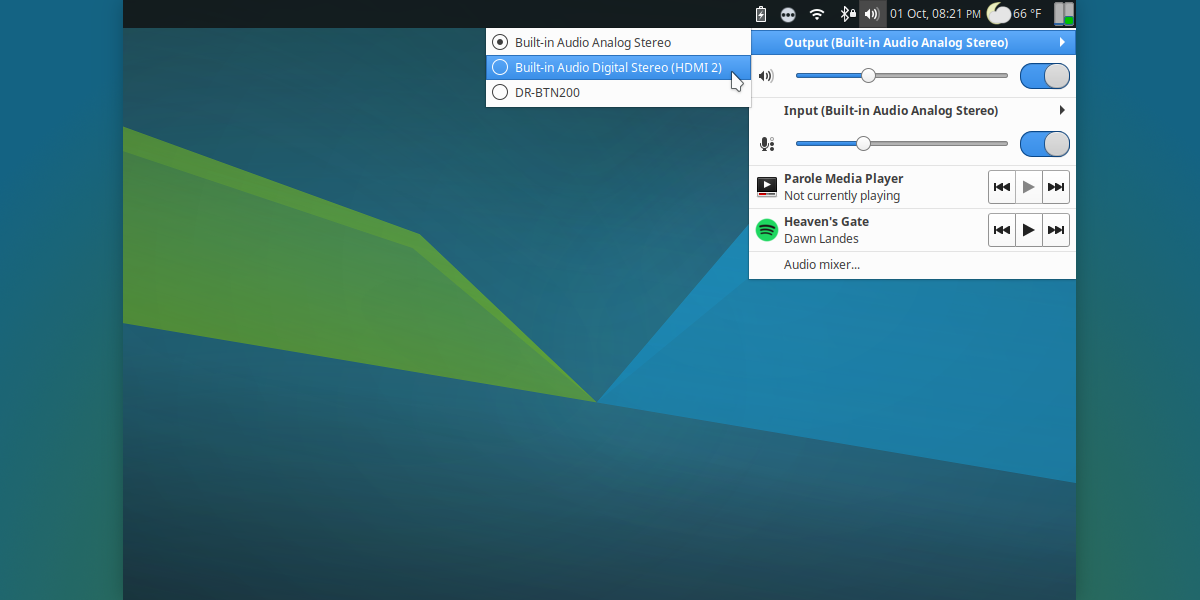
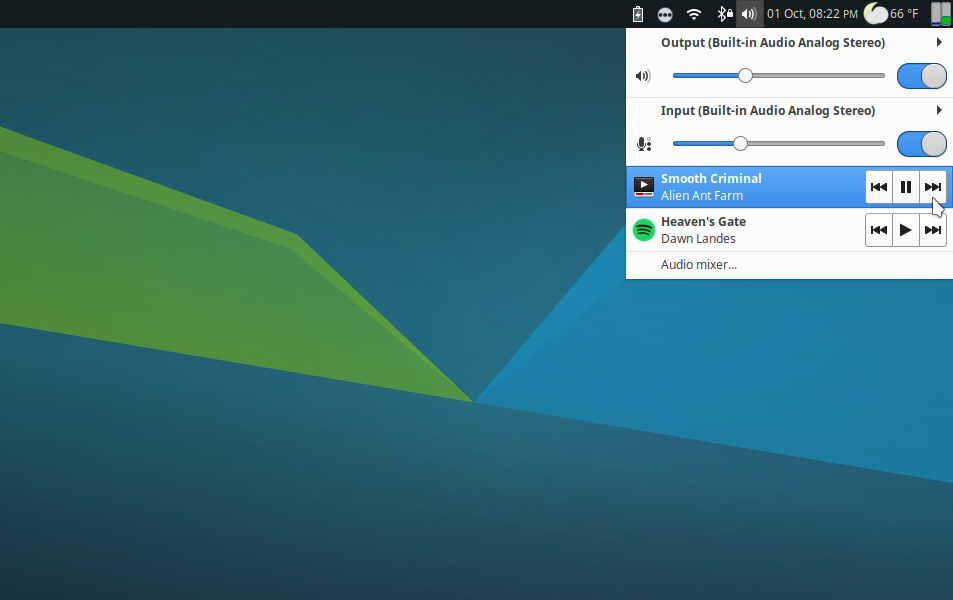
This plugin for the Xfce panel allows the user to adjust the audio volume of the PulseAudio sound system easily. As of the 0.3.0 release, this plugin was extended with support for controlling multimedia players via the MPRIS DBUS interface. This latest release lets users toggle the default audio input and output devices.
Features
- Control device volume from 0% to 100% and beyond
- Instantly mute volumes by middle-clicking the plugin or clicking the mute toggle
- Launch the configured audio mixer
- Open, raise, or control playback from known media players (since 0.3.0)
- Select default input and output devices (since 0.3.1)
Screenshots
Downloads
The latest version of the Xfce PulseAudio Plugin can always be downloaded from the Xfce archives. Grab version 0.3.1 from the link below.
- SHA-256: 61a39f892e5e06723a08f919682362ebaf54792ed1076f5be828d0209a52f482
- SHA-1: 6db0e12f5f171bd57b1330c7996d503aca7a4883
- MD5: ab2a12283555db063db3abea26b3237e